Mouseww/anything-analyzer
Fiddler and DevTools Had a Baby, and It Uses LLMs
It exists because reverse-engineering APIs across browsers, terminals, and mobile apps shouldn't require reading hundreds of requests by hand.
Not currently ranked — collecting fresh signals.
star history
What it does
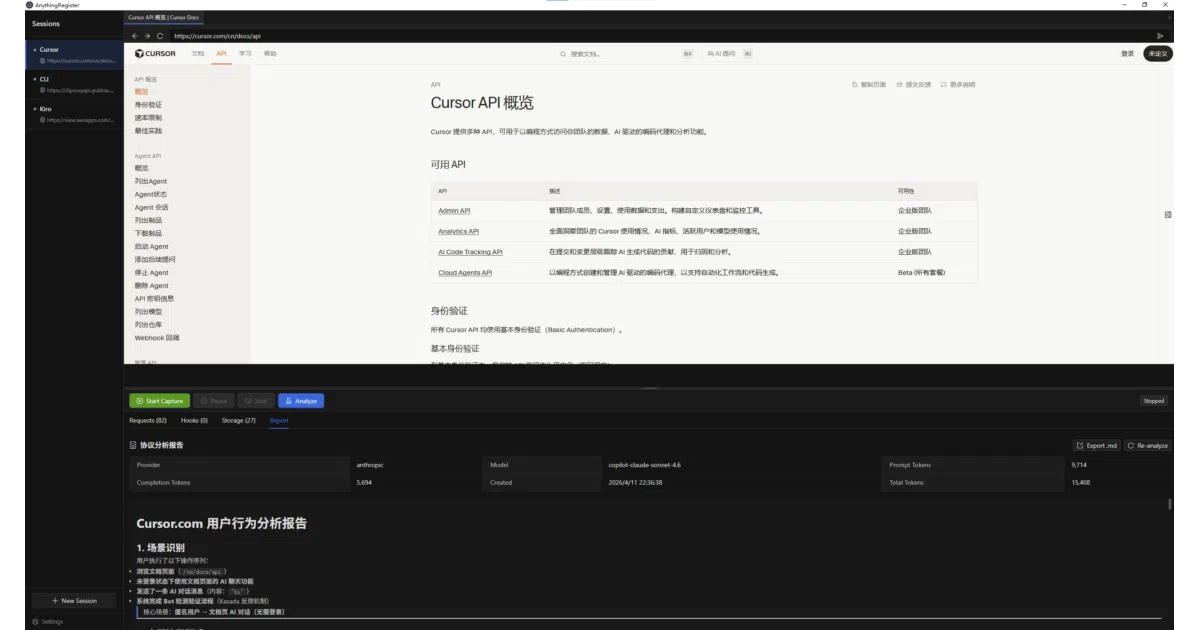
Anything Analyzer is an Electron desktop app that captures HTTP traffic from almost anywhere—an embedded Chromium browser, desktop apps, terminal commands, scripts, or mobile devices via Wi-Fi proxy—and funnels it all into one unified session. Instead of just logging requests, it sends them to an LLM (OpenAI, Anthropic, or any compatible API) for automated analysis, generating API documentation, security audits, or JavaScript crypto reverse-engineering reports. It also exposes its capture and analysis engines as an MCP Server, so Cursor or Claude Desktop can invoke it directly.
The interesting bit
The clever part is the two-stage pipeline: Phase 1 uses the LLM to filter noise and find the interesting requests, then Phase 2 deep-dives into those. For browser traffic, it injects JS hooks to intercept fetch, XHR, and crypto calls like crypto.subtle or CryptoJS in real time, extracting encryption logic without you setting breakpoints. It is read-only MITM—traffic is captured and decrypted for inspection, but never modified.
Key highlights
- Dual capture channels: Chrome DevTools Protocol for the built-in browser, and a built-in MITM HTTPS proxy (port 8888) for everything else, merged into one session.
- Five AI analysis modes including API reverse-engineering, security audit, and JS crypto reversal, with streaming output and follow-up questioning.
- Built-in MCP Server exposes capture and analysis tools to external AI agents; also acts as an MCP Client to pull in other servers.
- JS hook injection intercepts
fetch,XHR,crypto.subtle,CryptoJS, and SM2/3/4 calls in the embedded browser. - Read-only proxy: auto-generated CA certificates decrypt HTTPS for inspection, but requests and responses are not altered. WebSocket traffic is tunneled without decryption.
Caveats
- WebSocket traffic is forwarded but not decrypted, and request/response bodies are capped at 1 MB with binary content skipped.
- No built-in AI model: you must bring your own LLM API key and comply with local regulations (the authors explicitly note Chinese AI service laws).
- First-time CA certificate installation requires administrator privileges on Windows and macOS.
Verdict
Grab this if you regularly reverse-engineer web or mobile APIs and want an LLM to speed up the grunt work. Skip it if you need deep binary protocol analysis or full WebSocket inspection—this is strictly an HTTP/HTTPS shop.
Frequently asked
- What is Mouseww/anything-analyzer?
- It exists because reverse-engineering APIs across browsers, terminals, and mobile apps shouldn't require reading hundreds of requests by hand.
- Is anything-analyzer open source?
- Yes — Mouseww/anything-analyzer is open source, released under the Apache-2.0 license.
- What language is anything-analyzer written in?
- Mouseww/anything-analyzer is primarily written in TypeScript.
- How popular is anything-analyzer?
- Mouseww/anything-analyzer has 3.7k stars on GitHub.
- Where can I find anything-analyzer?
- Mouseww/anything-analyzer is on GitHub at https://github.com/Mouseww/anything-analyzer.