LoredCast/filewizard
A drag-and-drop front end for FFmpeg, Pandoc, and friends
FileWizard wraps the converters you already trust — FFmpeg, LibreOffice, Pandoc, Tesseract, Whisper — in one self-hosted web page, so you stop re-googling command lines.
Not currently ranked — collecting fresh signals.
star history
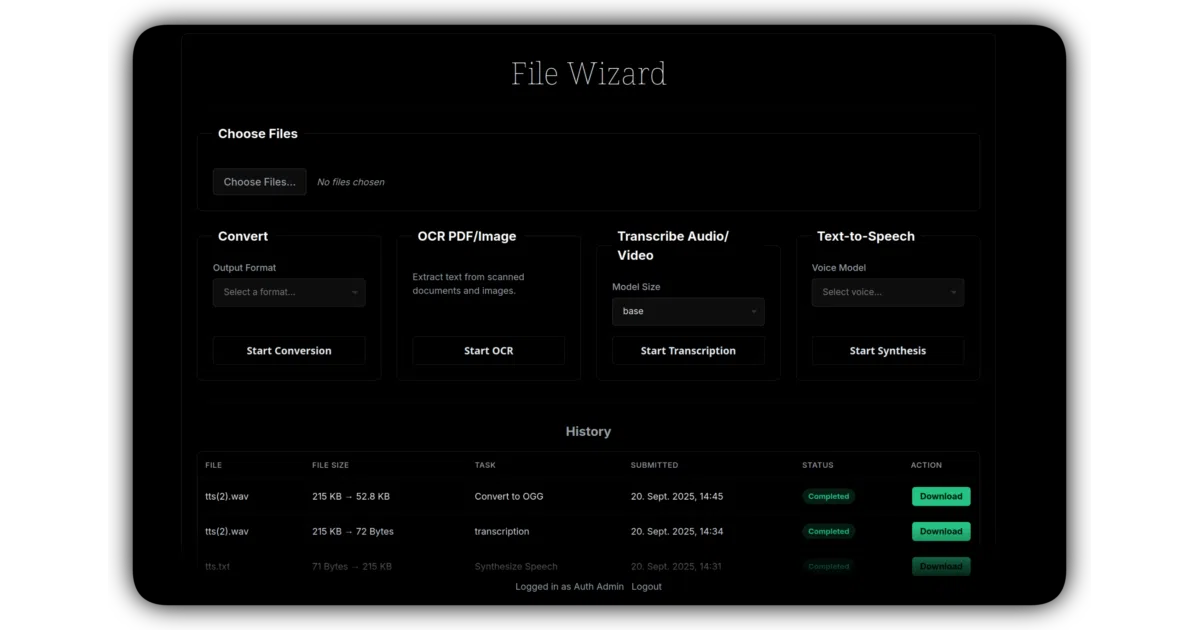
What it does FileWizard is a self-hosted web app for three chores that normally mean three different tools: converting files, OCR-ing PDFs and images, and transcribing audio. It reimplements none of them — it orchestrates the standard CLI stack (FFmpeg, LibreOffice, Pandoc, Ghostscript, Calibre, ImageMagick, Tesseract, faster-whisper, plus a drawer of others) behind one dark drag-and-drop UI. Jobs run in the background with live status and persistent history; 180+ formats work out of the box, 700+ in theory.
The interesting bit
This is glue code and refreshingly unashamed of it — the value is that someone else did the plumbing: a job queue, per-tool command templates, per-process CPU and memory limits, and secrets that never get sent to the browser. Adding a converter means writing a command template in settings.yml, not writing a converter.
Key highlights
- Conversion, OCR (many languages, selectable per job), and Whisper transcription with
.txt,.srt, and.vttoutput — all on your own hardware. - Extendable to any CLI tool via
settings.yml; command templates stay read-only in the browser unless you explicitly unlock edits. - Background jobs with real-time status, persistent history, and automatic cleanup of finished jobs after a set number of days.
- Ships as Docker images for amd64 and arm64 (Raspberry Pi 4/5, Apple Silicon); CPU-only by default, with a
cudavariant for GPU transcription. - FastAPI backend, vanilla HTML/JS/CSS frontend — no framework payload.
Caveats
- In
LOCAL_ONLYmode there is no login: anyone who can reach the port can use the app and change its settings. The README warns this in bold; believe it. - Converters process untrusted files, and the README itself says to run the container with only the volumes it needs.
- Fidelity varies — complex layouts through LibreOffice and PDF input/output via Calibre are flagged as imperfect in the project’s own tools table.
Verdict If you run a home server or NAS and regularly convert, OCR, or transcribe files, this is a genuinely handy appliance — arm64 support means it’ll even run on the Raspberry Pi in your drawer. If you’re exposing it beyond your own machine, note that local mode ships without a door lock; OIDC is the lock.
Frequently asked
- What is LoredCast/filewizard?
- FileWizard wraps the converters you already trust — FFmpeg, LibreOffice, Pandoc, Tesseract, Whisper — in one self-hosted web page, so you stop re-googling command lines.
- Is filewizard open source?
- Yes — LoredCast/filewizard is open source, released under the GPL-3.0 license.
- What language is filewizard written in?
- LoredCast/filewizard is primarily written in Python.
- How popular is filewizard?
- LoredCast/filewizard has 1.1k stars on GitHub.
- Where can I find filewizard?
- LoredCast/filewizard is on GitHub at https://github.com/LoredCast/filewizard.