Likely7/Veyra-NRVideo
A Windows video player that treats your whole screen as an upscaling target
Veyra pipes local video, capture cards, and PS5/Xbox/PC streams through one real-time GPU enhancement chain — super resolution, denoising, HDR, and frame generation.
Collecting fresh signals — velocity needs a few days of history.
collecting data…
star history
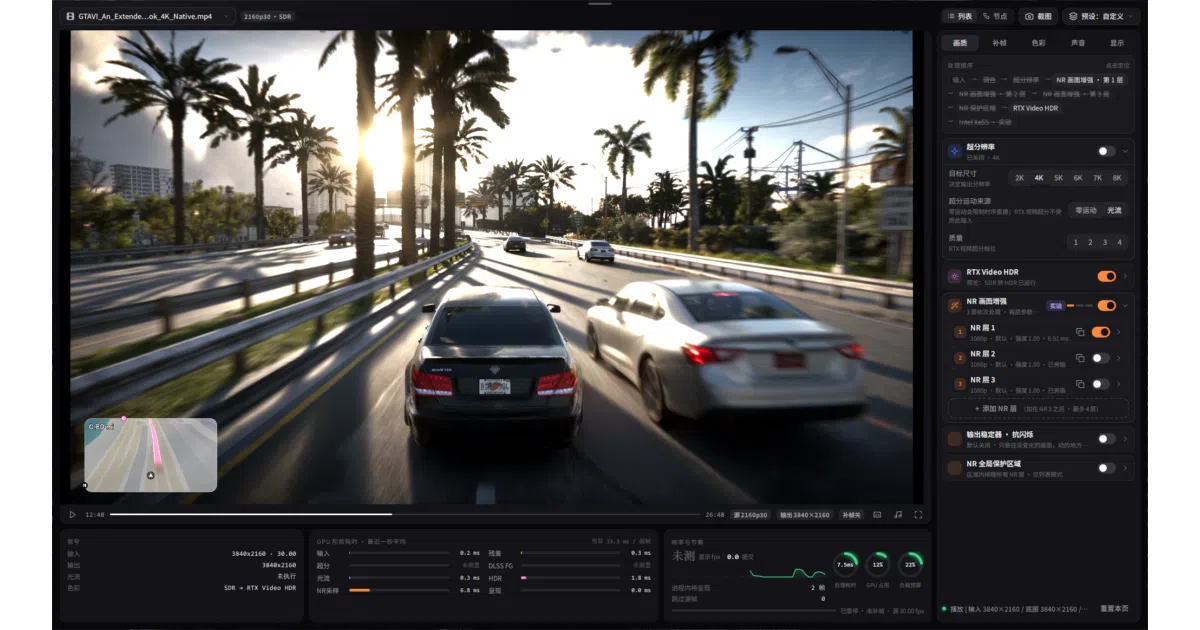
What it does Veyra is a C++/DirectX 12 Windows 11 player and capture tool that runs everything you watch — video files, capture cards, PS5, Xbox, PC streaming via Moonlight/Sunshine, screen capture — through a single real-time enhancement pipeline. That means RTX Video Super Resolution (three model families, including dual-pass), layered denoising, HDR handling, anti-aliasing, and frame generation, all applied to the picture before it hits your display. The pitch is simple: your console or old video file doesn’t get smarter, but the path to your monitor does.
The interesting bit It’s less a video player and more a compositing graph: a node editor with executable connections, per-layer NR parameters, sessions and presets, plus a Professional mode showing GPU stage time and load per effect. The layered denoise even extrapolates one inference’s residual up to strength five, with a protection slider to rein it back — the README is refreshingly honest that it “cannot promise full gain five with no artifacts on every video.”
Key highlights
- Dual RTX Video SR with independent second-pass models, plus SR-then-downsample and 8K output
- Frame generation with dedup, smoothed anchors, and optional VFG regulation; RTX 30 VFG compatibility in 2.1.3
- AMD support: RX 9000 NR models, experimental RX 7000 RedDuke NR, FSR and lmxxf options
- Export queue with trimming, MP4/MKV, multiple audio/subtitle tracks — records the processed picture with audio
- Optional extras: FXAA/SMAA/MLAA anti-aliasing, face restoration with 468-point contours, NVIDIA Low Latency modes
Caveats
- Windows 11 x64 and DirectX 12 only; most local testing was on an RTX 5070, and the README admits no local AMD speedup percentages were measured
- Migration between versions is fiddly — the docs warn against overwriting old
veyra.inior mixing DLLs, and in-place upgrades “leave stale components” - Xbox streaming is explicitly unofficial and experimental
Verdict Worth a look if you watch console or capture-card footage on a PC and want AI upscaling and frame generation applied to all of it, not just games. If you just play local files on a modest GPU or run Linux, this isn’t for you.
Frequently asked
- What is Likely7/Veyra-NRVideo?
- Veyra pipes local video, capture cards, and PS5/Xbox/PC streams through one real-time GPU enhancement chain — super resolution, denoising, HDR, and frame generation.
- Is Veyra-NRVideo open source?
- Yes — Likely7/Veyra-NRVideo is open source, released under the GPL-3.0 license.
- What language is Veyra-NRVideo written in?
- Likely7/Veyra-NRVideo is primarily written in C++.
- How popular is Veyra-NRVideo?
- Likely7/Veyra-NRVideo has 1k stars on GitHub.
- Where can I find Veyra-NRVideo?
- Likely7/Veyra-NRVideo is on GitHub at https://github.com/Likely7/Veyra-NRVideo.