Lightricks/LTX-Desktop
A video editor that generates its own B-roll
Lightricks open-sourced a desktop app for local AI video generation—if your GPU can handle the 160GB download.
Not currently ranked — collecting fresh signals.
star history
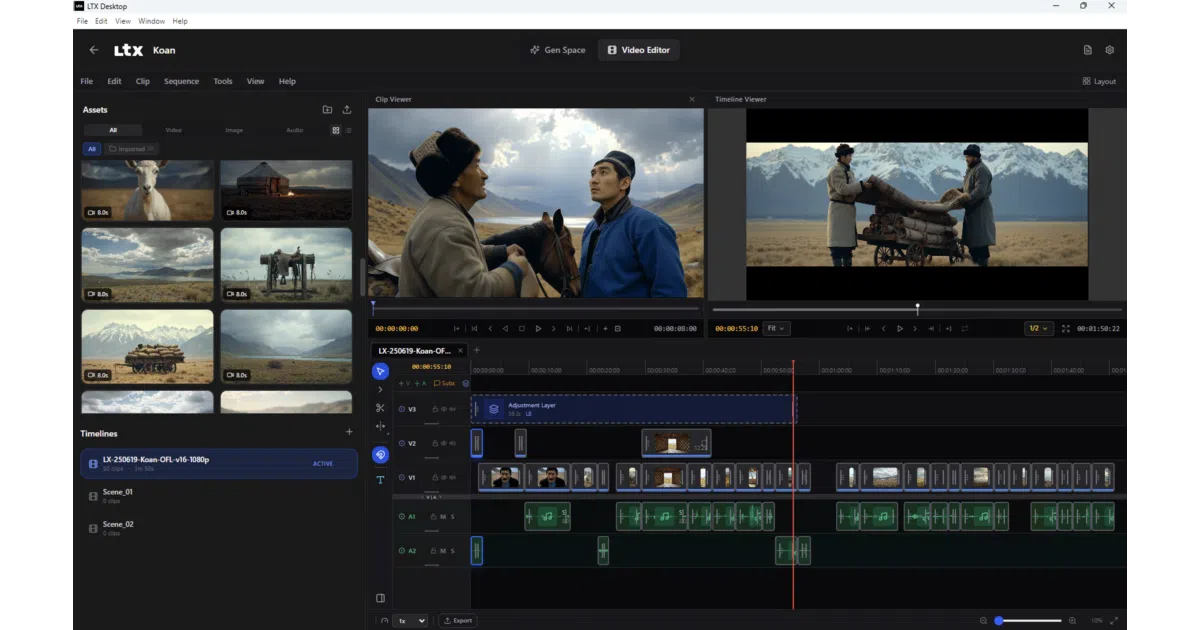
What it does LTX Desktop is an Electron-wrapped video editor that runs LTX generative models locally on beefy NVIDIA hardware, or falls back to Lightricks’ cloud API on macOS and weaker GPUs. It handles text-to-video, image-to-video, audio-to-video, and a “Retake” feature for regenerating segments of existing footage.
The interesting bit The architecture is refreshingly explicit: a React frontend talks to a Python FastAPI backend over localhost HTTP, while Electron manages OS grunt work and ffmpeg exports. The backend either hits your local GPU or phones home to Lightricks’ API—no magical “hybrid edge computing” euphemisms here. Even the free cloud text encoding is framed honestly as a performance and memory optimization, not charity.
Key highlights
- Local generation requires ≥16GB VRAM, 32GB RAM recommended, and 160GB+ disk space just for model weights
- API-only mode works on macOS Apple Silicon and underpowered Windows/Linux boxes, but requires a paid LTX API key for video generation (text encoding is free)
- Optional integrations with fal.ai for image generation and Google Gemini for prompt suggestions
- Sandboxed renderer (
contextIsolation: true,nodeIntegration: false) - Anonymous telemetry on by default, disable-able in settings
Caveats
- Beta status with active frontend refactor; the README warns large UI PRs “may be declined for now”
- macOS and most Windows users will end up in API-paid mode; local generation is a niche luxury
- First launch requires internet to fetch model license terms from Hugging Face
Verdict Worth a look if you’re sitting on a 16GB+ NVIDIA card and want hackable, local AI video generation with an actual timeline interface. Everyone else is essentially getting a skin over Lightricks’ API—fine, but know what you’re installing.
Frequently asked
- What is Lightricks/LTX-Desktop?
- Lightricks open-sourced a desktop app for local AI video generation—if your GPU can handle the 160GB download.
- Is LTX-Desktop open source?
- Yes — Lightricks/LTX-Desktop is open source, released under the Apache-2.0 license.
- What language is LTX-Desktop written in?
- Lightricks/LTX-Desktop is primarily written in TypeScript.
- How popular is LTX-Desktop?
- Lightricks/LTX-Desktop has 2.2k stars on GitHub.
- Where can I find LTX-Desktop?
- Lightricks/LTX-Desktop is on GitHub at https://github.com/Lightricks/LTX-Desktop.