LazoVelko/neverclick
A mouse you never have to touch, powered by pixels not APIs
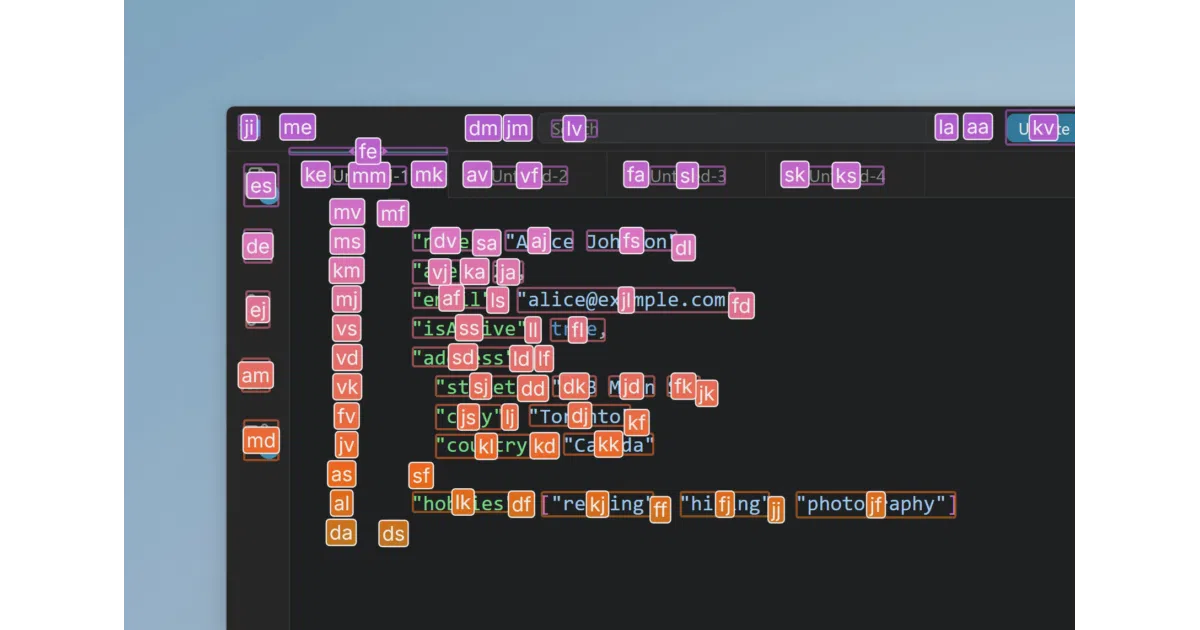
Neverclick overlays keyboard hints on whatever's on screen, using local computer vision to find every clickable thing — born from its author's own RSI.
★501 stars Computer Vision
Too new to rank. Velocity needs a few days of history.
star history
What it does
Neverclick is a Windows desktop app that replaces mouse actions with keyboard ones. Activate a tool, and it labels detected UI elements with lettered hints — type the letters, and the click lands on the target inside that element’s bounding box. Beyond clicking, it handles text selection, dragging, scrolling, window management across monitors, and multi-select along a path.
The interesting bit
The default vision mode, Neverclick Vision, detects UI elements from raw pixel data — no accessibility APIs, no cloud AI, no GPU. It runs locally, is claimed to be instantaneous even on decade-old hardware, and works across the full screen rather than just the foreground window. There’s also a fallback mode (Clairvoyance) that uses OS accessibility APIs, plus a Grid mode for blank areas like the desktop.
Key highlights
- Fully offline and local — nothing leaves your machine, no accounts or subscriptions
- Hint letters prioritize the center of the keyboard, and the priority map is customizable
- Targets can be moved within a bounding box (number-row keys, arrow snapping to word edges)
- GUI-based hotkey configuration — no config files
- Native support for Dvorak, Colemak, and other alternative layouts; multimonitor and 4K/8K friendly
- Zero CPU usage when idle — it only runs when activated
Caveats
- Windows only for now; Linux and macOS unsupported
- The source code isn’t in this repo — it’s for issues and releases only, so this isn’t a read-the-code project
- The vision system “does hallucinate occasionally,” per the author, and Clairvoyance mode is slower and less predictable
- Settings UI is English-only (hints follow your keyboard language)
Verdict
Worth a look if you have RSI, mouse-related strain, or just prefer keeping your hands on the keyboard — the author credits it with his own recovery. Skip it if you’re not on Windows or want an open-source codebase to audit.
Frequently asked
- What is LazoVelko/neverclick?
- Neverclick overlays keyboard hints on whatever's on screen, using local computer vision to find every clickable thing — born from its author's own RSI.
- Is neverclick open source?
- Yes — LazoVelko/neverclick is an open-source project tracked on heatdrop.
- How popular is neverclick?
- LazoVelko/neverclick has 501 stars on GitHub.
- Where can I find neverclick?
- LazoVelko/neverclick is on GitHub at https://github.com/LazoVelko/neverclick.