Kuddev/pebrel
A GPU terminal that treats AI agents like native apps
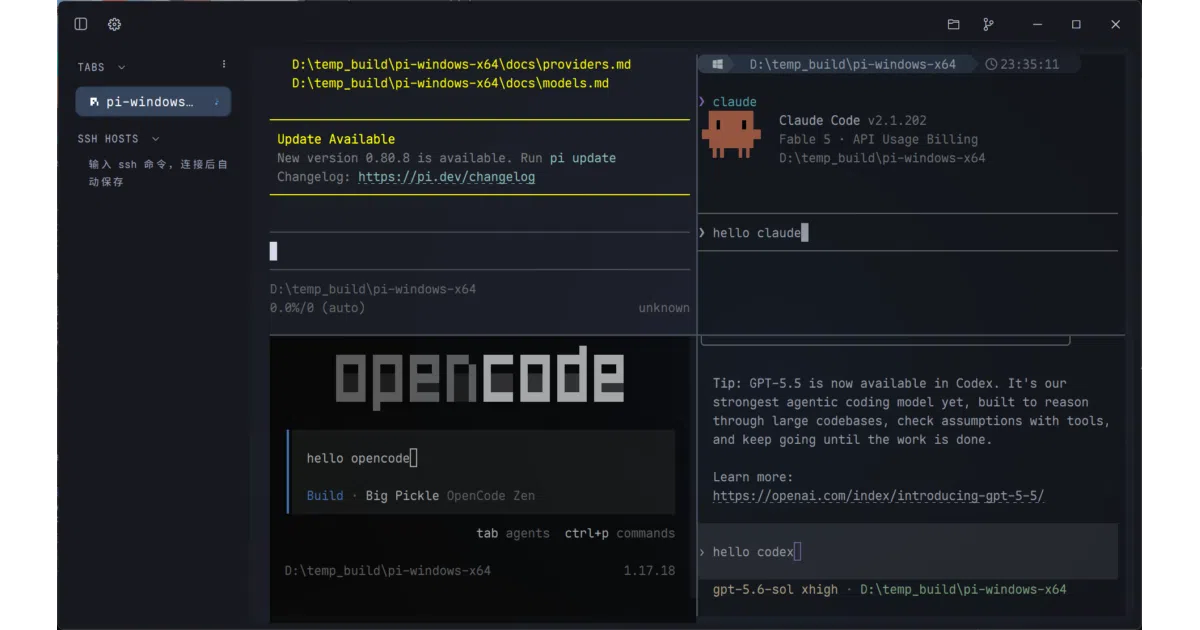
Pebrel is a GPU-accelerated Windows terminal built around AI CLI tools like Claude Code and Codex, tracking agent state and keeping sessions alive after you close the window.
Velocity · 7d
+13
★ / day
Trend
↘cooling
star history
What it does
Pebrel is a Rust and GPUI-based terminal emulator that wraps local shells, WSL, SSH connections, and SFTP file browsing into a single native desktop workspace. It renders on the GPU via OpenGL ES 2.0+ and adds a dedicated UI layer for AI agents like Claude Code and Codex, letting you split, tab, and monitor their activity alongside ordinary terminals. On Windows, it can keep sessions running in the background when the window closes, restoring layouts and—where supported—AI conversation state.
The interesting bit Instead of treating AI CLI output as a dumb text stream, Pebrel parses hook events to show per-pane activity states, routes notifications to their source terminal, and opens captured answers in a native reader that handles Markdown, math formulas, and local image previews without a WebView. It is essentially a terminal that has learned to read the room.
Key highlights
- AI-native workflows: recognized CLIs get custom icons, activity tracking, and a native document reader for their outputs.
- Deep session persistence on Windows: optional background residency keeps processes alive after the window closes, with workspace layout and AI conversation restoration.
- Integrated remote work: saved SSH hosts, jump hosts, SFTP transfers, and local Git actions share the same tabbed interface.
- GPU-native UI: built on Zed’s
GPUIframework with light/dark themes, opacity controls, and live-reloadableLuaconfiguration. - Cross-platform previews: Linux and macOS builds exist, but Windows currently carries the full feature set—tray residency, global hotkey, auto-updates, and automatic AI-hook setup.
Caveats
- Linux and macOS are marked as Preview builds and lack several Windows integrations, including tray residency, global quick-terminal hotkeys, and automatic AI-hook setup.
- Restoring AI conversations after a process exits requires a supported CLI and a usable session identity; the README notes this is a separate feature from basic session persistence.
- Inline terminal images depend on the CLI emitting the
OSC 1337protocol, and image attachment previews rely on the CLI itself, so visual richness varies by tool.
Verdict
Windows developers already living in Claude Code or Codex should try this; it is the rare terminal that actually understands what those tools are doing. Linux and macOS users should treat it as an early preview and expect a narrower feature set.
Frequently asked
- What is Kuddev/pebrel?
- Pebrel is a GPU-accelerated Windows terminal built around AI CLI tools like Claude Code and Codex, tracking agent state and keeping sessions alive after you close the window.
- Is pebrel open source?
- Yes — Kuddev/pebrel is open source, released under the GPL-3.0 license.
- What language is pebrel written in?
- Kuddev/pebrel is primarily written in Rust.
- How popular is pebrel?
- Kuddev/pebrel has 3.6k stars on GitHub and is currently cooling off.
- Where can I find pebrel?
- Kuddev/pebrel is on GitHub at https://github.com/Kuddev/pebrel.