Jeffser/Alpaca
A native GNOME client for Ollama that runs AI-generated scripts
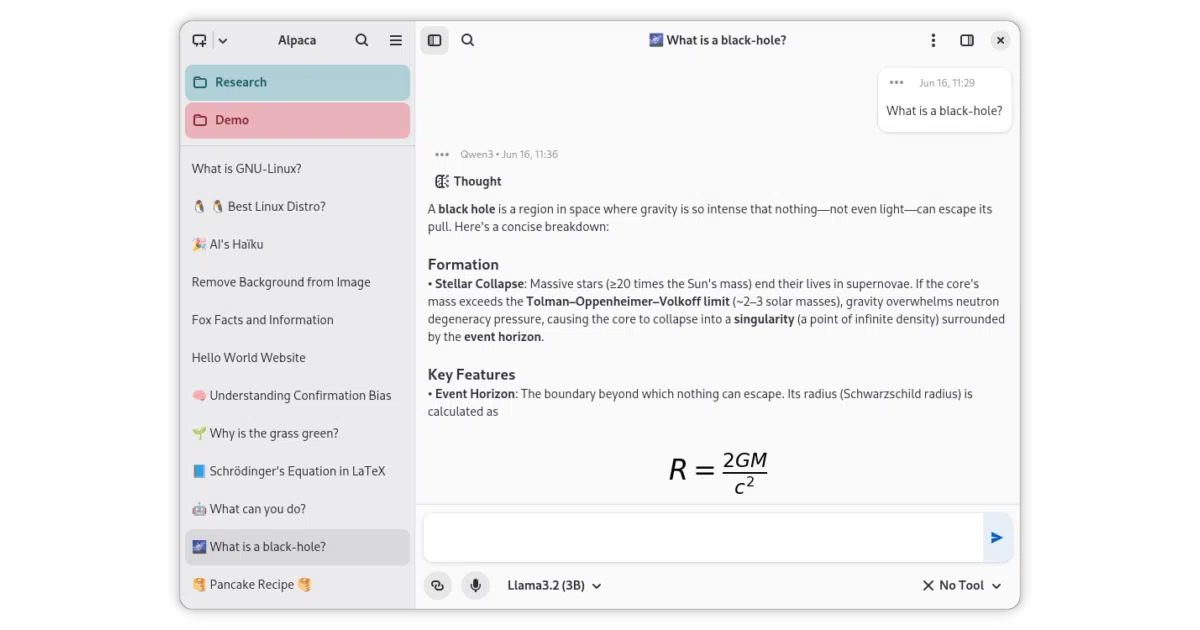
It wraps Ollama in a beginner-friendly GTK4 shell so you can chat with local models, query websites, and let AI run scripts on your desktop.
Not currently ranked — collecting fresh signals.
star history
What it does Alpaca is a GTK4/Adwaita desktop application that acts as a graphical front-end for Ollama. It lets you pull, delete, and converse with local models, and it can also route requests to cloud providers such as Gemini and ChatGPT via OpenAI-compatible APIs using your own keys. Beyond basic chat, it handles image and document recognition, imports and exports conversations, and supports features like message editing and regeneration.
The interesting bit The app allows multiple models to participate in the same conversation, which is less common in simple Ollama wrappers. More notably, it offers integrated script execution—meaning it will run code that the AI produces locally, a feature the author explicitly warns may damage your device or software. It also scrapes YouTube transcripts and website text so you can query them directly.
Key highlights
- Native GNOME styling via GTK4 and Adwaita, distributed as a Flatpak.
- Multi-model chat: talk to several local or cloud models in a single thread.
- Media and web recognition: images, plain-text documents, YouTube transcripts, and pasted URLs.
- Cloud fallback: connect to third-party providers through OpenAI-compatible APIs with your own keys.
- Chat management: import, export, edit, delete, and regenerate messages.
Caveats
- Document recognition is limited to plain text files, so don’t expect PDF or Office parsing out of the box.
- The author warns that the app can execute AI-generated code locally and disclaims responsibility for any resulting damage to your device or software.
Verdict Best for GNOME users who want a polished, all-in-one GUI for Ollama and don’t mind the risks of local script execution. Skip it if you prefer a purely terminal-driven workflow.
Frequently asked
- What is Jeffser/Alpaca?
- It wraps Ollama in a beginner-friendly GTK4 shell so you can chat with local models, query websites, and let AI run scripts on your desktop.
- Is Alpaca open source?
- Yes — Jeffser/Alpaca is open source, released under the GPL-3.0 license.
- What language is Alpaca written in?
- Jeffser/Alpaca is primarily written in Python.
- How popular is Alpaca?
- Jeffser/Alpaca has 1.7k stars on GitHub.
- Where can I find Alpaca?
- Jeffser/Alpaca is on GitHub at https://github.com/Jeffser/Alpaca.