FireRedTeam/FireRed-OpenStoryline
Chat with your timeline: an AI agent that edits video by talking
FireRed-OpenStoryline replaces timeline scrubbing with natural-language directing, then packages your workflow into reusable Skills.
Not currently ranked — collecting fresh signals.
star history
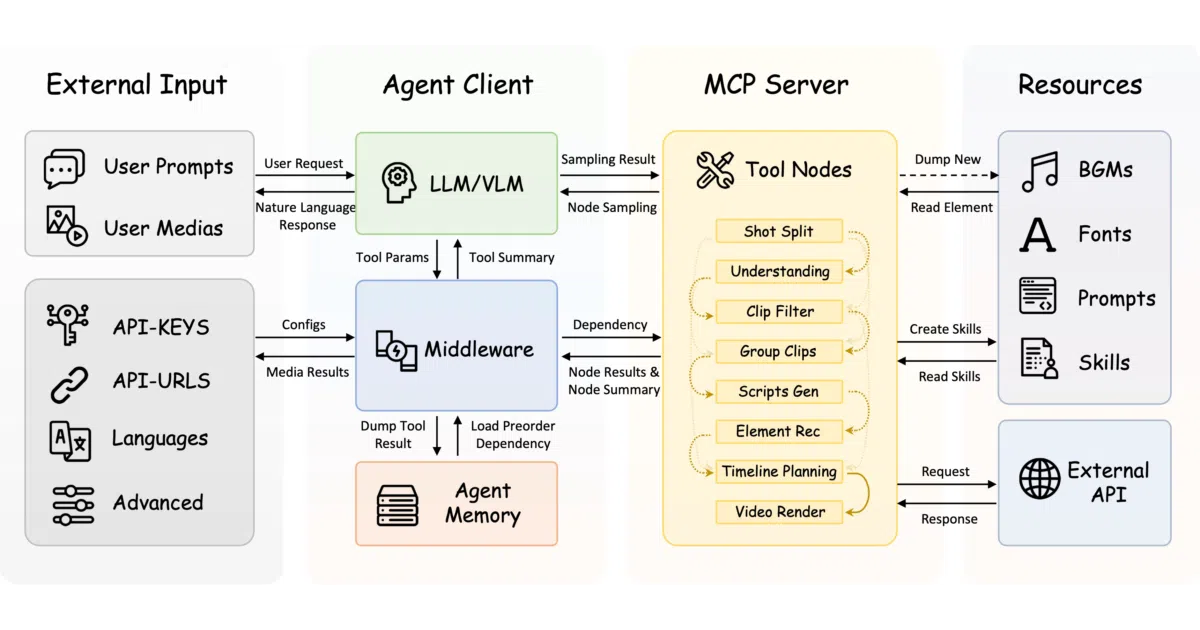
What it does FireRed-OpenStoryline is a Python-based video editing agent. You describe what you want—“cut the filler words,” “make this feel like a documentary,” “add a beat-synced transition here”—and it plans the edits, calls the tools, and renders. It can search and download media, generate scripts, recommend music/voiceover/fonts, and refine details through back-and-forth conversation. Finished workflows can be saved as “Skills” and reapplied to new footage for batch creation.
The interesting bit The project treats editing as an agentic planning problem rather than a UI automation problem. It uses LLMs to break high-level direction into concrete tool calls, and it exposes the plan to the user for human-in-the-loop tweaks. The “Skill” abstraction—serializing an entire creative workflow for reuse—is where the real leverage sits; it turns one-off creative effort into a template engine.
Key highlights
- Natural-language editing: cut, swap, resequence, color-correct, and restyle via chat prompts with immediate feedback
- Built-in media pipeline: searches online sources, downloads clips, segments footage, and performs content understanding
- Style transfer via few-shot prompting: feed reference text to replicate tone, rhythm, and sentence structure in generated narration
- ASR-based rough cut for speech videos: auto-removes filler words and disfluencies with timestamp-aligned segmentation
- AI transition generation: creates bridge shots between clips from start/end frames plus a text description (added April 2026)
- Agent-native packaging: ships OpenClaw and Claude Code Skills for installation and usage; experimental Codex support
Caveats
- AI transitions rely on third-party AIGC video generation services; the README warns costs are “relatively high” and results are “somewhat unpredictable”
- Default open-source assets (fonts, music) are deliberately basic; the authors “highly recommend” setting up a custom asset library for commercial-grade output
- Automatic environment setup is Linux/macOS only; Windows users must follow manual steps
Verdict Worth a look if you produce repetitive video formats—product reviews, vlogs, speech content—and want to automate the grunt work without surrendering creative control. Less compelling if you need frame-precise manual editing or are cost-sensitive about generative API calls.
Frequently asked
- What is FireRedTeam/FireRed-OpenStoryline?
- FireRed-OpenStoryline replaces timeline scrubbing with natural-language directing, then packages your workflow into reusable Skills.
- Is FireRed-OpenStoryline open source?
- Yes — FireRedTeam/FireRed-OpenStoryline is open source, released under the Apache-2.0 license.
- What language is FireRed-OpenStoryline written in?
- FireRedTeam/FireRed-OpenStoryline is primarily written in Python.
- How popular is FireRed-OpenStoryline?
- FireRedTeam/FireRed-OpenStoryline has 3.6k stars on GitHub.
- Where can I find FireRed-OpenStoryline?
- FireRedTeam/FireRed-OpenStoryline is on GitHub at https://github.com/FireRedTeam/FireRed-OpenStoryline.