Ebony-Vinyl/EAC-design-world
A video studio that lives inside your AI chat window
EAC design world bolts a local-first editing, design, and export pipeline onto DeepSeek Harness — no DaVinci or Premiere required.
Collecting fresh signals — velocity needs a few days of history.
collecting data…
star history
What it does
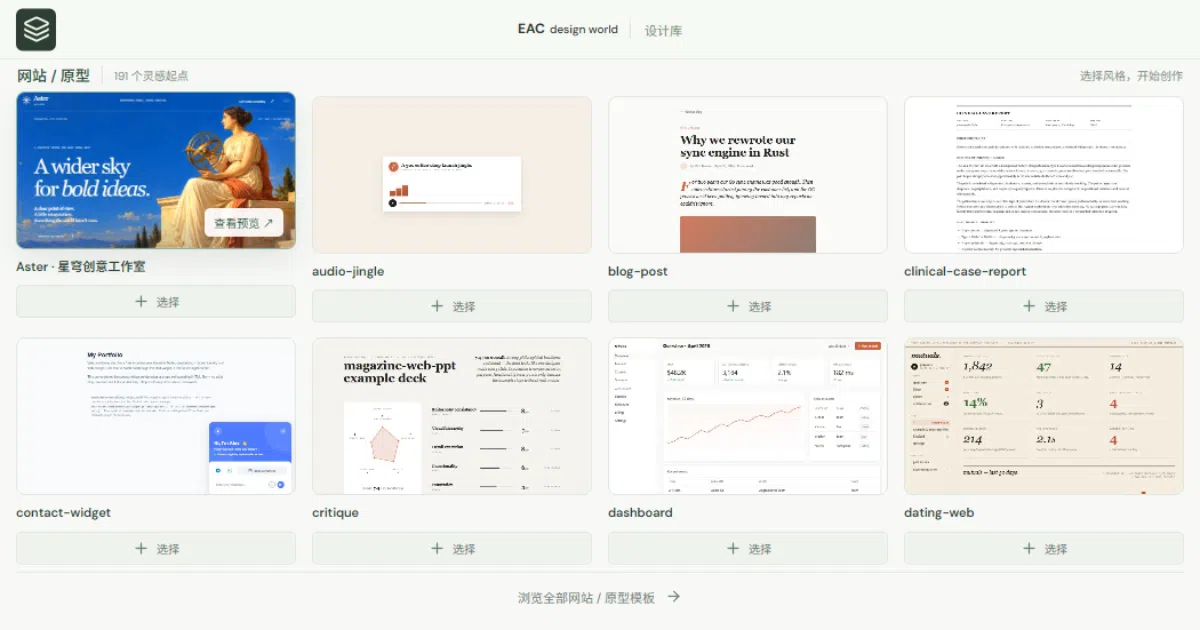
EAC design world is a plugin for DeepSeek Harness (with a standalone local workbench mode) that turns a chat conversation into an actual video production environment. It offers a multi-track timeline, template and design-system libraries, a native preview canvas, and real file export — H.264 video, SRT subtitles, PDF/PNG/PPTX documents, and even handoff formats like FCP7 XML for Premiere/DaVinci and Jianying drafts. Recording, voiceover, music, subtitles, encoding, and QC all produce real files on disk.
The interesting bit
The editing, grading, and rendering are done by the plugin itself — you don’t install DaVinci or Premiere. It leans on FFmpeg and an auto-discovered Chrome/Edge for HTML frame-by-frame rendering, and exposes MCP tools (beats, scopes, grade-preview, color_workflow) so the AI can iterate on color grading and beat-synced cuts like an assistant editor. The README is refreshingly honest about limits: template counts reflect searchable content, not offline-renderable output, and 205 of the 865 library items need external generation services.
Key highlights
- 152 design systems and 517 OpenDesign template entries, plus a Shotcraft library of 150 motion shots with video previews and a persistent shortlist
- Parameterized color grading: curves, HSL secondaries, LUT export as
.cube, scopes, and exposure-match suggestions for AI iteration - Beat analysis drives music-synced editing;
clip.speedandclip.motionhandle speed ramps and digital camera moves, with chunked multi-pass rendering to avoid memory blowups on big timelines - Local voiceover via Windows SAPI, macOS
say, or local GPT-SoVITS; optionalfaster-whispertranscription (models not downloaded for you) - Signed updates with rollback, draft recovery, and isolated previews — maintenance is treated as a first-class feature
Caveats
- Desktop recording is Windows-only; some fonts and media must be fetched from official sources yourself
- Shotcraft’s original TSX recipes need porting into an HTML timeline or a Remotion project — they don’t run in the HTML renderer directly
- Optional Motion Web / Onetake imports are non-commercial licensed and excluded from public releases
Verdict
Worth a look if you’re already in the DeepSeek Harness ecosystem and want AI-assisted video work that ends in real files. If you’re not, the standalone workbench is usable but this is clearly built to live inside its host — and v0.6.0 is still labeled a dev preview.
Frequently asked
- What is Ebony-Vinyl/EAC-design-world?
- EAC design world bolts a local-first editing, design, and export pipeline onto DeepSeek Harness — no DaVinci or Premiere required.
- Is EAC-design-world open source?
- Yes — Ebony-Vinyl/EAC-design-world is open source, released under the AGPL-3.0 license.
- What language is EAC-design-world written in?
- Ebony-Vinyl/EAC-design-world is primarily written in JavaScript.
- How popular is EAC-design-world?
- Ebony-Vinyl/EAC-design-world has 1.1k stars on GitHub.
- Where can I find EAC-design-world?
- Ebony-Vinyl/EAC-design-world is on GitHub at https://github.com/Ebony-Vinyl/EAC-design-world.