ChatGPTBox-dev/chatGPTBox
A browser extension that puts ChatGPT everywhere, quietly
ChatGPTBox embeds LLM assistance into any webpage without sending data until you explicitly ask.
Not currently ranked — collecting fresh signals.
star history
What it does
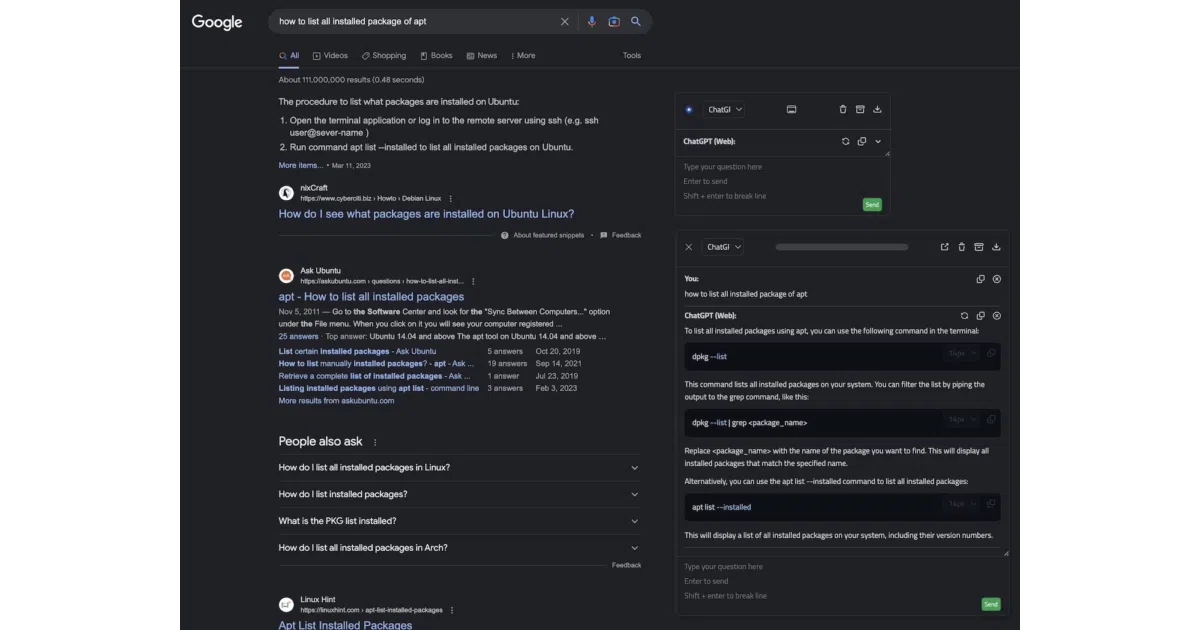
ChatGPTBox is a cross-browser extension that injects ChatGPT into your daily browsing. Hit Ctrl+B for a floating chat dialog, right-click to summarize pages, or select text for instant translation, code explanation, or polishing. It supports multiple backends—OpenAI web API, GPT-3.5/4, Claude, New Bing, Moonshot, Azure, and even self-hosted models via Ollama or OpenRouter.
The interesting bit
The privacy stance is unusually concrete: the README literally dares you to grep for fetch( and XMLHttpRequest( to verify no data collection. By default, nothing transmits until you click “Ask ChatGPT” or trigger a selection tool. That’s a refreshing inversion of the usual “trust us” model.
Key highlights
- Works on Chrome, Edge, Firefox, Safari, and Android
- Site-specific integrations for Reddit, GitHub, YouTube, StackOverflow, Zhihu, Bilibili, plus all mainstream search engines
- “Static cards” for branching conversations without losing context
- Modular design: toggle off any site adapter or bubble tool you don’t want
- Custom API endpoints and third-party format converters (litellm, one-api) supported
Caveats
- The project lineage is a fork of a fork of a fork; the README spends surprising energy tracing this genealogy
- Mobile support exists but the screenshot looks cramped; your mileage may vary
Verdict
Grab this if you want LLM assistance woven into existing workflows rather than living in a separate tab. Skip it if you already have a preferred desktop client and don’t need page-contextual features.
Frequently asked
- What is ChatGPTBox-dev/chatGPTBox?
- ChatGPTBox embeds LLM assistance into any webpage without sending data until you explicitly ask.
- Is chatGPTBox open source?
- Yes — ChatGPTBox-dev/chatGPTBox is open source, released under the MIT license.
- What language is chatGPTBox written in?
- ChatGPTBox-dev/chatGPTBox is primarily written in JavaScript.
- How popular is chatGPTBox?
- ChatGPTBox-dev/chatGPTBox has 10.8k stars on GitHub.
- Where can I find chatGPTBox?
- ChatGPTBox-dev/chatGPTBox is on GitHub at https://github.com/ChatGPTBox-dev/chatGPTBox.