Chaoses-Ib/ComfyScript
ComfyUI's node spaghetti, now edible as Python
A transpiler and runtime that turn ComfyUI's graph workflows into plain Python you can diff, loop over, and run in Jupyter.
Not currently ranked — collecting fresh signals.
star history
What it does
ComfyScript is a Python frontend for ComfyUI, the node-based Stable Diffusion interface. It translates ComfyUI’s JSON workflows into readable Python scripts via a transpiler, then runs them through a runtime that talks to a ComfyUI server. You can also write workflows directly in Python, generate them programmatically, or use ComfyUI nodes as a function library in other projects.
The interesting bit
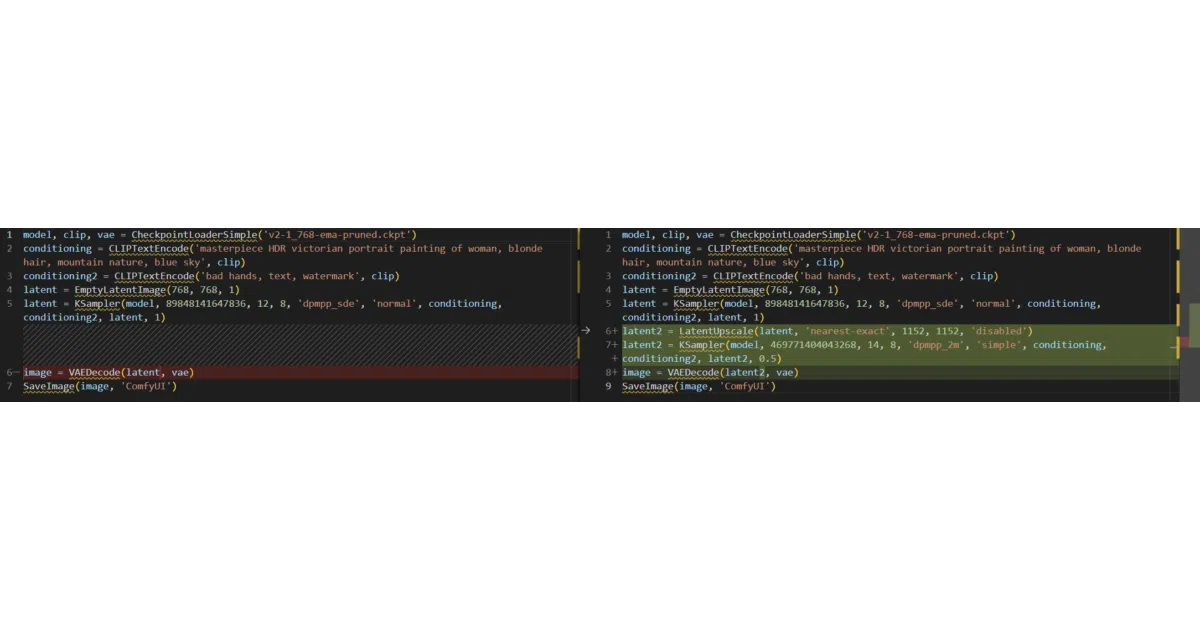
The transpiler doesn’t just dump JSON into dicts—it reconstructs linear Python code with proper variable dependencies, so a tangled multi-pass workflow collapses into something you can git diff. The runtime then executes that script against a live ComfyUI server, returning PIL images or saving metadata back into generated images. It’s essentially treating a visual GUI as a compile target.
Key highlights
- Transpiler converts ComfyUI workflows to Python automatically; scripts embed as image metadata
- Runtime supports local or remote ComfyUI servers, with
uvone-liner execution without installing Python - Works as a library: import ComfyUI nodes as Python functions for ML research or custom node debugging
- Generates ComfyUI workflows from scripts for use in the web UI—useful for programmatically building huge graphs
- Jupyter Notebook and ipywidgets/Solara UI integrations included
Caveats
- Installation is involved: four different install paths depending on whether you have ComfyUI, want it as a package, or are using
uv [default]extras are mandatory for common dependencies; omitting it installs nothing useful- Type stubs exist but the README shows truncated docs; some node compatibility gaps likely
Verdict
Worth a look if you’re hitting ComfyUI’s GUI ceiling—batching, version control, or LLM-generated workflows. Skip it if you’re happy clicking nodes and don’t need loops or diffs.
Frequently asked
- What is Chaoses-Ib/ComfyScript?
- A transpiler and runtime that turn ComfyUI's graph workflows into plain Python you can diff, loop over, and run in Jupyter.
- Is ComfyScript open source?
- Yes — Chaoses-Ib/ComfyScript is open source, released under the MIT license.
- What language is ComfyScript written in?
- Chaoses-Ib/ComfyScript is primarily written in Python.
- How popular is ComfyScript?
- Chaoses-Ib/ComfyScript has 707 stars on GitHub.
- Where can I find ComfyScript?
- Chaoses-Ib/ComfyScript is on GitHub at https://github.com/Chaoses-Ib/ComfyScript.