Ansub/tv-detox
Let Claude Code de-bloat your Android TV while you hold the remote
A tiny ad-free home screen plus a carefully engineered prompt that has an AI agent strip bloatware off your TV — with an undo script for when it gets too confident.
Collecting fresh signals — velocity needs a few days of history.
collecting data…
star history
What it does
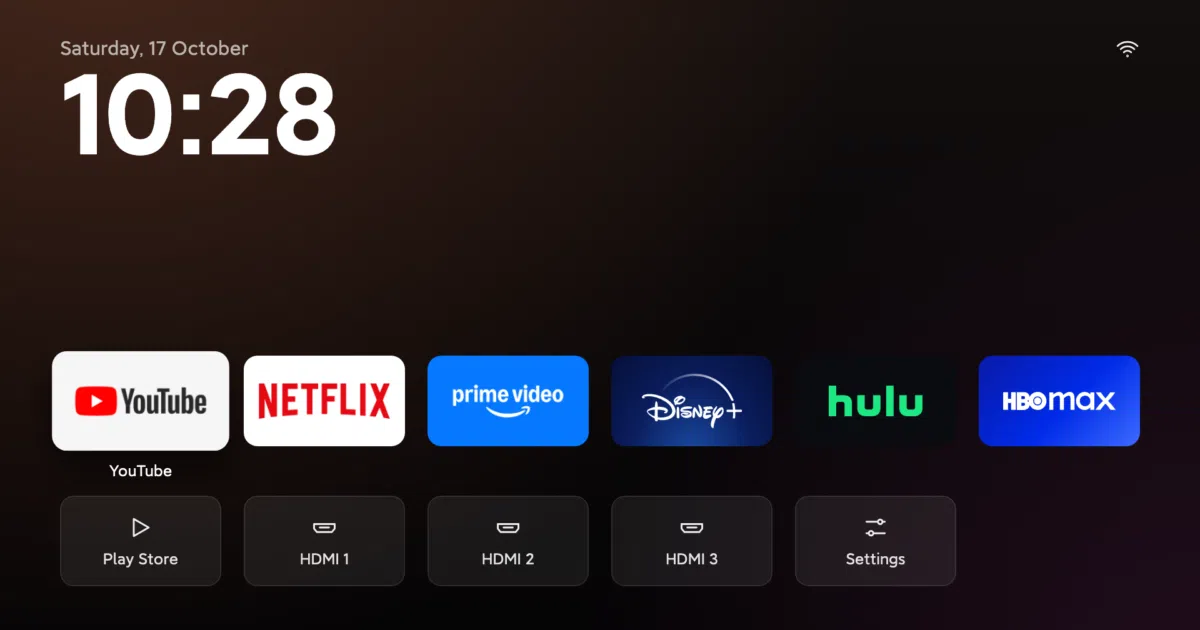
TV Detox is two things: a minimal Java home screen replacement for Android TV (your apps, HDMI inputs, and a clock — nothing else), and a long, carefully worded prompt you paste into Claude Code or Codex. The agent connects to the TV over Wi-Fi via ADB, inventories every installed app, sorts them into safe-to-disable versus load-bearing, and turns off the bloat — ads, sponsored rows, preinstalled junk. You confirm each change from the couch.
The interesting bit
The real artifact here is the prompt itself. It’s a masterclass in defensive agent instructions: demand confirmation before every change, never disable com.google.android.gms or the launcher framework, keep an undo list, restart and verify before declaring victory, remind the user to turn debugging back off. It’s glue code plus prompt engineering — and the glue is the point.
Key highlights
- Apps are disabled, never deleted —
undo.shplus its undo list restore everything - Tested automatically on Android TV 9/11/12 and Google TV 14 emulators, plus real TCL and Sony hardware
- On a TCL with 2.3 GB RAM, free memory went from ~660 MB to ~1 GB (partly just from the reboot)
- Works on most Android TV/Google TV devices (Sony, TCL, Hisense, Philips, Xiaomi, Shield); Fire TV gets cleanup only, Roku/Tizen/webOS are out
- Since v1.4.1,
install.shleaves Google TV’s own launcher on by default, after reports of Chromecasts stuck in boot loops
Caveats
- Genuinely risky: the README itself warns a few TVs got stuck at the logo or kept restarting, and the AI can make mistakes — factory reset was the only fix in at least one case
- Chromecast with Google TV needs wireless-debugging pairing; the plain install script won’t connect, and the port changes on every restart
- The YouTube remote button can stop working and some setups lose casting
Verdict
If your Android TV has aged into an ad-delivery device, this is a satisfying, well-guarded fix — and a neat template for supervising AI agents on real hardware. If you own a Roku, Samsung, or LG, or you’d rather not risk a boot loop, keep scrolling.
Frequently asked
- What is Ansub/tv-detox?
- A tiny ad-free home screen plus a carefully engineered prompt that has an AI agent strip bloatware off your TV — with an undo script for when it gets too confident.
- Is tv-detox open source?
- Yes — Ansub/tv-detox is open source, released under the MIT license.
- What language is tv-detox written in?
- Ansub/tv-detox is primarily written in Java.
- How popular is tv-detox?
- Ansub/tv-detox has 1.2k stars on GitHub.
- Where can I find tv-detox?
- Ansub/tv-detox is on GitHub at https://github.com/Ansub/tv-detox.