AltimateAI/vscode-dbt-power-user
VS Code extension that treats dbt like a first-class citizen
A kitchen-sink VS Code extension for dbt users who are tired of context-switching between their editor and the warehouse.
Not currently ranked — collecting fresh signals.
star history
What it does
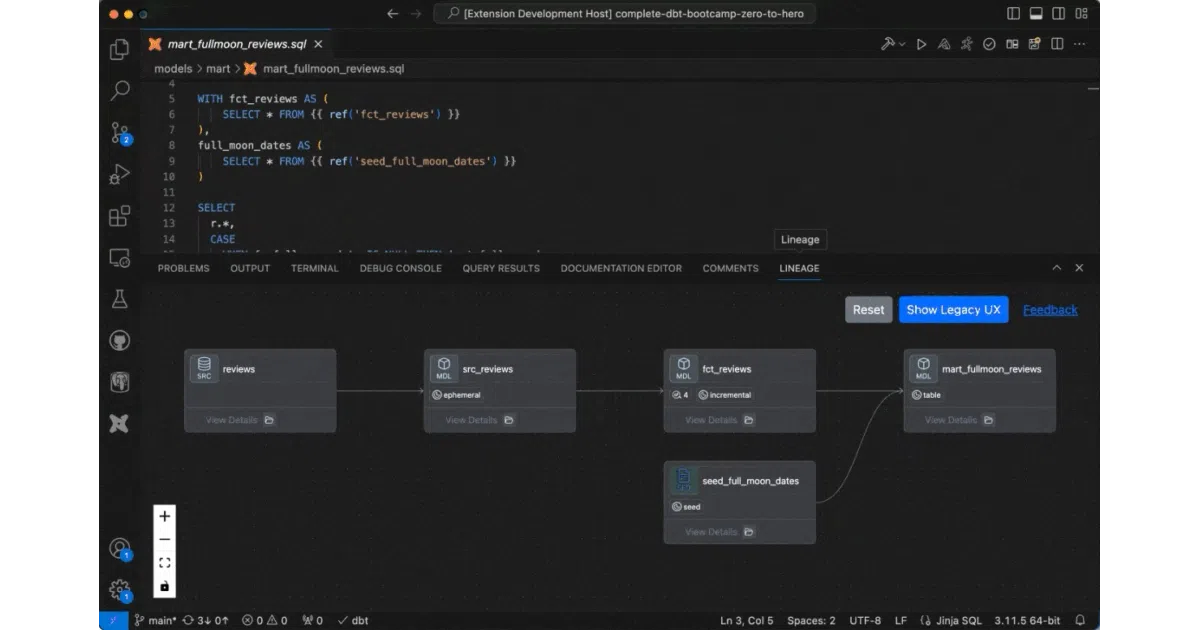
This open-source VS Code extension wraps dbt Core (and Cloud) with IDE conveniences: autocomplete for models and macros, click-to-definition, query preview with CSV export and basic charting, column-level lineage, one-click runs of parent/child models and tests, and a live compiled-query preview as you type. It also bolts on some warehouse-specific extras like BigQuery cost estimation and SQL validation.
The interesting bit
The extension tries to solve the “dbt is just Jinja-flavored SQL in a text editor” problem by pushing project awareness down into the IDE—column lineage, health checks for missing columns or unmaterialized models, and even AI-generated documentation. The “defer to prod” feature is a nice touch for dbt Core users who want to skip rebuilding upstream models in dev.
Key highlights
- Auto-complete and go-to-definition for models, macros, sources, and docs
- Column-level lineage visualization (not just model-level)
- Generate dbt models from source definitions or convert raw SQL to dbt-ified code
- AI-assisted documentation generation with a UI editor that saves to YAML
- BigQuery cost estimator and SQL validator (catch typos, missing columns, bad parens)
- Force-tailed dbt logs viewer inside VS Code
- Works in dev containers, Codespaces, and WSL; requires dbt 1.0+
Caveats
- Several features (AI docs, health checks, cost estimation) likely lean on Altimate’s cloud service; the README doesn’t clarify what runs locally vs. what phones home
- The “AI” branding is vague—no mention of which models or whether API keys are needed
Verdict
Worth a look if you live in dbt + VS Code and want fewer round-trips to the docs site. Probably overkill if you just write simple models and already have a good dbt Cloud setup.
Frequently asked
- What is AltimateAI/vscode-dbt-power-user?
- A kitchen-sink VS Code extension for dbt users who are tired of context-switching between their editor and the warehouse.
- Is vscode-dbt-power-user open source?
- Yes — AltimateAI/vscode-dbt-power-user is open source, released under the MIT license.
- What language is vscode-dbt-power-user written in?
- AltimateAI/vscode-dbt-power-user is primarily written in JavaScript.
- How popular is vscode-dbt-power-user?
- AltimateAI/vscode-dbt-power-user has 586 stars on GitHub.
- Where can I find vscode-dbt-power-user?
- AltimateAI/vscode-dbt-power-user is on GitHub at https://github.com/AltimateAI/vscode-dbt-power-user.