AlexeyAB/Yolo_mark
A no-frills bounding-box editor for the YOLO faithful
Before your object detector can learn, someone has to draw thousands of rectangles by hand—this C++ tool makes that slightly less miserable.
Not currently ranked — collecting fresh signals.
star history
What it does
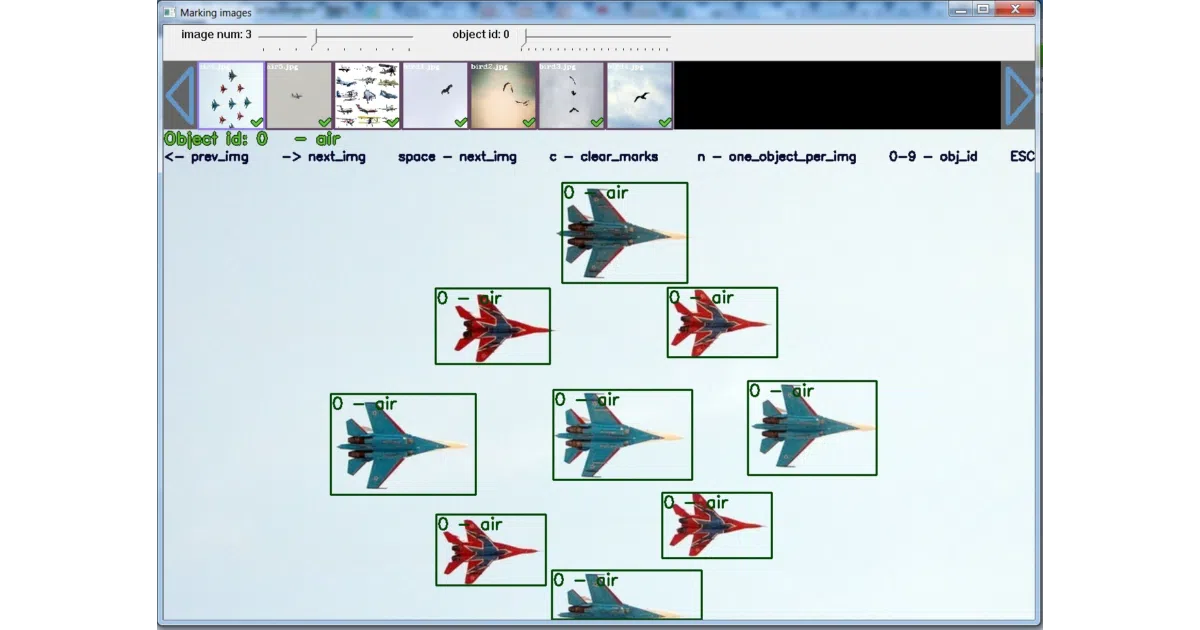
Yolo_mark is a keyboard-driven desktop GUI for drawing and editing bounding boxes on images, producing the exact text files YOLO v2/v3 expects for training. It runs on Windows and Linux, speaks OpenCV 2.x or 3.x, and includes a video-to-frames extractor so you can mine stills from footage without leaving the repo.
The interesting bit
The whole thing is essentially a thin OpenCV wrapper—C++ code, MSVS solution, cmake file, done. The value is in the tight coupling to the Darknet ecosystem: it ships with sample .cfg, .data, .names, and even a .cmd file that shows how to kick off training once your thumbs are sore from labeling. The “track objects” shortcut (o) and copy-previous-mark (p) suggest someone actually used this for repetitive frames.
Key highlights
- Native Windows (MSVS 2013/2015) and Linux builds; no Python stack required
- Keyboard-heavy workflow: arrow keys to flip images,
rto delete,0-9for class IDs,pto clone the last box - Built-in video frame extractor (
cap_videomode) dumps every Nth frame for batch labeling - Ships with working YOLO v3 config templates and a training command reference
- Outputs YOLO-format
.txtfiles directly—no conversion scripts needed
Caveats
- README still references MSVS 2013/2015 and OpenCV 2.x; the build instructions feel circa-2017
- Windows setup requires hand-editing library paths in Visual Studio—no vcpkg, no Conan
- Only
.jpgmentioned for custom images; support for other formats is unclear
Verdict
Grab this if you’re already in the Darknet/YOLO v2-v3 pipeline and want a fast, offline labeler without installing a Python annotation suite. Skip it if you’ve moved on to YOLOv8+, need team collaboration, or want modern formats like COCO JSON export.
Frequently asked
- What is AlexeyAB/Yolo_mark?
- Before your object detector can learn, someone has to draw thousands of rectangles by hand—this C++ tool makes that slightly less miserable.
- Is Yolo_mark open source?
- Yes — AlexeyAB/Yolo_mark is open source, released under the Unlicense license.
- What language is Yolo_mark written in?
- AlexeyAB/Yolo_mark is primarily written in C++.
- How popular is Yolo_mark?
- AlexeyAB/Yolo_mark has 1.8k stars on GitHub.
- Where can I find Yolo_mark?
- AlexeyAB/Yolo_mark is on GitHub at https://github.com/AlexeyAB/Yolo_mark.