AUTOMATIC1111/stable-diffusion-webui
Stable Diffusion’s default workbench is a Gradio kitchen sink
It wraps Stable Diffusion—and the whole messy ecosystem of models, upscalers, and LoRAs—into one browser-based workbench.
Not currently ranked — collecting fresh signals.
star history
What it does
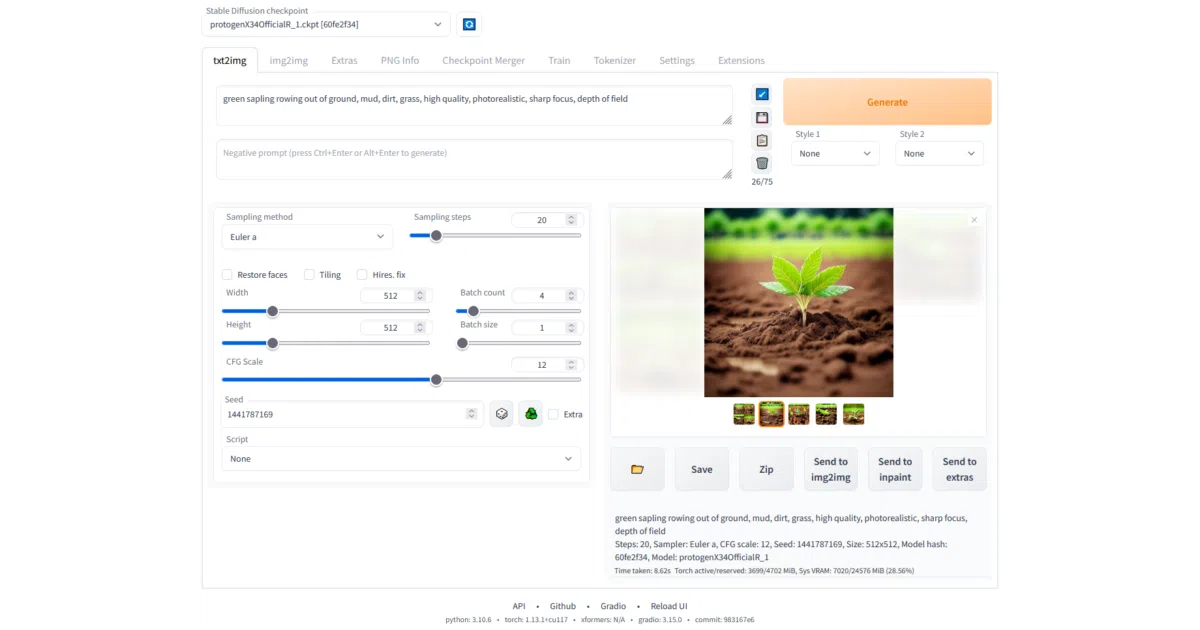
AUTOMATIC1111’s WebUI is a Gradio-based browser interface for Stable Diffusion that integrates text-to-image, image-to-image, inpainting, outpainting, upscaling, and model training into a single local application. It acts as a control panel for dozens of community techniques—handling checkpoints, VAEs, textual inversion embeddings, hypernetworks, and LoRAs—so you can generate, tweak, and merge models without writing scripts. The project also exposes an API and supports running arbitrary Python code from the UI if explicitly enabled.
The interesting bit
The README treats “prompt editing mid-generation” as a casual feature—letting you switch from a watermelon to an anime girl halfway through the diffusion steps—which hints at how deep the control goes. It also squeezes the whole stack down to 4 GB VRAM (with reports of 2 GB working), and includes a checkpoint merger that can blend up to three models inside the browser.
Key highlights
- Supports txt2img, img2img, inpainting, outpainting, and batch processing with live preview and progress bars.
- Saves generation parameters directly into PNG chunks or JPEG EXIF, and can restore them by dragging the image back into the UI.
- Integrates face restoration (GFPGAN, CodeFormer) and multiple upscalers (RealESRGAN, ESRGAN, SwinIR, LDSR) in an Extras tab.
- Removes the original 75-token prompt limit and supports weighted composable diffusion with multiple prompts.
- Can reload checkpoints on the fly, merge up to three checkpoints, and load separate VAEs, embeddings, and LoRAs from a dedicated picker UI.
Caveats
- The “one click install” script still requires you to install Python and Git first.
- Documentation has been moved entirely to the wiki, so the README is now mostly a feature list.
- Running arbitrary Python code from the UI is possible with
--allow-code, which is a notable security footgun.
Verdict
If you want to run Stable Diffusion locally and actually control the chaos of models, prompts, and post-processing, this is the default choice. If you need a clean API-only backend or a lightweight consumer app, keep looking.
Frequently asked
- What is AUTOMATIC1111/stable-diffusion-webui?
- It wraps Stable Diffusion—and the whole messy ecosystem of models, upscalers, and LoRAs—into one browser-based workbench.
- Is stable-diffusion-webui open source?
- Yes — AUTOMATIC1111/stable-diffusion-webui is open source, released under the AGPL-3.0 license.
- What language is stable-diffusion-webui written in?
- AUTOMATIC1111/stable-diffusion-webui is primarily written in Python.
- How popular is stable-diffusion-webui?
- AUTOMATIC1111/stable-diffusion-webui has 165.1k stars on GitHub.
- Where can I find stable-diffusion-webui?
- AUTOMATIC1111/stable-diffusion-webui is on GitHub at https://github.com/AUTOMATIC1111/stable-diffusion-webui.