170-carry/codex-tools
Turn your spare Codex accounts into a local OpenAI-compatible proxy
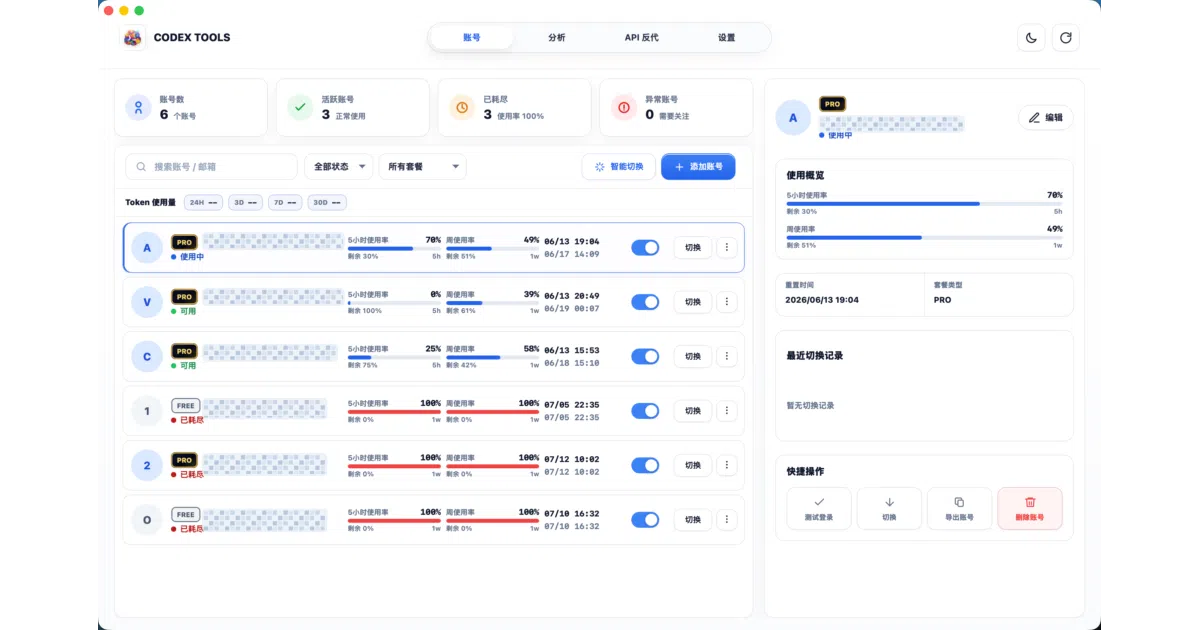
Codex Tools imports, switches, and rotates multiple Codex accounts through a local OpenAI-compatible proxy so tools like Cursor can consume your pooled logins without manual swapping.
Not currently ranked — collecting fresh signals.
star history
What it does
Codex Tools is a Rust-backed desktop app and CLI that manages multiple OpenAI Codex accounts. It imports logins via OAuth or JSON batch, tracks per-account usage over five-hour and one-week windows, and hot-swaps the local ~/.codex/auth.json so you can switch identities without re-authenticating. It also runs a local OpenAI-compatible /v1 proxy that routes requests through your imported account pool.
The interesting bit
The proxy layer is the real trick: it lets Cursor, ChatWise, or local scripts treat a bundle of personal Codex accounts as a single API endpoint, automatically rotating based on remaining quota. It can even rewire the official Codex App or CLI to talk to your local proxy instead of OpenAI’s servers, then restore the original config when you’re done.
Key highlights
- Import accounts via OAuth, JSON batch, or backup restore; export the full library as JSON
- CLI (
ctc) and TUI for listing, switching, and usage checks, plus a React-based desktop GUI - Local proxy at
127.0.0.1:8787/v1withsk-...keys, supporting model aliases and reasoning/speed parameters for GPT-5.6 models - One-click bind/unbind for Codex App/CLI to route through the proxy; includes Cloudflared tunneling for public access when local IPs are blocked
- macOS menu-bar and Windows taskbar/system-tray widgets showing remaining quota
Caveats
- Desktop builds are macOS and Windows only; Linux users get a separate proxy daemon at best
- Cursor and some clients block local/private IP addresses (
ssrf_blocked), so you’ll need a Cloudflared tunnel or remote proxy unless you enjoy debugging SSRF errors - Cross-provider resume may hit Codex encryption-context limits; provider sync generates backups, but encrypted history may only regain list visibility, not full resumability across accounts
Verdict
Worth a look if you’re sitting on multiple Codex accounts and want to feed them into Cursor or local scripts through a single OpenAI-shaped straw. Skip it if you have one account and no need for a local API shim.
Frequently asked
- What is 170-carry/codex-tools?
- Codex Tools imports, switches, and rotates multiple Codex accounts through a local OpenAI-compatible proxy so tools like Cursor can consume your pooled logins without manual swapping.
- Is codex-tools open source?
- Yes — 170-carry/codex-tools is open source, released under the MIT license.
- What language is codex-tools written in?
- 170-carry/codex-tools is primarily written in Rust.
- How popular is codex-tools?
- 170-carry/codex-tools has 1.1k stars on GitHub.
- Where can I find codex-tools?
- 170-carry/codex-tools is on GitHub at https://github.com/170-carry/codex-tools.