vastsa/PI-Desktop · 15 Sep 2026 · Feature
PI-Desktop Was Built by AI Models, for AI Coders

Wei Chen
Contributing Editor
A local-first desktop workspace that separates the UI from the agent loop, treats permission as a first-class concern, and refuses to lock you into a single model or editor.
vastsa/PI-Desktop
★7.5k stars Velocity · 7d +48 ★/day ↗accelerating
star history
The Token-Powered Construction Crew
Somewhere near the bottom of the PI-Desktop repository, below the architecture diagrams and plugin API notes, sits a table that reads like a credits roll from an alternate timeline. It lists the models that “created” the project: GPT-5.6-luna at 5.3 billion tokens, Claude Opus 5 at 3.9 billion, Grok-4.5 at 1.9 billion, and roughly two dozen others, totaling more than 27 billion tokens. The README does not treat this as a gimmick. It states, plainly, that the project was created by these models—not by a lone genius, but by a token-powered construction crew.
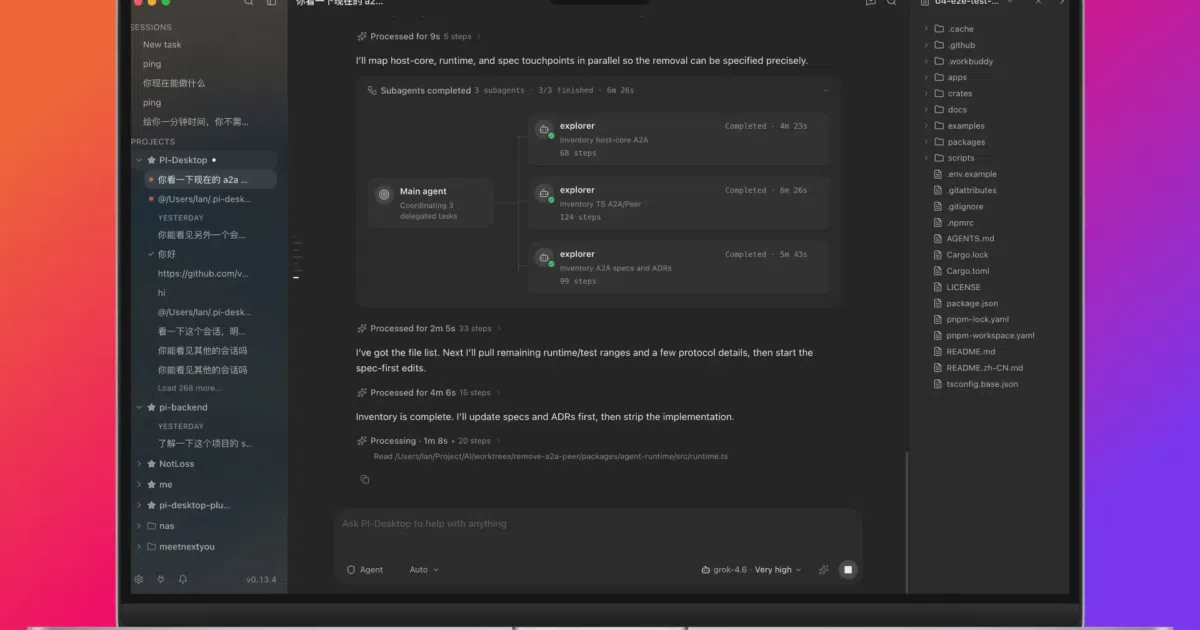
That confession is more than a novelty. It is a stress test of PI-Desktop’s own premise. The application is a local-first desktop workspace built specifically for AI coding agents. If the future of software development is agents writing code, then agents should also get a decent office. PI-Desktop tries to build that office, and to do it, it let the workforce design the floor plan.
Desktop-First in an IDE-First World
Most coding agents today live in one of three places: a terminal window, an IDE sidebar, or a remote dashboard. PI-Desktop occupies a fourth category: the standalone desktop application. The distinction matters. According to an analysis by Augment Code, the industry is shifting from IDE sidebars toward desktop, CLI, and cloud “mission control” surfaces because IDE extensions typically trap agents inside a single context window and force synchronous, editor-bound interactions. Desktop tools, by contrast, can run parallel agents and long-horizon jobs without blocking the user’s text cursor.
PI-Desktop embraces that shift literally. It is an Electron-based shell that houses a persistent workspace for chat, file review, command output, and plugin management. The project’s feature page describes additional surfaces including a Mission Control panel for background sessions, a CodeMirror 6 editor, a full PTY terminal, and an activity dashboard that tracks token usage and active-day streaks. It runs on macOS, Windows, and Linux, and it deliberately refuses to lock itself to a single editor or model. You can open any local repository, connect your own API keys, and let the agent work while you review diffs in a side panel. The goal is not to replace your IDE but to give the agent a room of its own. The Pi ecosystem is already surfacing in local workflow tutorials as a viable alternative to cloud-only agents, and the project is cataloged in public ecosystem trackers that monitor the shift toward open-source desktop agents.
Architecture by Separation
What makes PI-Desktop technically interesting is not the choice of Electron but what sits behind the renderer. The application splits responsibilities across four layers. The React renderer handles the UI and has no Node integration, meaning it cannot directly touch the filesystem or execute commands. Electron’s main process orchestrates the desktop lifecycle. A Rust Host Core owns every privileged operation: filesystem access, SQLite persistence, OS keychain storage for secrets, and the permission layer that gates dangerous actions. Finally, the pi Agent Sidecar runs the agent loop, model streaming, and tool execution in its own process.
This separation is the project’s real engineering bet. By isolating the renderer and confining privileged work to Rust, PI-Desktop attempts to solve the trust problem that haunts agentic tools. When an agent wants to edit a file or run a shell command, the request passes through the Rust core’s permission layer. The user reviews the diff or command output before it executes. The architecture treats the agent as inherently capable but inherently untrusted, which is a healthier security posture than hoping a prompt-engineered LLM never emits a destructive command.
The autonomy model is equally cautious. PI-Desktop offers three modes—Agent, Plan, and Goal—that act as throttle controls on trust. In Agent mode, the agent reads, edits, and runs commands in a continuous loop, though privileged tools still stop at the permission gate. In Plan mode, the agent researches the codebase, writes an immutable implementation plan, and waits for human approval before touching a single file. In Goal mode, the human locks the objective and acceptance criteria, then the agent chooses its own path. Same runtime, three different consent boundaries.
Local-First, Honestly
“Local-first” is an abused phrase in AI tooling, often meaning little more than “we cache some files on disk.” PI-Desktop’s README includes a data-behavior table that attempts to be precise. Conversations live as local JSONL with a SQLite index. Settings stay on the machine. API credentials live in the OS keychain. Telemetry is explicitly listed as none. Model requests are sent directly to the provider or local endpoint the user configures, with no mandatory PI-Desktop relay.
There is no required account, which means the workspace is portable in a way that cloud-hosted agents are not. The application can also import existing sessions from Claude Code, Codex, OpenCode, and Pi, suggesting the authors see migration friction as a competitive threat. If you have already spent weeks tuning an agent session, PI-Desktop wants you to bring that history with you rather than start from zero.
Extensibility and the Ecosystem Bet
PI-Desktop does not ship with a hardcoded model list. It supports OpenAI, Anthropic, local gateways such as Ollama and LM Studio, and any OpenAI-compatible API. Model configuration includes context windows, output limits, and reasoning controls, and you can switch models mid-session without losing the conversation thread.
The extension model is similarly agnostic. Skills provide reusable agent instructions. MCP servers connect external tools through Anthropic’s Model Context Protocol without baking them into the app. Subagents let the system delegate independent tasks—codebase exploration, multi-file implementation, adversarial review—to background agents that report back to the parent session. And Plugins, distributed as .piplug packages, can contribute tools, commands, panels, themes, and even resident services.
The plugin system is ambitious but visibly unfinished. The README notes that plugin processes are permission-gated and isolated from the renderer, yet “plugins are still user-trusted code rather than a complete operating-system sandbox.” That honesty is refreshing, but it also flags a real risk: the marketplace and publisher verification roadmap items are there for a reason.
The Preview-Phase Caveats
PI-Desktop is currently at version 0.14.x and labels itself an early preview. The core workflows are usable, but APIs and extension interfaces remain in motion. Some of the packaging is still rough. macOS builds are unsigned and unnotarized; Windows builds are also unsigned. Linux users get an AppImage, a .deb, or a raw .asar intended for repackaging with a system Electron. These are not fatal flaws for an open-source preview, but they are friction points that will determine whether early adopters stick around or retreat to the relative polish of Cursor or Claude Code.
Where the Agents Work
PI-Desktop enters a market that is consolidating fast. As one 2026 guide notes, code-specialized LLMs have achieved larger context windows, real-time IDE integration, and autonomous debugging. The competitive landscape includes editor-native tools like Copilot and Cursor, terminal-first agents like Claude Code, cloud dashboards like Devin, and now a wave of desktop “mission control” apps including OpenAI’s Codex Desktop and Imbue’s Sculptor.
IBM’s overview of AI coding assistants observes that the distinction between assistants and agents is increasingly blurred, with terminology driven partly by marketing. For organizations, enterprise adoption research suggests that governance and data privacy are bigger blockers than model capability. PI-Desktop’s local-first posture and OS-keychain credential storage speak directly to those concerns, even if the unsigned builds and preview APIs still make it a risky standard-issue tool for regulated environments.
PI-Desktop’s wager is that developers will want a dedicated surface for long-running, multi-repository agent work that does not live inside their IDE or terminal. It bets on local data ownership, model neutrality, and a permission architecture that treats agent autonomy as a dial, not a switch. Whether that bet pays off depends on whether the convenience of a second desktop app outweighs the friction of leaving the editor—and whether a construction crew of 27 billion tokens can iterate fast enough to close the gap with better-funded rivals.
Sources
- joylarkin/AI-Coding-Landscape: AI coding models, agents ...
- AI Coding Assistants: Seizing the Once-in-a-Generation ...
- Pi Desktop — Desktop GUI for the Pi and oh-my-pi coding ...
- Sentinel: an open-source local-first desktop app for AI coding
- AI code generation: Best practices for enterprise adoption ...
- Raspberry Pi OS downloads
- The Best Local Agentic Coding Workflow (Complete Guide)
- What Are AI Coding Assistants?
- Top 7 Raspberry Pi Desktop OS 2026
- 9 Best AI Coding Agent Desktop Apps in 2026 (Ranked by ...
- Best AI coding assistant in 2026: complete developer guide
- pi-gui — A native desktop for AI coding agents