iamajmeena/neonclipping · 23 Nov 2026 · Feature
A Clipper That Finds Highlights Without Watching the Video

Giulia Conti
Editor
NeonClipping turns hours of stream footage into captioned vertical clips in about two minutes by ignoring the pixels until the last possible second, all on your own machine.
iamajmeena/neonclipping
★2.1k stars
The AI clipping market has settled into a familiar shape: upload your footage to a service, wait ten to fifteen minutes, pay a subscription, and hope the moments it picks match your taste. Choppity markets itself to 500,000-plus creators on exactly that model. Adobe Express has its own version, English-only and desktop-bound. Short AI wraps clipping in a broader faceless-video factory with scheduled posting.
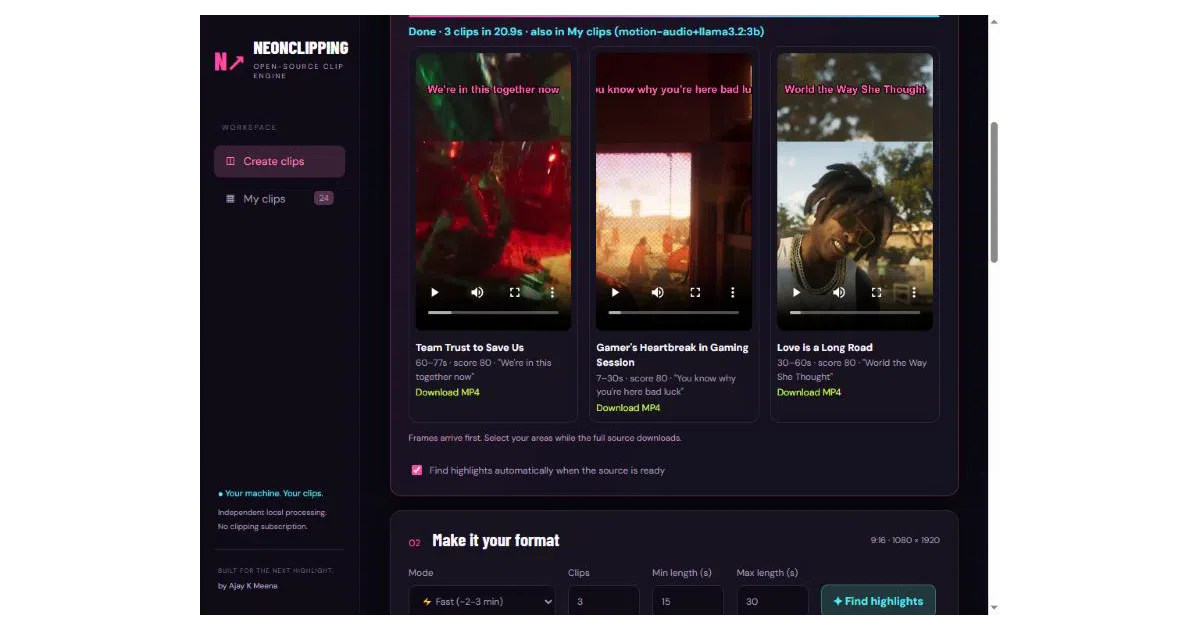
Into this crowded shelf walks a solo project from Jaipur with a different proposition: paste a link, get captioned 9:16 clips in about two minutes, with the entire pipeline running on your own machine. AlphaSignal covered it shortly after release and reported roughly 1,800 GitHub stars within days. The two-minute claim comes from the project’s own benchmarks on an RTX 2060, so it deserves scrutiny, and it gets that below. The interesting part is how the number is achieved at all.
Never look at the whole video
NeonClipping’s Fast mode, the default for anything over ten minutes, is built on one discipline: defer every expensive operation. The project’s site and README describe a pipeline that treats video pixels as a final rendering problem, never a selection problem.
It starts by downloading audio only. For an 85-minute stream that is 79 megabytes and about ten seconds, against multiple gigabytes for the full file. Then comes the move that separates it from most local clippers: when the source is YouTube, it takes the transcript from YouTube’s own word-timed captions, at zero compute cost. A speech model runs only as a fallback for sources without captions, such as Twitch VODs and local files.
Selection then happens on cheap signals. The audio timeline is scored for sudden loudness jumps measured against a rolling two-minute baseline, for energy in the 2 to 4 kHz band where raised voices live, and for quiet-to-loud transitions. The transcript is scanned for trigger phrases, and the phrase list tells you exactly who this tool is for: “oh my god”, “run”, “police”, “bhaago”, “arre yaar”. English, Hindi, and Hinglish all get equal billing.
The shortlisted moments then go to a small local LLM, by default llama3.2:3b through Ollama, which reads each candidate’s transcript, scores it for emotion and payoff, writes a title and a hook, and snaps the clip boundaries to sentence endings within your configured length range. Only after all of that does NeonClipping touch video: it downloads just the chosen sections, aligns them against the audio track for frame-accurate trims, and renders 1080x1920 clips with burned-in captions.
The measured results on that one RTX 2060 machine: 97 seconds for three clips from an 85-minute YouTube stream with captions, 136 seconds for a three-hour Twitch VOD that needed local transcription, 14 seconds for a 90-second local file. The README is careful to note these are single-machine numbers that depend on network and CPU. Even with that caveat, the shape of the achievement is clear. Most of a three-hour VOD is dead air, and the expensive part of clipping is video. Skip the video until you know where to look, and the problem collapses.
Deep mode exists for when you want more: it downloads the full video and adds optical-flow motion detection via OpenCV’s Farneback algorithm, catching fast objects, impacts, and camera whips, plus cut density, and gives the LLM fifteen seconds of context around each candidate. The README admits Deep mode was verified on a short video only and is slow by design on multi-hour sources. It reads like a mode built because it could be, with Fast mode as the real product.
A colorist from Jaipur, building for an audience the cloud skips
The author, Ajay K Meena, is a director, cinematographer, and DaVinci Resolve educator in Jaipur, and the project’s identity follows. The setup guide ships as a PDF in both English and Hindi. The installer offers to have an AI agent explain the app “in simple Hindi.” Hinglish captions, Hindi speech written in Latin script, are the default rather than an afterthought: Devanagari transcripts are transliterated word by word with timings preserved, nukta letters handled, repeated-word loops trimmed.
This matters more than it might first appear. Indian gaming and streaming is an enormous audience whose speech patterns, code-switching, and caption preferences are poorly served by tools that transcribe English well and treat everything else as a locale setting. Adobe Express’s clip maker supports English only. NeonClipping’s trigger-phrase list, its transliteration work, and its bilingual documentation all point at a specific user the subscription services have been content to ignore. The one local model kept on purpose is a large-v3 Whisper configuration for full Hindi, slow on small GPUs, because the project found its faster local model produced worse captions and removed it.
The taste model, and the chat detector
Two features give the tool a memory. The first is small and honest: every clip carries a five-star rating widget, ratings persist in a local JSONL file, and after eight ratings the signal weights are re-fitted with ridge regression pulled toward the defaults and blended in gradually. A user who rates shout-heavy clips highly gets shouting ranked higher; a calm-explainer audience gets the opposite. Nothing uploads. This is personalization at a scale a single developer can maintain, and the README is upfront that eight ratings is a thin foundation, which is why the regression is anchored to the defaults.
The second is the more clever one. Live clipping watches Twitch chat, counting messages in ten-second buckets, and cuts a clip around every spike that exceeds 2.5 standard deviations and 2.5 times the five-minute baseline. The clip starts about 24 seconds before the spike, because chat reacts after the moment. Using crowd reaction as a highlight detector is an old broadcast instinct applied neatly: thousands of viewers are already voting on what just happened, in real time, for free. A Creators panel extends this into a watchlist that records and clips a streamer’s streams unattended, one at a time, with sensible guards (a three-hour cap on unattended recordings, a stop below 8 GB of free disk, deletion of the raw recording after clipping). A phone remote on the same Wi-Fi, PIN-protected with lockout after five wrong attempts, turns the PC into the engine and the phone into a trigger. The README notes the Twitch path is tested end to end while the YouTube live path was never run all the way through, a disclosure worth respecting.
There is also a workaround for very long streams that says a lot about the project’s pragmatism: it splits a nine-hour transcript into roughly 25-minute parts and generates copy-ready prompts for any free chatbot, because a chatbot handed a nine-hour transcript only reads the beginning. You paste the answers back, tick the moments, and only those sections get downloaded. It is manual, it is inelegant, and it is free, which appears to be the governing philosophy.
What it is made of, and what it admits
The credits section is unusually specific: design ideas studied from open-source clippers PeakCut, ClipCutter, and content-ai, a facecam-by-static-border idea reimplemented with original code plus a face check, and a feature list read off a commercial editor’s public webpage. The stack underneath is FFmpeg, yt-dlp, faster-whisper, OpenCV’s YuNet face detector, and Ollama. In the plain sense this is glue code, and very good glue: the value is in the pipeline order, the signal choices, and the audience focus, with the heavy lifting done by established components. The project says so itself, which is rarer than it should be.
The “Honest limits” section deserves its own mention because it functions as anti-hype armor. Highlight picking is a heuristic plus a small local LLM that finds loud, energetic, quotable moments, with no guarantee of virality. The LLM sees text only and cannot see the screen. The action cues run on a tiny low-resolution copy and rank moments without recognizing what is happening in them. Facecam presets are starting points, and picking the wrong corner crops the wrong half. Sources without YouTube captions get rougher captions from local transcription. The Mac installer has never been tested on a real Mac. A test report of 187 checks is published alongside the twelve problems that run found and fixed. One oddity: the README references a “Gemma 4” local judge for certain moment-mix modes, a name readers will have trouble finding in any public model registry, and the project would do well to clarify it.
Where this lands
The competitive question is whether heuristic audio scoring plus a 3-billion-parameter local model can pick moments as well as the cloud services, which throw larger models and more compute at the same problem. On the evidence available, the answer is that it picks different moments, faster, for a specific kind of content: streams where excitement is audible. For a podcast or a lecture, where the good minute sounds like every other minute, the loudness-jump heuristic has less to grab, and the transcript-led Dialogue mode plus the LLM judge carries more of the weight. The project does not claim otherwise.
The pitch that seems to be landing, judging by the star count and the coverage it has drawn, is the combination of price, privacy, and speed. No account, no upload, no subscription, a server bound to localhost, and a two-minute turnaround on hardware a streamer already owns. For a hobbyist clipping their own channel, the subscription services were never a good fit, and a free local tool that runs while they get a drink is a straightforward win. For the Indian streaming audience the author built it for, it may be the first clipping tool that speaks their language, in both senses. The open questions are durability ones: whether one maintainer can keep pace with YouTube’s caption formats and Twitch’s API moods, whether the untested Mac path gets real hardware, and whether the taste model grows beyond its eight-rating ridge regression. The foundation, a pipeline that refuses to pay for pixels it has not yet earned, is sound enough to build on.
Sources
- NeonClipping Turns 3-Hour Streams Into Vertical Clips in 2 Minutes
- Free AI Clip Maker & AI Shorts Maker — Turn Long Videos into Viral Clips
- NeonClipping: Turn Long Videos Into Captioned Vertical Clips
- Free AI Clip Generator | Adobe Express
- Do people here actually use AI short-form video generation tools?
- NeonClipping · Free AI clip maker for gamers and streamers
- What's the best tool to automatically create short clips from long videos?
- I Built an AI Tool That Auto Creates TikTok Shorts Until One Goes Viral, Should I Activate It?
- NeonClipping: open-source tool auto-generates vertical clips
- What is the best AI tool to create short videos fast?
- Free AI Short Video Generator:Auto Create Viral Videos | Short AI
- NeonClipping turns long YouTube, Twitch, or Kick videos, or your own ...