iamajmeena/neonclipping
The clip farm that never watches the whole video
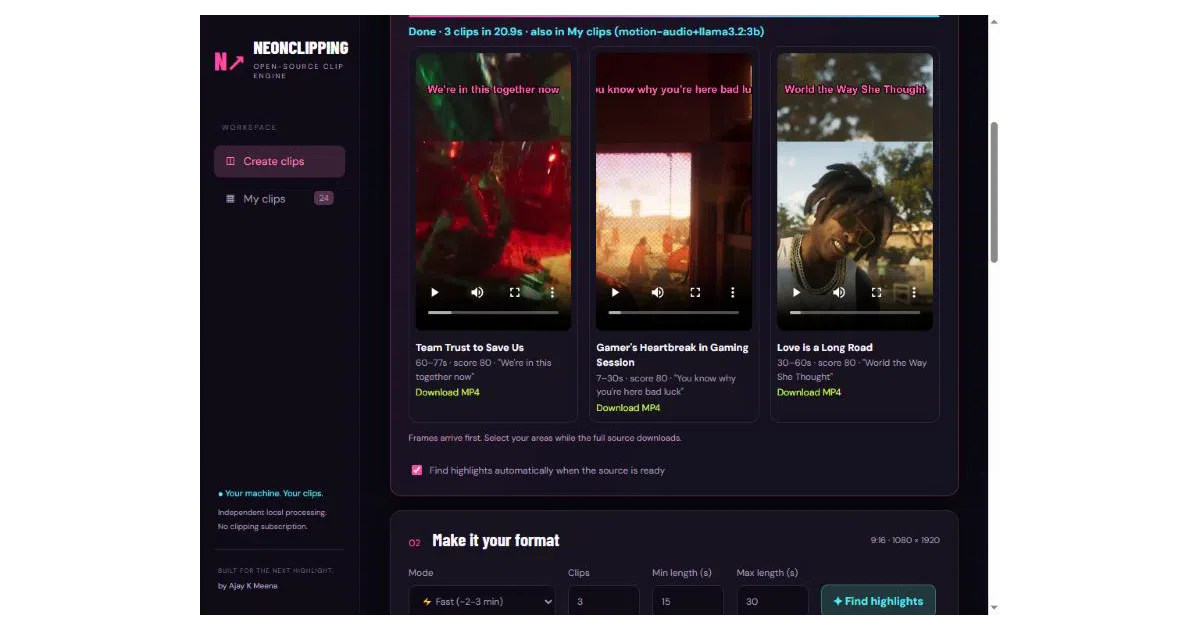
NeonClipping finds viral moments in hours-long streams by listening for shouting and reading YouTube's own captions — all on your machine, in about two minutes.
Too new to rank. Velocity needs a few days of history.
not enough history yet
star history
What it does
You paste a YouTube, Twitch, or Kick link (or a local MP4) and it returns vertical 1080x1920 clips with burned-in captions, a title, and a hook. It picks the moments itself, snaps clip boundaries to sentence ends, and offers 11 facecam/gameplay layouts plus caption styles named after people you’ve definitely seen in a Shorts feed. Nothing leaves your machine — the server binds to 127.0.0.1 only.
The interesting bit The Fast mode’s core trick is refusing to look at the whole video: it downloads audio only (79 MB for an 85-minute stream), grabs word-timed transcripts from YouTube’s own captions for free, and scores moments by loudness jumps and 2–4 kHz “raised voice” energy — the frequency band of screaming. A local Ollama LLM then reads each candidate’s transcript, scores it, and writes the title and hook. It also learns from your star ratings, re-fitting signal weights after eight ratings via ridge regression, so a shouting-heavy taste and a calm-explainer taste get different rankings.
Key highlights
- Measured on an RTX 2060: 97 s for an 85-minute YouTube stream, 136 s for a 3-hour Twitch VOD (local Whisper fallback when no captions exist).
- Deep mode adds optical-flow motion (OpenCV Farneback) and cut density, shortlists 4× more candidates, and gives the LLM surrounding context.
- Live clipping: records ongoing Twitch/YouTube streams and cuts clips around chat-velocity spikes, starting ~24 s before the spike because chat reacts late.
- Hinglish support — Hindi speech transliterated to English letters word-by-word, timings preserved.
- Keyword spotting includes “bhaago” and “arre yaar” alongside “oh my god”; the target audience is not ambiguous.
Caveats
- The Mac/Linux
install.shis new and untested on a real Mac; the polished one-click path is Windows-only. - Auto-clipping YouTube creators via the Creators panel was never run end to end; only Twitch is fully tested there.
- Editing a clip’s start/end or spoken language requires a separate workflow — the saved editor handles framing and captions only.
Verdict If you produce stream clips and want a free, local, no-subscription pipeline — especially for Hindi/Hinglish content — this is unusually thoughtful glue around yt-dlp, FFmpeg, Whisper, and Ollama. If you need cloud-scale batch processing or polished Mac support, wait a bit.
Frequently asked
- What is iamajmeena/neonclipping?
- NeonClipping finds viral moments in hours-long streams by listening for shouting and reading YouTube's own captions — all on your machine, in about two minutes.
- Is neonclipping open source?
- Yes — iamajmeena/neonclipping is open source, released under the MIT license.
- What language is neonclipping written in?
- iamajmeena/neonclipping is primarily written in Python.
- How popular is neonclipping?
- iamajmeena/neonclipping has 1.7k stars on GitHub.
- Where can I find neonclipping?
- iamajmeena/neonclipping is on GitHub at https://github.com/iamajmeena/neonclipping.