dataelement/dsh-desktop · 07 Sep 2026 · Feature
DSH Desktop: Making DeepSeek’s Agent Runtime a Native App

Megan Russo
Staff Writer
A community-built Electron shell turns DeepSeek Harness from a Node.js web service into a local-first desktop product with third-party model support and one-click deployment.
dataelement/dsh-desktop
★16.9k stars Velocity · 7d +242 ★/day ↘cooling
star history
The Last Mile of Local AI
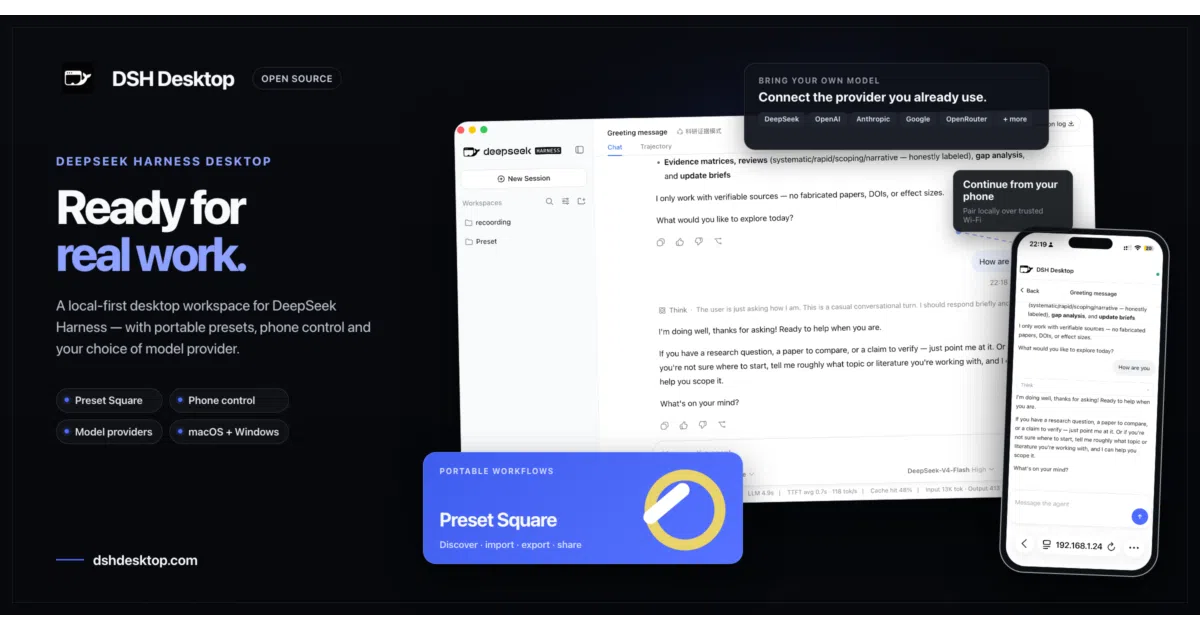
DeepSeek Harness arrived as a complete agent runtime with a web interface, yet running it still meant wrangling Node.js, loopback ports, and child processes from a terminal. DSH Desktop exists to close that gap. It is an open-source Electron wrapper that packages Harness into a macOS or Windows application, auto-starts the local runtime, and drops the user straight into the full interface without a CLI in sight. In the current wave of local-first AI tools, the project has found an audience that wants the power of an autonomous agent runtime with the polish of a consumer desktop app. The maintainers describe it as an independent community wrapper, not an official DeepSeek product, which makes its distribution through a signed and notarized macOS build, a Windows installer, and even the Microsoft Store all the more notable.
Host Capabilities, Not a Reimplementation
The README is admirably blunt about scope: DSH Desktop does not reimplement Harness. Instead, it supplies the host capabilities a web runtime needs to become a desktop product. Think of it as a specialized container runtime for a web app that was never designed to be one.
At launch, the Electron main process creates an application-owned directory, spawns Harness as a child process on a random loopback address, and waits for readiness before opening a hardened BrowserWindow. When the app quits, it gracefully terminates the child. User data—profiles, sessions, plugins—lives in Electron’s userData folder, isolated from the installation directory so that upgrades never wipe state. The renderer is stripped of Node.js privileges, with context isolation, sandboxing, and navigation restrictions enabled. These are the unglamorous details that separate a prototype from a product.
The random loopback port deserves a moment of attention. By binding Harness to 127.0.0.1 on an ephemeral port, the shell ensures that the agent runtime never accidentally exposes its API to the local network, let alone the internet. The Electron main process alone knows the port, and the renderer is restricted from navigating anywhere except the Harness origin. This is the kind of security posture that Node-based web apps often ignore when users simply run a dev server and hope for the best.
Because Harness is a rapidly moving target—the current pin is release candidate 0.1.0-rc.6—DSH Desktop uses patch-package to apply reproducible UI modifications. These patches handle desktop-specific branding, a model-provider onboarding flow, and the sidebar identity. When upstream changes, the maintainers must verify contracts, rewrite the customized interface, regenerate the patch, and run regression checks against a real Harness startup. It is tedious, necessary maintenance that keeps the wrapper honest.
Model Agnosticism in a Branded Shell
Although the name evokes DeepSeek, the desktop shell is model-agnostic. Initial setup ships with a catalog of mainstream third-party providers including OpenAI, Anthropic, Google Gemini, xAI, Moonshot, MiniMax, Zhipu GLM, Mistral, OpenRouter, Groq, and Together AI. The user selects a provider, pastes an API key, and the routes and model lists configure themselves. Keys are written only to the local credential store. This provider directory is itself a patch on the upstream Harness UI, turning a manual configuration exercise into a first-run wizard.
The project also imports and exports complete agent presets as portable DSH preset packages, with conflict checks and a trust warning before installation. This suggests an ambition to make agent configurations as portable as virtual machine images or editor extensions—something the ecosystem badly needs as presets grow complex.
The Plugin Economy
DSH Desktop is not merely a shell; it is a host for a plugin ecosystem. A sibling project, the DeepSeek Harness plugin market, operates as a marketplace with over nine hundred community plugins, screenshots, and one-click install or theme switching. Most plugins take effect instantly without a restart. One review describes the desktop itself as part of the plugin ecosystem, where everything is a plugin, hinting at a future where the boundary between host and hosted runtime blurs. For now, the relationship is pragmatic: the desktop provides the file system, the process lifecycle, and the security model; Harness provides the agent logic and the web interface. Because Harness supports hot reloading for many extensions, the desktop shell does not need to restart when the user installs a new capability. This turns the application into a platform rather than a monolith, a design that mirrors the extensibility of modern code editors, but for agentic workflows.
Where It Sits in the 2026 Landscape
The agent tooling landscape of 2026 has consolidated around several architectural patterns: local agents, cloud agents, IDE agents, and computer-use agents that drive GUIs via screenshots. DSH Desktop occupies the local-agent niche, but with a twist: it is not an agent itself, but a specialized operating environment for one. It is closer to a local server manager than to a coding assistant.
This distinction matters. As industry trend analyses note, the field is moving toward multi-agent orchestration, computer-using agents, and coding agents that operate inside IDEs. DSH Desktop does not try to be any of those things. It is the infrastructure layer—the boring part—that lets Harness run on a laptop without a terminal. In a market saturated with all-in-one tools, a project that admits it is just packaging is almost refreshing.
Compare this to Claude Code or GitHub Copilot, which are cloud-hybrid or IDE-bound. DSH Desktop keeps everything local: the model API key, the agent state, the plugin code. That aligns with a growing faction of users who want agentic tooling without shipping their codebase context to a SaaS endpoint. It also differs from other local agent projects, which often provide their own execution environment. DSH Desktop delegates all agent intelligence to Harness, staying deliberately out of the way.
The Rough Edges of Early Preview
DSH Desktop is explicit about its preview status. macOS Apple Silicon builds are fully validated through code signing, Apple notarization, and DMG packaging. macOS Intel and Windows x64 have packaging configurations and platform checks, but runtime verification still requires hardware the maintainers may not have in continuous integration. Windows ARM64 is not supported. The status notes also indicate that automatic update integration is not yet fully validated, despite the download page describing background checks—a tension that suggests the plumbing exists but has not been battle-tested.
The larger risk is upstream velocity. Because Harness is pinned to a release candidate and the UI is maintained via patches, every Harness update is a potential breaking change. The project lives or dies on the maintainers’ ability to keep pace with DeepSeek’s internal iterations.
Outlook: The Packaging Layer as Product
The most interesting implication of DSH Desktop is what it says about the maturity of open-source agent runtimes. We have reached a phase where the runtime—Harness—is sophisticated enough that competitive differentiation shifts to packaging, security hardening, and distribution. DSH Desktop turns a GitHub repository into a code-signed, model-agnostic desktop citizen. It supports the DeepSeek API format and third-party backends, positioning Harness as a neutral runtime rather than a DeepSeek-only tool.
As agent protocols proliferate and users demand local-first operation, projects like this will multiply. The open-source AI stack is splitting into engines and chassis. DSH Desktop has chosen to build the chassis. It is unglamorous work, but without it, the engine never leaves the garage.
Sources
- AI Agent Landscape 2025–2026: A Technical Deep Dive
- DeepSeek API Docs: Your First API Call
- DSH Desktop — Desktop app for DeepSeek Harness
- The 2026 Tool-Use and Computer Agent Landscape
- What are you all using the DeepSeek API for (besides coding)?
- Data Safe Haven User Guide & FAQs
- AI Agents Landscape & Ecosystem (September 2026)
- What's deepseek API?
- DSH Desktop (Community) - Gratis Download an ...
- AI Agent trends have drastically changed from 2024 to 2025
- deepseek-ai/awesome-deepseek-integration: Integrate the ...
- dsh-desktop Review (2026) - The Art of CTO