ccch1mneyyy/dsh-Go · 12 Nov 2026 · Feature
The Agent Harness That Moved Into Your Pocket

Rachel Stein
Contributing Editor
dsh-Go wraps DeepSeek Harness in a full Android app — an embedded Linux runtime, a remote control for your desktop agent, and a whale that does backflips when the build passes.
ccch1mneyyy/dsh-Go
★19.8k stars
Every few months, someone rediscovers that the interesting part of an AI agent isn’t the model. The model, left alone, is a text generator — it can write a build command but can’t run it, can’t read the output, can’t open your app on a device. What turns text into action is the software wrapped around it: the harness. Google’s own Android developer documentation lays this out plainly — a harness supplies the foundation (system instructions, project context, memory), the capabilities (tools the model can call), and the execution (the loop that drives a task to completion). And then it makes the observation that matters here: agents differ mostly in their harness — specifically, in where it runs.
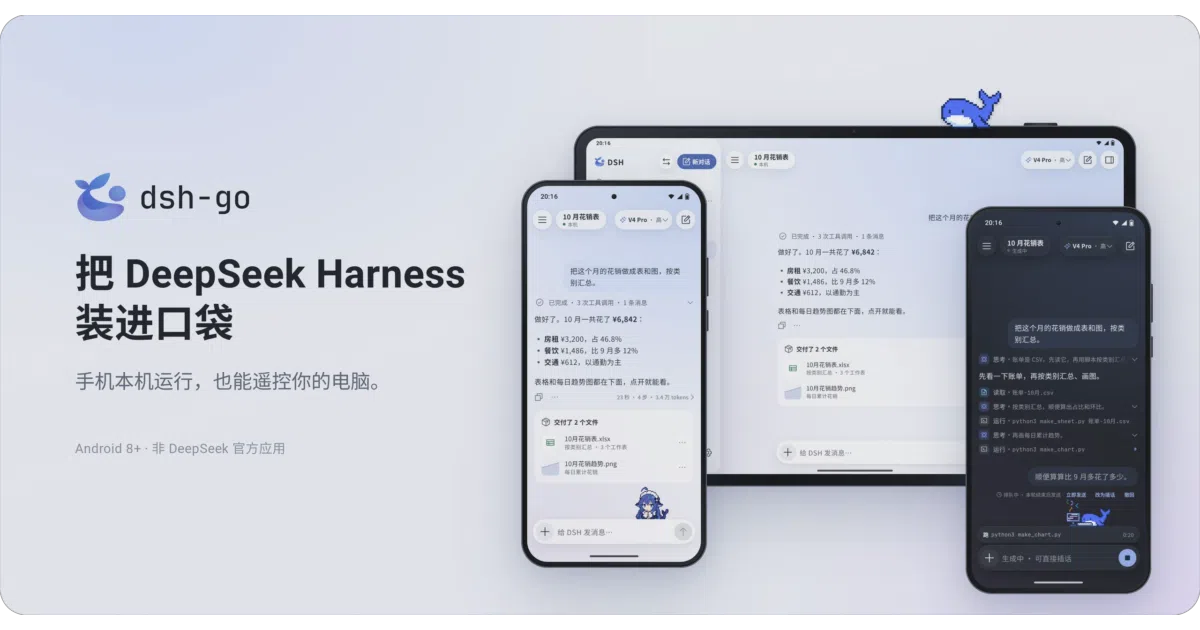
Almost every harness worth using today assumes a desk. A terminal, a laptop, an IDE. dsh-Go — a community-built, unofficial Android client for DeepSeek Harness — makes a different bet: the harness’s home can be the phone in your pocket. Not a thin chat wrapper pointed at an API, and not just a viewer for a session running elsewhere. The actual DSH engine, running on Android, with an option to remote into the copy on your real computer when you’d rather it do the heavy lifting there.
The boring miracle: a Linux userland inside an APK
The unglamorous part of this project is the part that makes it work. To run DSH on a phone, you need a Linux environment — and Android does not hand you one. The conventional answer is Termux plus a lot of patience. dsh-Go instead ships an embedded environment: Ubuntu, Node.js, and the DSH runtime, installed inside the app, no root required, no Termux required, roughly a gigabyte of storage.
The mechanism, for those who care, is PRoot — the userspace trick where syscalls are translated so a process believes it has its own root filesystem and root privileges without the kernel granting either. It is slow relative to a real chroot, which is presumably why the project’s direct-boot option (bypassing PRoot compatibility launching) exists in developer settings, is off by default, and comes with its own compatibility caveats in the FAQ. The default path is the safe one; the fast path is labeled as such. That’s the right ordering.
Structurally, the repository tells you exactly what this is: a Flutter interface with Kotlin platform code underneath, Dart client packages for the DSH Web API and DSH Remote, a runtime directory handling Linux packaging, engine patches, and app bridging, plus tooling scripts that provision an entire build toolchain from scratch. This is, candidly, glue code — sophisticated, painstaking glue, but glue. The value is precisely in the glue: nobody else has packaged this harness so that a stock, unrooted Android 8 phone becomes a competent agent host. The model requests still go to whatever provider you configure, billed to that account. The phone runs the harness, not the model.
Not mobile coding — a steering wheel
The closest Western analog is AgentsRoom, which syncs desktop agent sessions to a phone and is refreshingly honest about what it is: “not mobile coding in the sense of trying to replace VS Code with a touchscreen keyboard.” The phone becomes a remote; the desktop stays the engine. There is evidently real demand for this — Reddit threads with titles like “How do you remotely use AI agents on your computer from your phone?” keep appearing, though the platform’s blocking makes the answers themselves hard to audit from outside.
dsh-Go covers that use case — SSH or DSH Remote into a desktop or server, pick up the same conversation — but it also covers the case where there is no desktop. And its interaction design is built for how people actually supervise agents: you can interject mid-generation, queue a message and fire it immediately, and when the work finishes, the whole process collapses into a single line. The native interface and the official web view can be swapped with one tap, on the same conversation, and the app remembers which one you left off in. These are small decisions, and they are the difference between an agent client people tolerate and one they keep open.
When the agent drives the phone itself
The feature that stops being small is phone control. With permissions granted, the on-device engine can read the screen, tap, and type — the agent operating the very device you’re holding. A widely shared Medium piece captures why this lands differently from code generation: watching a cursor move without your hand on the mouse is the moment an agent stops feeling like a chatbot. dsh-Go puts that loop in one place — the agent and the screen it’s manipulating share a chassis, which is either the most honest version of computer use yet or the most claustrophobic, depending on your temperament.
The guardrails are stated plainly: three confirmation tiers you choose from, and payments, passwords, and verification codes are always handed back to the human. The stricter “do-not-disturb” mode requires Android 14 plus Shizuku or a self-connected ADB — a reasonable bar for a mode that lets the agent work with fewer interruptions. The privacy trade is also disclosed rather than hidden: when phone control is on, screen text (and screenshots, for vision-capable models) may be sent to the model provider. That’s the deal computer-use agents strike everywhere; here at least it’s written down.
Mascots, telemetry, and the texture of trust
Then there are the desktop pets. Deepy, a small whale, and 鲸娘, borrowed from the maintainer’s earlier dsh-TUI project, sit on your screen: typing while the agent works, backflipping when it finishes, raising a hand when it needs your confirmation, sleeping when idle. With the overlay enabled they follow you out of the app onto the desktop. It would be easy to file this under decoration, and mostly it is — but the raised hand is a notification system wearing a costume, and a surprisingly legible one. Confirmation prompts are the bottleneck of every agent workflow; making the waiting state visible at a glance is a genuine interface idea, even if it arrives dressed as a mascot.
The trust architecture elsewhere is conventional and mostly sound: share links are end-to-end encrypted with the key living in the link itself, and the local web view only accepts the app’s own access. One default will raise eyebrows in privacy circles — anonymous usage statistics are collected unless you opt out during first-run setup or dig into settings. It’s disclosed, and the FAQ covers scope, but opt-out telemetry in a tool that can read your screen is the kind of default that privacy-focused communities will debate on principle.
Rough edges, honestly labeled
To the project’s credit, the README enumerates its own limitations instead of letting users discover them. DSH Remote currently supports image attachments only, can’t open the web view in-app, limits plugin management to on/off toggles, and doesn’t support DS Bot or conversation log export. The APK is sideload-only — not a Play Store configuration — and there’s no 32-bit ARM build. Early test builds with different signatures can’t be upgraded in place; the uninstall that fixes it wipes conversations, the Linux environment, and settings. And because Chinese OEMs aggressively kill background processes, the app detects when vivo, Xiaomi, Huawei, Honor, or OPPO power management is about to strangle it and routes you directly to the relevant whitelist setting — a small feature that tells you a lot about who’s actually using this.
The plugin ecosystem is young and endearingly quirky. The SDK ships in-repo rather than on npm, and the most visible third-party plugin, dsh-go-usage — a corner widget showing OpenCode GO subscription usage inside DSH’s web interface — is Windows-only because it fetches data through PowerShell. It works, it’s bilingual, it’s theme-aware, and it is a window into a plugin scene still finding its feet.
Licensing is a clean split with one notable carve-out: the app is AGPL-3.0, the SDK and examples are MIT, and the project’s name, logo, and both mascots are explicitly not under the open license, per a separate assets file. Community infrastructure runs through a forum, a QQ group, and a WeChat group whose QR code rotates weekly — a thoroughly Chinese open-source community shape, and one that Western observers consistently underestimate in reach.
Where it sits, and what it signals
The macro context is that agent harnesses are racing to be everywhere. Cursor now runs in the terminal, in Slack, and in GitHub PR reviews; aggregator repositories like awesome-llm-apps catalog hundreds of agent applications. Meanwhile, the local-AI-on-phones conversation — PocketPal, Locally AI, and friends — keeps bumping into the same wall: on-device models that are smart enough for translation but not for agentic reasoning. dsh-Go threads that needle neatly. It doesn’t ask the phone to be smart; it asks the phone to be a harness host, with the intelligence rented from wherever you point it.
One practical problem the project can’t engineer away: its name. Search for “DSH” and you will find Washington’s Department of Social and Health Services, California’s Department of State Hospitals, and a wall of Homeland Security results before you find a single whale doing a backflip. Discoverability is not this project’s friend.
The open questions are the obvious ones: whether the promised iOS and HarmonyOS ports arrive (the maintainer has tied their pace, cheerfully, to star count), whether PRoot performance holds up as the engine grows, whether Play distribution ever happens, and whether phone control matures past novelty. But the signal underneath is already clear. The harness — the unglamorous scaffolding that makes an LLM useful — is becoming a consumer artifact, something you install like a music app and carry like a pet. dsh-Go got there early, got the details mostly right, and documented its own flaws on the way in. That last part, more than the backflips, is why it deserves attention.
Sources
- DSHS: Home
- Build Android apps with AI agents
- How do you remotely use AI agents on your computer from ...
- dsh-go-usage
- Shubhamsaboo/awesome-llm-apps: 100+ AI Agents ...
- Mobile-Desktop Sync: Control AI Agents from Your Phone
- Homeland Security: Home
- On phones, what app do you use for LLMs?
- Cursor: AI Coding Agent for Building Ambitious Software
- California Department of State Hospitals
- Local AI mobile apps - General
- I Gave an AI Agent Access to My Computer. Here's What It ...