agegr/pi-web · 07 Aug 2026 · Feature
The Browser Skin for a Terminal-Born Agent

Rachel Stein
Contributing Editor
agegr/pi-web turns the local pi coding agent’s JSONL session files into a structured, browsable workspace, giving a command-line tool the visual affordances of a modern IDE.
agegr/pi-web
★7.1k stars Velocity · 7d +24 ★/day ↘cooling
star history
The Terminal Agent Gets a Browser Window
The current wave of AI coding tools has bifurcated into two species. On one side sit the proprietary IDEs—Cursor, Windsurf, and Replit Agent—forked from VS Code or rebuilt as cloud playgrounds, where the model and the interface are inseparable. On the other side lives a growing menagerie of open-source agents that still speak in terminal scrollback and JSONL files. The pi coding agent, born in the CLI, belongs to the latter camp. agegr/pi-web is the interface layer that drags it toward the former without surrendering its open-source bones.
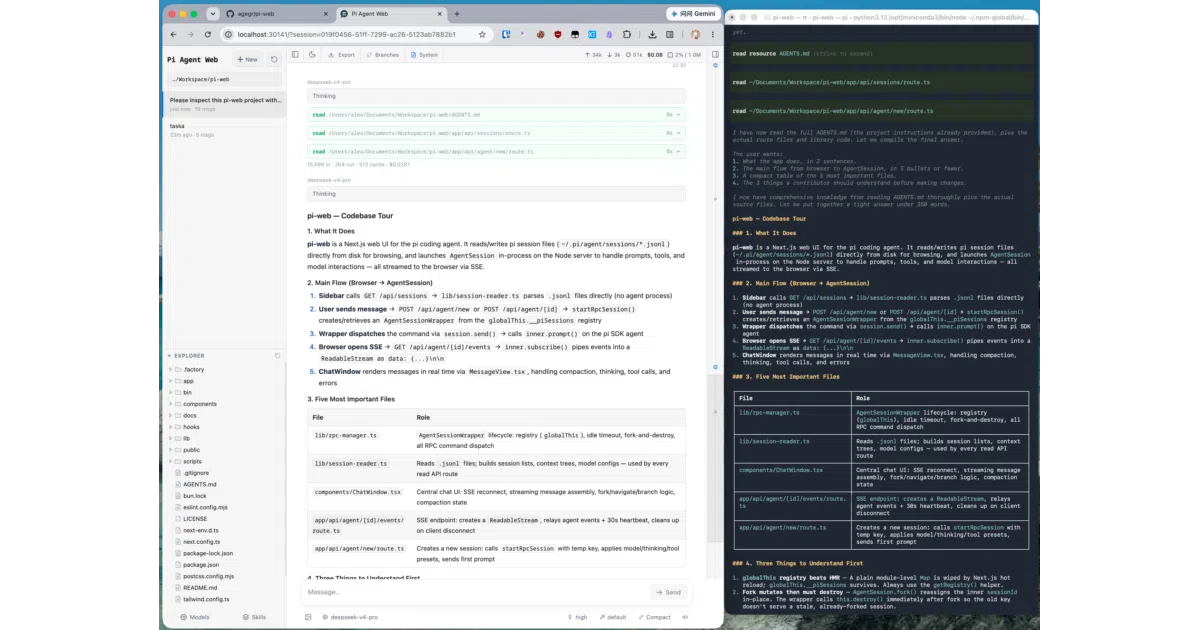
The project is a local web UI that reads the pi agent’s session files and renders them into a browser-based workspace. It does not replace the agent; it reveals it. Where the terminal shows a linear stream of text, pi-web reconstructs structured tool calls, browsable project histories, and side-by-side file previews. The README’s opening screenshot makes the value obvious: the same pi session shown in a terminal and in the browser, with the latter rendering structured Markdown, tool calls, and project navigation. The terminal is not wrong; it is just incomplete.
This matters because the agent itself—pi-mono—is designed to operate headlessly. Its sessions are stored as timestamped JSONL files under ~/.pi/agent/sessions, organized by an encoded working-directory hash. Left alone, these files are opaque. agegr/pi-web parses them, forks them, and visualizes their branches. In a landscape where developers are increasingly wary of subscription IDEs that own the stack, a local UI that sits atop an open agent feels like a credible escape hatch.
Parsing the Archaeology of a Session
The most technically interesting part of agegr/pi-web is not the chat interface; it is the session reconstruction engine. The application must make sense of pi-mono’s disk format: newline-delimited JSON objects scattered across directories named after encoded paths, with timestamps and UUIDs baked into filenames. The session-reader.ts module handles this archaeology, parsing .jsonl files and reconstructing branch contexts so that the UI can present a tree of conversations rather than a flat log.
This is harder than it looks. The agent supports forking. A user can continue from an earlier message or split a session into a separate route, and the UI must distinguish between a new .jsonl file on disk and an internal branch within the same file. The README calls this “Forks vs in-session branches,” and the distinction is meaningful: one creates a new file, the other mutates the existing transcript. The UI must track both without confusing the user.
The lib/ directory reads like the index of a reverse-engineering project. normalize.ts exists because the agent’s output format—specifically tool call field names—has likely evolved or varied. file-paths.ts handles path encoding and relative path helpers. pi-types.ts maintains the TypeScript contract with the agent. Rather than passing raw agent output to the frontend, pi-web sanitizes it. An rpc-manager.ts maintains a global registry of AgentSessionWrapper instances, coordinating lifecycle events and exposing them as Server-Sent Events to the Next.js frontend. The frontend hooks confirm the complexity: useAgentSession.ts manages not just message loading but command sending and an SSE state machine. The chat window is not polling an API; it is subscribing to a living process.
The frontend rendering stack is equally deliberate. Markdown is processed with plugins for Mermaid diagrams and KaTeX math. Tool calls are not dumped as raw JSON; they are structured. The MessageView component handles thinking traces, tool results, and image drag-and-drop. This is not a generic LLM frontend bolted onto a coding tool. It is a domain-specific visualizer for a particular agent’s output dialect.
A Control Plane, Not a Chatbot Skin
Where agegr/pi-web distinguishes itself from a simple “ChatGPT in a box” implementation is in its workspace integration. The AppShell manages URL state, top panels, and file tabs. The SessionSidebar offers a project selector, session tree, and file Explorer. The FileViewer previews not just source code, but diffs, images, audio, PDFs, and DOCX files. This turns the browser into a supervisory dashboard rather than a mere messaging client.
The Git worktree integration is a telling detail. The sidebar can switch worktrees, and new sessions follow the checkout you choose. This acknowledges a reality of agentic development: the agent is not just chatting about code; it is operating on a repository that may have multiple active branches or experimental worktrees. The UI meets the developer where they actually work, not in an abstracted chat context.
Configuration is also pulled out of the terminal. Model lists, defaults, thinking levels, and API keys are managed through a web panel that reads and writes models.json in the agent directory. Skills—modular capabilities that extend the agent—can be installed, enabled, or disabled from the same interface. Context usage, cost estimates, and compaction state sit in the top bar. The terminal-only user might scoff at the convenience, but removing friction from model switching and key management is exactly what makes an open-source agent competitive with its closed-source rivals.
The file-access.ts module enforces a safety boundary. File browsing and preview are scoped to the selected project directory and the working directories that appear in session metadata. This matters because an agent with shell access can wander; the UI deliberately refuses to let the browser become an unscoped file manager. Unlike the AI-native IDEs listed in the awesome-ai-devtools roundup—Cursor and Windsurf, both forked from VSCodium—agegr/pi-web does not try to be the editor. It assumes you already have one. It sits beside your terminal and your IDE, offering a supervisory layer for the agent itself.
Local-First in an Ecosystem Going Remote
The pi-web name is not unique to this repository. The ecosystem has sprouted multiple implementations, each with different deployment postures. Epsilondelta-ai/pi-web bundles a Go backend and Astro frontend into a single binary, supports internationalization across nine languages, and leans toward broader deployment. The pi-web.dev project pushes a “remote-first” philosophy, arguing that agentic development should happen on persistent server-side workspaces where the laptop is merely a “window, not the workstation.”
agegr/pi-web takes the opposite stance. It is explicitly local. It binds to a localhost port and reads directly from the user’s home directory. There is no server binary, no systemd service, no remote tunnel. This positions it as the zero-config, single-developer entry point. You point it at your existing pi sessions and open a browser tab. The trade-off is clear: you cannot close your laptop and expect the agent to keep running in the cloud. But you also do not need to configure a VPS, manage secrets on a remote box, or trust a hosted service with your codebase.
In the taxonomy of AI developer tools—where curated lists separate “Terminal Agents” from “Web-Based Tools” and “AI-Native IDEs”—agegr/pi-web occupies the liminal space between the first two categories. It is a web-based tool that serves a terminal agent. That hybrid identity is its value proposition. It gives the agent a visual cortex without forcing it into a cloud-native body. The pi-web.dev project argues that local-only development becomes the blocker when one device owns the tools, terminals, build cache, and agent runtime. agegr/pi-web partially answers this by making the interface accessible from any browser on the local network, but it stops short of full remote persistence. It is a local server, not a cloud workspace.
The Honest Limits of an Interface Layer
It would be generous to call agegr/pi-web anything more than what it is: a well-architected interface layer. It contains no LLM logic of its own. It does not train models, fine-tune prompts, or deploy applications. It is tightly coupled to pi-mono’s session format, and if that format shifts, the parser must shift with it. The file access is deliberately scoped to the project directory and working directories that appear in sessions—a necessary sandbox, but one that reminds you the UI is a guest in the agent’s house.
The project is also a Next.js application, which means it brings the entire Node.js and React runtime along for the ride. For a tool that fundamentally reads JSONL files and streams text, this is not the lightest possible stack. The README even warns developers to avoid production builds during local development because the build output can interfere with the dev server. These are small rough edges, but they betray the reality that this is a web developer’s solution to an agent interface problem. A leaner stack might boot faster, but it would not offer the component ecosystem that makes the file previews and drag-and-drop interactions trivial to implement.
The Bigger Picture
The broader trend is unmistakable. Chrome DevTools is integrating Gemini directly into the browser for debugging and styling assistance. Replit Agent is building full-stack applications through chat in a web playground. The open-source community, meanwhile, is trying to keep pace without surrendering ownership of the toolchain. agegr/pi-web is part of that rearguard action. It asserts that the session data belongs on your disk, in plain JSONL, and that the interface should be a local server you control.
The open-source agent ecosystem is racing to close the interface gap with proprietary tools. agegr/pi-web is not the finish line, but it is a credible checkpoint. It proves that an open agent does not need to surrender the visual workspace to closed IDEs. It only needs a local port, a browser tab, and a willingness to parse some JSONL. Whether this local-first model survives depends on how quickly agentic development moves toward persistent, multi-device orchestration. For now, it offers something equally important: immediacy. It is the fastest way to give a terminal agent the visual literacy that users have come to expect from Cursor or Copilot. In a field obsessed with scale and persistence, there is still room for a tool that simply opens a port on your machine and says, here is what your agent has been doing.
Sources
- Best AI Coding Agents Summer 2025 - Medium
- DevTools Get started AI assistance - Chrome for Developers
- PI WEB — web UI for Pi Coding Agent
- steel-dev/awesome-web-agents
- Things to do with DevTools AI assistance
- Epsilondelta-ai/pi-web: A web UI for viewing ...
- Free AI Coding Agent That Replaces Paid Tools Like Cursor
- Introducing AI Assistance in Chrome DevTools
- PI Web API
- AI Coding Agent: Build Apps Through Chat
- Awesome AI-Powered Developer Tools
- ZEISS PiWeb | Quality Data Management