QingYunA/answer-me-with-html · 07 Oct 2026 · Feature
The Cheapest Way to Make an Agent Draw

Samantha Lowe
Staff Writer
Answer me with HTML splits the labor: the model writes content, a bundled CLI does the layout — and the waiting time collapses while the bill stays the same.
QingYunA/answer-me-with-html
★1.8k stars
Somewhere between the chatbot and the agent, a problem snuck up on everyone: output. Not output quality — output volume. When a model writes code, you review it. When a model answers a hard question, you read it. And as Andrej Karpathy observed in a post late last year, as LLMs do more of the work, keeping up with what they produce becomes the hard part. A wall of text explaining the TCP handshake is technically complete and practically unreadable. A page with a sequence diagram, a state diagram, and a flag table is something you absorb in thirty seconds.
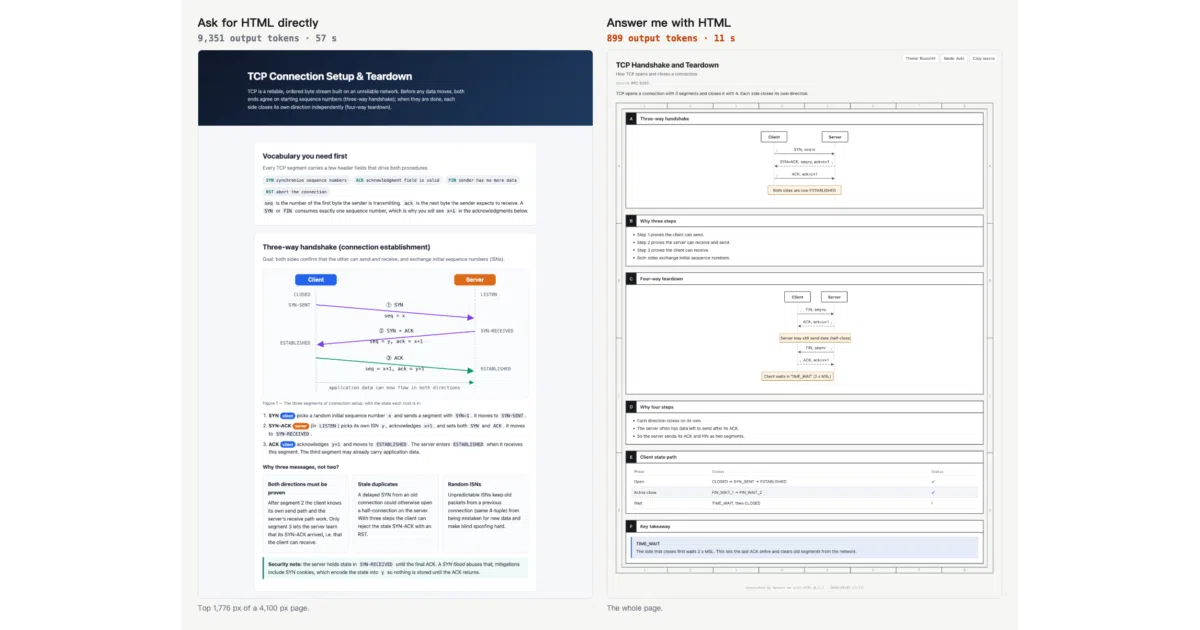
The obvious fix — just ask the model for HTML — works better than you’d expect. Models write decent HTML now. The problem is the bill, and more acutely, the wait. Every line of CSS, every wrapper div, every SVG coordinate is an output token, and output tokens are the ones you sit and watch stream in. A decent page takes a minute or two to generate, most of it spent on hundreds of lines of CSS that are nearly identical every single time. Diagrams are worse: the model has to compute SVG coordinates by hand, and the arrows often point at nothing in particular.
Answer me with HTML, a skill by QingYunA, takes that work away from the model entirely. The model writes a short Markdown draft — content, structure, a few diagram descriptions — and hands it to a CLI bundled inside the skill. About 50 milliseconds later, there’s a page. The division of labor is the whole idea: the model does the part it’s good at (knowing things, choosing what matters), and deterministic code does the part it’s bad at (layout, color, geometry).
The token arithmetic
The README’s benchmark is small but honest about being small: three topics, three runs each, medians, one model (Claude Sonnet 5.5). Asking for HTML directly cost a median of 6,873 output tokens and 46 seconds. Using the skill cost 923 tokens and 13 seconds. That’s 7.4× fewer tokens and 3.6× faster.
The interesting number is the one that didn’t move: cost per answer was $0.22 the plain way and $0.26 with the skill. Roughly the same, slightly worse. The README explains why without flinching — the skill adds two short turns (loading the skill, running the CLI), and every turn re-reads the conversation context. Input tokens eat the savings from output tokens. You save the waiting, not the bill.
That candor is worth pausing on, because it reframes what the skill is for. This isn’t a cost-optimization tool. It’s a latency and legibility tool. If your pain is watching a model type CSS for ninety seconds, this fixes it. If your pain is the invoice, this doesn’t — and the project says so on its own front page, which is rarer than it should be.
What the model actually writes
The draft format is the quiet design achievement here. The model doesn’t write HTML at all. It writes Markdown with a small frontmatter block and a handful of domain-specific components: sequence for message flows, flow for architecture and call chains, tree for folders and taxonomies, timeline for history, annot for word-by-word notes on a sentence, plus tables, callouts, and key-value blocks. Each ## heading becomes a panel; attributes control span and height.
The CLI then does the work that used to burn tokens. It picks the template, places the panels on a grid, applies one of two themes, lays out flow charts with dagre — the same graph layout library that powers a lot of the diagramming you’ve already seen — and spaces sequence diagrams by label width. Coordinates are computed, not guessed. Labels don’t get cut off. There are no gaps in the grid, and no arrows pointing at empty air.
This is the boring part, and it’s where the value lives. Layout is a solved problem with decades of tooling behind it; asking a language model to do it by typing coordinates is using a calculator as a hammer. The skill’s insight is that “the model writes the content, the CLI handles the drawing” isn’t a compromise — it’s the correct architecture. It also has a nice failure mode: when a draft has an error, the CLI returns the line number, the component, and a correct example, and the agent fixes it in one try. The feedback loop is tight because the validator is deterministic.
The pages themselves are single .html files with no CDN links and no web fonts. They open offline, they’re easy to share, and each one embeds the Markdown that produced it — click a button and you get the source back. That last detail sounds minor and isn’t: it means every page is regenerable and auditable, not a dead artifact.
A writing check borrowed from aviation
The strangest and most charming feature is the STE writing check. ASD-STE100 is a controlled form of English originally developed for aircraft maintenance manuals — the genre where “the reader misreads a sentence and the plane doesn’t take off” is a real design constraint. Its rules are concrete: keep sentences short, give each word one meaning, write steps as commands. Karpathy noted that asking an LLM to follow these rules makes its output dramatically easier to read.
The skill turns the machine-checkable parts into an English and Chinese rule set and runs it on every render: sentence-length caps (20 words for steps, 25 for descriptions, in English; character-based limits for Chinese), a preference for common words (“use” over “utilize”), flags for passive voice, three or more 的 in one Chinese sentence, and stock corporate phrases like 赋能 and 闭环. It warns by default and refuses to render only if you ask for strict mode. There’s even a pragmatic hack for Japanese: a draft with kana gets Japanese buttons and lang="ja", with only the length rules applied.
This is a linting mindset applied to prose, and it’s the kind of thing that only makes sense once you accept the premise that agent output is a build artifact, not a conversation. Aircraft-maintenance English turns out to be a surprisingly good register for machines that tend to pad.
The video ladder
Karpathy’s ladder for understanding LLM output ends with explainer videos, and the skill climbs that rung too. Ask for a 3Blue1Brown-style video and the agent writes the same kind of draft, plus one line of narration per beat. The CLI turns it into a player page where the Nth line of narration plays as the Nth step of the diagram appears, arrows draw themselves, and a bracketed node name in the narration — [Server] — pushes the camera toward that node and highlights it. Nodes with the same name glide between scenes instead of cutting.
The economics stay absurdly good: the example draft is 1.3 KB, a few hundred output tokens, and rendering takes under a second without voice. Narration uses ElevenLabs if you have a key, the system voice otherwise, and captions if neither exists. There’s also a local-voice path that talks to any OpenAI-compatible speech endpoint — the README names mlx-audio with Qwen3-TTS as an example — with a sanity check that regenerates clips whose duration doesn’t match their text. The whole thing plays offline as one file, and an MP4 export exists if you have Chrome, ffmpeg, and patience (about 1.3× the video’s length).
It’s a genuinely clever format — narration-synced diagram animation is the thing that makes 3Blue1Brown work, and getting it from a few hundred tokens of draft is the same trick as the pages, applied to time instead of space.
A crowded shelf
The idea is in the air. ThariqS’s html-effectiveness gallery made the rounds arguing for “the unreasonable effectiveness of HTML” as an agent output format, and it has already been packaged into skills: GoDiao’s show-html ships 24 magazine-quality reference pages across 12 categories that an agent reads as a style library before generating HTML from scratch. Nico Bailon’s visual-explainer is a closely parallel project — an agent skill that generates rich interactive explainers, actively maintained, with recent work on packaging it as an Agent Plugins 1.0.0 plugin and making video dependencies optional.
The difference is architectural. show-html teaches the model to imitate good examples — which means the model still writes all the HTML, and you still pay for every token of it. Answer me with HTML moves the rendering out of the model entirely. The first approach bets on models getting cheaper and better at front-end work; the second bets that they never need to be good at it at all. Both bets may pay off, but they’re different bets, and the second one is the one that changes the cost curve today.
There’s also a broader context worth naming. The web-dev world is currently absorbed in making sites legible to agents — web.dev’s guide to agent-friendly websites is all about semantic HTML, accessibility trees, and WebMCP annotations so visiting agents can parse your pages. This skill runs the pipeline in the other direction: making agent output legible to humans, using the same substrate. HTML is turning into the universal interchange format in both directions, which is a strange vindication for a 30-something-year-old markup language.
And the skills ecosystem itself is maturing fast. Practitioners like Matt Pocock now build careers around encoding process into skills — his argument being that agents have no memory, so strict, well-defined processes are the only way to get consistent work out of them. Answer me with HTML fits that thesis neatly: it’s a skill that encodes not just a process but a rendering contract, and it installs across Claude Code, Codex, Cursor, and OpenCode through the vercel-labs/skills installer, which supports over 70 agents.
The rough edges
The benchmark is three topics. It’s transparent about methodology and ships a reproduction script, but three topics on one model is a pilot study, not a paper. The cost-parity result may also shift with pricing models that weight input and output differently — the skill’s economics depend on the ratio between them, and that ratio is a moving target.
The always-on mode — a ~90-token reminder each turn that makes the agent attach a small page to every conclusion — is the feature most likely to divide users. It’s opt-in, pausable, and it skips casual chat, but “a page with every conclusion” is a habit that could easily become noise, and the project seems aware of it: pages made this way never pop open, and Claude Code suppresses them in plan mode.
Housekeeping details are handled with unusual care for a small project: a weekly version check that downloads only a version number and never auto-updates, a cleanup prompt when the pages directory passes 200 MB, and a refusal to delete anything without confirmation. Symlinked folders are skipped rather than followed — the kind of edge case that suggests someone actually uses this daily.
What it displaces
The deepest thing here isn’t the pages or the videos. It’s the argument about where the boundary should sit between what a model generates and what code computes. For a couple of years, the default answer has been “the model writes it all” — convenient, flexible, and slow. Answer me with HTML is one of the cleaner articulations of the counter-position: give the model a compact, expressive input format and let boring, fast, deterministic software produce the artifact.
It’s the same shape as a compiler, and that’s not a coincidence. The model is the programmer; the draft is the source; the page is the binary. And like any good compiler, it makes the source smaller than the output by an order of magnitude — 923 tokens in, a page out. The open question is whether this pattern generalizes beyond explainers: how much of what agents currently hand-write — reports, slides, dashboards, the whole output genre — is really just uncompiled markup waiting for its toolchain. If the answer is “most of it,” projects like this one are early examples of a category, not a one-off.
Sources
- nicobailon/visual-explainer: Agent skill that generates rich ...
- Optimizing Your Web Content for AI Agents!
- an agent skill that answers hard questions with a one-page ...
- show-html - AI Agents on GitHub
- Build agent-friendly websites
- Introduction to HTML
- a skills framework for creating interactive HTML explainers ...
- AI Agents: What They Are, How They Work, and Why Web ...
- Where do you write in html? : r/learnprogramming
- 5 Agent Skills I Use Every Day
- A new approach to building websites with AI agents
- 🚀 I Built My First Web Page with HTML — Here's What I ...