AlexsJones/llmfit · 20 Aug 2026 · Feature
A Terminal Constraint Solver for the Local LLM Arms Race

Conor Walsh
Staff Writer
It probes your actual hardware and scores hundreds of quantized models by fit, not hype, because local LLM deployment is a memory-bandwidth math problem dressed up as shopping.
AlexsJones/llmfit
★37.7k stars Velocity · 7d +43 ★/day →steady
star history
The Guessing Game Nobody Wanted
The open-weight ecosystem has reached a density where discovery is no longer the bottleneck. Between Meta’s Llama variants, DeepSeek’s MoE architectures, Qwen’s coding specialists, and Google’s Gemma releases, the HuggingFace hub is a firehose of checkpoints. Each ships in multiple quantizations—Q4_K_M, Q8_0, MLX 4-bit—and the practical question has shifted from “which model is best?” to “which model will even fit?” Web-based hardware calculators like Run This LLM let users manually dial in GPU tiers and RAM sizes to see theoretical compatibility, but they rely on self-reported specs and browser fingerprinting. A Hacker News discussion of a similar web tool highlighted the gap: native code can inspect the machine directly, while websites approximate. That distinction is where llmfit stakes its claim. It treats model selection as a constraint-satisfaction problem to be solved, not a shopping list to be eyeballed.
A Constraint Solver in Disguise
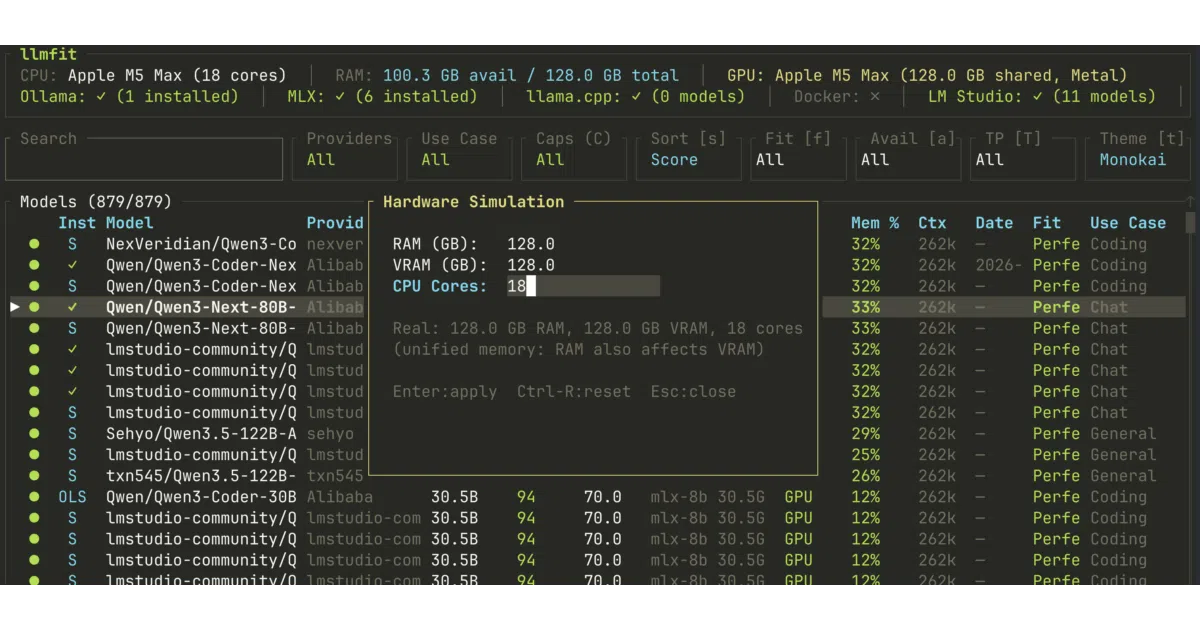
At its core, llmfit is a hardware probe attached to a curated model database and a multi-dimensional scoring heuristic. It detects system RAM, CPU cores, and GPU VRAM through native interfaces—querying NVIDIA cards through the nvidia-smi utility, AMD through rocm-smi, and Apple Silicon unified memory through system_profiler—and compares those real constraints against an embedded catalog of hundreds of models sourced from the HuggingFace API. The technical insight grounding the tool is that local inference is governed by memory bandwidth, not raw compute. Token generation requires reading the full model weights from VRAM once per token. llmfit estimates throughput by dividing a GPU’s known memory bandwidth by the model’s size in gigabytes, then applying an efficiency factor to account for kernel overhead and KV-cache reads. For GPUs it does not recognize, it falls back to backend-specific constants derived from published llama.cpp benchmarks.
The more interesting logic is dynamic quantization. Rather than assuming a fixed bit depth, the tool walks a hierarchy from Q8_0 down to Q2_K, selecting the highest-fidelity quantization that still leaves headroom for the target context window. If the model cannot fit at full context, it retries at half context. This matters because quantization is not merely about storage; it directly affects quality. As detailed in comparisons of GGUF and MLX formats, mixed-precision schemes like Q4_K_M preserve attention-layer accuracy better than uniform 4-bit approaches, particularly on smaller models below eight billion parameters. llmfit’s hierarchy implicitly encodes these trade-offs by preferring higher-quality quants when memory permits.
The scoring itself spans four dimensions: quality, speed, fit, and context. Quality weights parameter count and family reputation. Speed uses the bandwidth-derived token estimate. Fit measures memory utilization efficiency, targeting the fifty to eighty percent sweet spot. Context compares the model’s window against the use-case target. These dimensions are combined into a weighted composite score that shifts by category; chat workloads prioritize speed, while reasoning tasks weight quality higher. The result is a ranked list that answers the user’s actual question: not “is this a good model?” but “will this model run well on my specific hardware?”
Mixture-of-Experts support adds another layer of precision. Models like Mixtral 8x7B advertise 46.7 billion total parameters, but only activate roughly 12.9 billion per token. llmfit accounts for this by calculating effective VRAM requirements with expert offloading, reducing the estimated footprint from nearly 24 GB to roughly 6.6 GB. Without this, MoE models would be filtered out on hardware that can actually run them.
Estimates vs. Reality
The gap between theoretical throughput and wall-clock latency is the persistent headache of local inference. Tokens-per-second counters measure decode speed, not prefill—the time spent processing a prompt before the first token appears. For agent workloads that stuff tool outputs and file chunks into every turn, prefill dominates, yet the streaming counter never captures it. One analysis of GGUF versus MLX on Apple Silicon found that while MLX often posts higher decode tok/s, GGUF sometimes finishes real tasks faster due to more mature prompt caching and FlashAttention implementations.
llmfit attempts to bridge this gap in two ways. First, an advanced configuration panel lets users tune the efficiency factor and per-mode speed multipliers—pure GPU, CPU offload, CPU-only, tensor-parallel, and MoE switching—addressing prior overestimation issues for specific models. Second, and more significantly, it integrates a community leaderboard sourced from localmaxxing.com, displaying measured tok/s, time-to-first-token, and peak VRAM from users with identical hardware. This crowdsourced telemetry acts as a reality check against the bandwidth-based formula, letting users see whether a theoretical good fit actually performs in practice. A built-in inference bench runs live benchmarks against local providers—Ollama, vLLM, MLX—caching results for direct comparison.
The tool also navigates the platform wars between GGUF and MLX without forcing the user to become a format theologian. GGUF is the portable container format supported by llama.cpp, Ollama, and LM Studio across every platform including Raspberry Pi. MLX is Apple Silicon-only but can offer fifteen to forty percent better throughput on small models where framework overhead matters. llmfit auto-detects the acceleration backend—CUDA, Metal, ROCm—and maps models to compatible runtimes, effectively treating format selection as another hardware-dependent constraint rather than a user-facing dilemma.
The Native Advantage
There is a subtle but important difference between llmfit and web-based hardware requirement calculators. The latter ask you to select a GPU from a dropdown and estimate VRAM; llmfit queries the driver directly. As one Hacker News user observed, it accurately identified their GPU and specifications without requesting permissions, simply because userspace hardware queries are available to native code in ways that browser APIs approximate through fingerprinting. This makes it genuinely useful for the “I already have this laptop, now what?” scenario, whereas web tools excel at the “I am buying hardware, what should I get?” question.
Beyond detection, llmfit functions as a lightweight control plane. It integrates with five local runtime providers—Ollama, llama.cpp, MLX, Docker Model Runner, and LM Studio—detecting installed models and triggering downloads directly from the terminal interface. A plan mode inverts the usual query: instead of asking what fits available hardware, it estimates the RAM, VRAM, and CPU cores required to run a specific model configuration at a target context length and speed. For administrators, a serve mode exposes a REST API that returns top runnable models for a node, complete with fit levels and sorting parameters, turning the tool into a hardware-aware scheduler for clusters.
Limits and Rough Edges
The project is not without friction. The model database is baked into the binary at compile time, meaning end users refresh the catalog by upgrading the application rather than downloading a data file. On Android and Termux environments, GPU autodetection is not currently supported; mobile GPUs like Adreno are invisible through the desktop probing interfaces, forcing manual memory overrides if users want recommendations at all. And while the speed estimation formula is grounded in memory bandwidth physics, it remains an estimate—tunable, but still vulnerable to the overhead of real-world inference stacks.
Where It Fits
llmfit occupies a narrow but valuable niche between a web calculator and a model server. It is not a runtime, nor is it a training framework. It is, essentially, a decision-support system for the local inference crowd: a way to stop guessing whether a quantized Qwen2.5-Coder will fit into a sixteen-gigabyte VRAM budget alongside the KV cache for an eight-thousand-token context window. By combining native hardware introspection, dynamic quantization logic, MoE-aware memory math, and real-world benchmark telemetry, it turns model selection from a shopping exercise into a solved constraint. For a community that spends as much time debating hardware requirements as it does fine-tuning prompts, that is a welcome piece of infrastructure.
Sources
- What to Buy for Local LLMs (April 2026) | by Julien Simon | Medium
- MLX vs GGUF: Ultimate Comparison - YouTube
- llmfit: Right-sizes LLM models to your system's RAM, CPU ...
- PSA: Local LLM Hardware Requirements : r/homeassistant
- Recommended GGUF files for Android? And their uses? - Reddit
- LLmFit - One command to find what model runs on your ...
- Search Local LLM Hardware Requirements — Run This LLM
- GGUF vs MLX: A Decision Guide, Not Another Benchmark - Muhammad
- llmfit - A terminal tool that finds what LLM models can run ...
- Local LLM Hardware Requirements in 2026 | AI Hub - Overchat AI
- GGUF vs MLX Quantization Formats on Apple Silicon - Contra Collective
- Is this just llmfit but a web version of it? https://github.com ...