AlexsJones/llmfit
Before you download another 40GB model, check your fit
A terminal tool that scores hundreds of local LLMs against your actual hardware so you stop downloading models that won't fit.
Feature · 20 Aug 2026
A Terminal Constraint Solver for the Local LLM Arms Race
It probes your actual hardware and scores hundreds of quantized models by fit, not hype, because local LLM deployment is a memory-bandwidth math problem dressed up as shopping.
Read the in-depth article →
Velocity · 7d
+59
★ / day
Trend
↗accelerating
star history
What it does
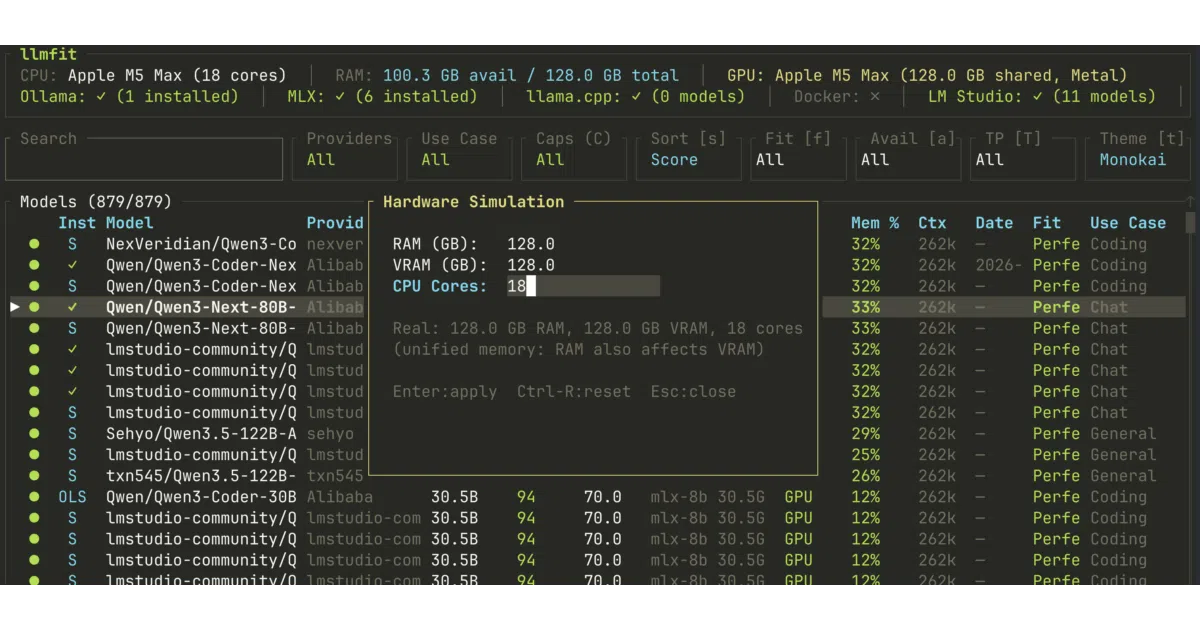
llmfit is a Rust-based terminal utility that inspects your machine’s RAM, CPU, and GPU, then compares those specs against a catalog of hundreds of local models. It returns a composite score for each model across quality, speed, memory fit, and context length, and suggests the best quantization level and run mode. The default interface is an interactive TUI, though a classic CLI mode is available for scripting.
The interesting bit
The tool flips the usual “download and pray” workflow. A Plan mode inverts the problem: pick a model and it tells you what hardware you would need to hit a target token-per-second speed. More unusually, it aggregates real-world performance measurements from a community leaderboard spanning 27+ hardware presets, so you can compare estimates against actual user benchmarks before you buy or build.
Key highlights
- Auto-detects multi-GPU, MoE architectures, and mixed CPU/GPU setups
- Ranks models by fit categories: Perfect, Good, Marginal, or Runnable
- Vim-inspired TUI with Normal, Visual, and Select modes for bulk comparison and column-based filtering
- Integrates with local runtimes including Ollama, llama.cpp, MLX, LM Studio, and Docker Model Runner
- Community leaderboard powered by localmaxxing.com with measured tok/s, TTFT, and VRAM across presets from Apple M1 to RTX 5090
Verdict
Worth a look if you maintain a local model zoo or are sizing a new rig. Probably overkill if you only ever run one small model via a single chat app.
Frequently asked
- What is AlexsJones/llmfit?
- A terminal tool that scores hundreds of local LLMs against your actual hardware so you stop downloading models that won't fit.
- Is llmfit open source?
- Yes — AlexsJones/llmfit is open source, released under the MIT license.
- What language is llmfit written in?
- AlexsJones/llmfit is primarily written in Rust.
- How popular is llmfit?
- AlexsJones/llmfit has 38.4k stars on GitHub and is currently accelerating.
- Where can I find llmfit?
- AlexsJones/llmfit is on GitHub at https://github.com/AlexsJones/llmfit.