yazinsai/OpenOats
A meeting recorder that does one thing and leaves you alone
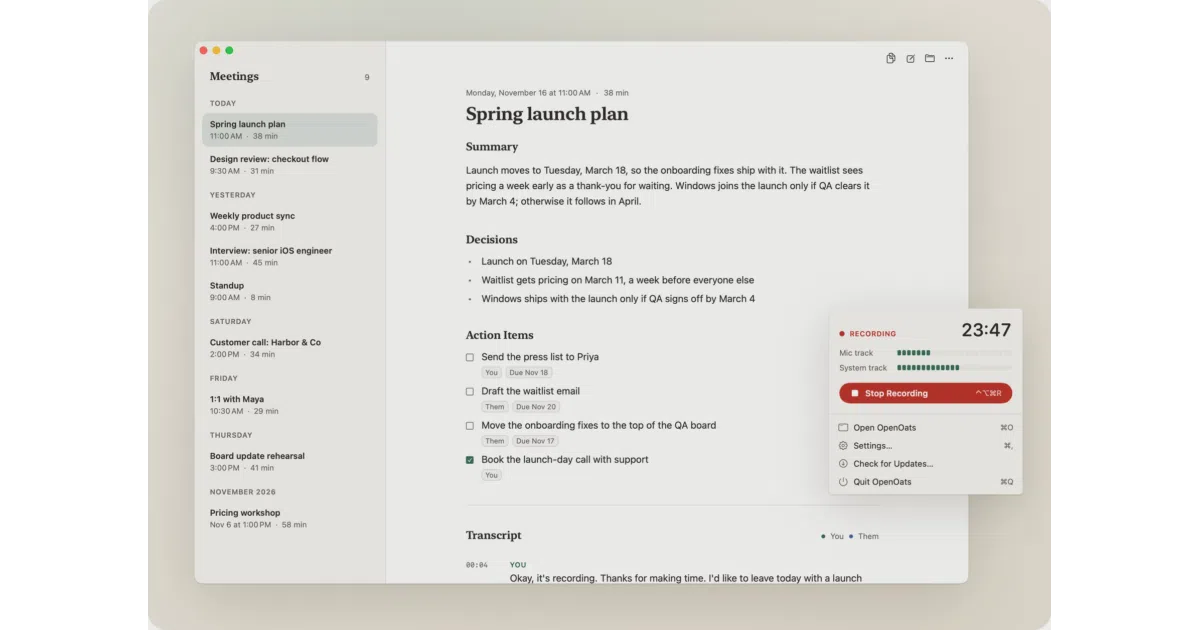
OpenOats records your call on your Mac, transcribes it on-device, and hands you a single markdown file — no bot, no account, no cloud.
Too new to rank. Velocity needs a few days of history.
star history
What it does OpenOats is a Mac menu bar app that records your microphone and your Mac’s audio as two separate tracks, so it works with Zoom, Meet, Teams, or anything that makes sound. Press Stop and it transcribes both tracks locally — an hour of audio in about a minute on Apple Silicon — then drops one markdown file in your notes folder: a summary with decisions and action items on top, a timestamped You/Them transcript below.
The interesting bit Speaker separation comes from the audio routing itself: your mic is You, your Mac’s audio is Them, and speaker echo gets filtered out. No diarization model guessing who’s talking — the wiring does the work. It’s also deliberately tiny: about 4,000 lines of Swift, after version 2.0 stripped out the live transcripts, knowledge base, and calendar integration that 1.x had accumulated.
Key highlights
- Fully on-device transcription: Parakeet v3 for 25 European languages, Whisper large-v3-turbo for the rest
- Crash-safe by design — audio flushes to disk every couple of seconds; their kill test lost 1.1 seconds
- Quiet while recording: under 2% of one CPU core, ~19 MB memory, models load only after Stop
- Notes are optional AI — plug in Ollama, LM Studio, OpenAI, Anthropic, etc.; the backend only ever sees text
- Output is plain markdown with Obsidian Dataview fields for action items; ships with an
oatsCLI for batch transcription
Caveats
- Apple Silicon only, macOS 14.2+ — Intel Macs are out
- 2.0 removed live transcription, suggestions, and calendar features from 1.x; if you used those, stay on the old branch
- Notes (summaries, action items) require you to configure an AI backend; the free no-key path gets you the transcript only
Verdict If you want meeting notes without a bot joining your call or your audio leaving your Mac, this is about as clean as it gets. If you need live captions or in-meeting assistance, look elsewhere — this app’s whole personality is doing nothing until you press Stop.
Frequently asked
- What is yazinsai/OpenOats?
- OpenOats records your call on your Mac, transcribes it on-device, and hands you a single markdown file — no bot, no account, no cloud.
- Is OpenOats open source?
- Yes — yazinsai/OpenOats is open source, released under the MIT license.
- What language is OpenOats written in?
- yazinsai/OpenOats is primarily written in Swift.
- How popular is OpenOats?
- yazinsai/OpenOats has 2.7k stars on GitHub.
- Where can I find OpenOats?
- yazinsai/OpenOats is on GitHub at https://github.com/yazinsai/OpenOats.