tianjiangqiji/nova-image-studio
A self-hosted AI image workbench where video support is pure JSON plugins
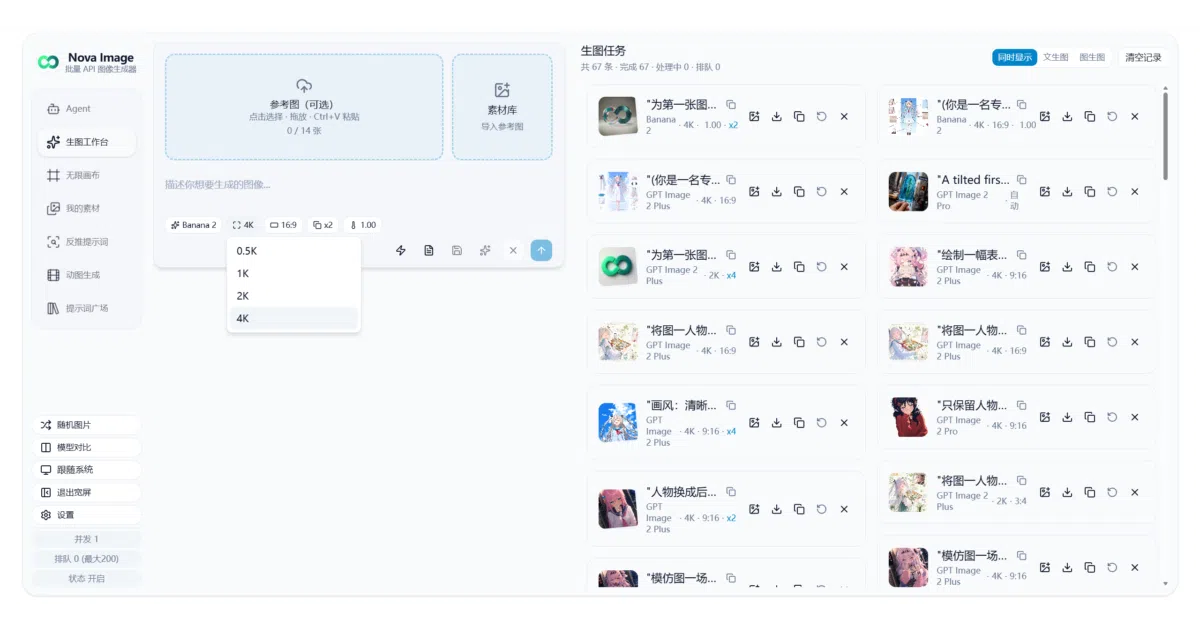
Nova Studio bundles seven generation modes behind your own API keys, and its video workbench knows nothing about any upstream — plugins do all the talking.
Too new to rank. Velocity needs a few days of history.
star history
What it does
Nova Studio is a self-hosted AI image and video generation workbench for individuals and small teams. The frontend is a Next.js 16 + React 19 static-export PWA; the backend is a deliberately small Node.js service (server.js, SQLite, WebSocket) that queues tasks and proxies generation APIs. You bring your own models — every image and text model gets its own protocol, API key, and base URL, with all client config living in browser localStorage.
The interesting bit
Video generation ships with zero upstream protocol in the host. Each plugin is three pure-JSON files (manifest.json, ui.schema.json, provider.json) — no executable code — declaring who to call, what to send, how to poll, and what the form looks like. Egress must be declared in permissions.hosts, private/loopback addresses are refused, and credentials stay in the browser, never the database. There’s even a doc (docs/plugins/LLM.md) designed to be pasted verbatim into an AI so it writes the plugin for you.
Key highlights
- Seven modes: text-to-image, image-to-image, Agent chat, UI design (mockup slicing + web reproduction), reverse prompt, GIF generation, and the plugin-driven video workbench
- UI design mode: AI slices a mockup, a multi-turn agent reproduces it as
index.html/styles.css/script.js, exports as ZIP, with context budgets enforced (warn at 140K tokens, refuse at 175K) - Task queue with server-side concurrency (default 50), WebSocket updates with HTTP polling fallback, 12-hour task TTL
- Four text protocols (OpenAI Responses/Chat, Anthropic, Gemini) with multi-turn tool calling
- Responsive layouts for desktop, tablet, and mobile; workspaces stored in IndexedDB with one-click backup
Caveats
- Brush-mask “AI fill” inpainting is broken in this release due to a render-ordering defect in the editor component
- UI design mode is wide-screen only; some image-editing features require an OpenAI-protocol model (Gemini and Grok lack a masked-edit equivalent)
- Plugin docs are written in Chinese; installing or removing plugins requires server access
Verdict
Worth a look if you want a bring-your-own-key generation workbench you fully control, especially one where adding a new video provider is a JSON file rather than a code change. Skip it if you want a turnkey hosted product or English-only documentation.
Frequently asked
- What is tianjiangqiji/nova-image-studio?
- Nova Studio bundles seven generation modes behind your own API keys, and its video workbench knows nothing about any upstream — plugins do all the talking.
- Is nova-image-studio open source?
- Yes — tianjiangqiji/nova-image-studio is open source, released under the AGPL-3.0 license.
- What language is nova-image-studio written in?
- tianjiangqiji/nova-image-studio is primarily written in TypeScript.
- How popular is nova-image-studio?
- tianjiangqiji/nova-image-studio has 515 stars on GitHub.
- Where can I find nova-image-studio?
- tianjiangqiji/nova-image-studio is on GitHub at https://github.com/tianjiangqiji/nova-image-studio.