pewdiepie-archdaemon/odysseus
Your own ChatGPT, but with shell access and a to-do list
A self-hosted AI workspace that bolts chat, agents, email triage, calendars, and deep research onto your own hardware.
Velocity · 7d
+8112
★ / day
Trend
→steady
star history
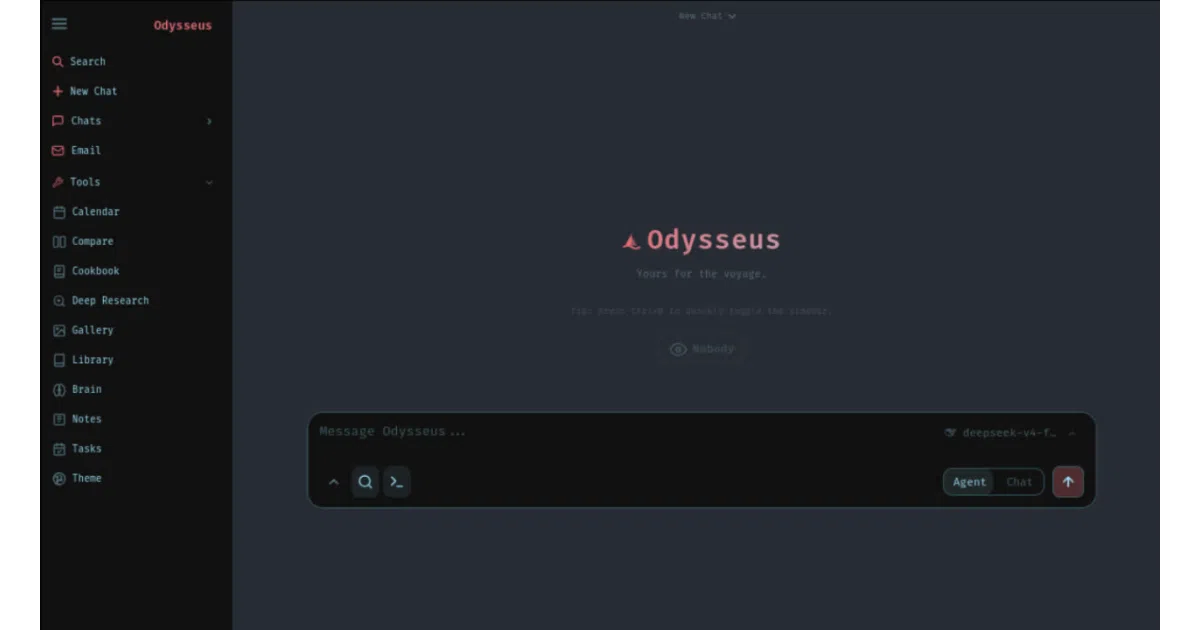
What it does Odysseus is a browser-based AI workspace you run yourself. It wraps chat, agentic task execution, document editing, email triage, notes, tasks, and calendar sync into one interface, with a “Cookbook” that scans your hardware and recommends downloadable models. Think of it as the open-source equivalent of paying for ChatGPT Plus, Claude Pro, and Notion simultaneously—except your data stays local and your GPU fans spin louder.
The interesting bit
The project doesn’t hide its jank; it leans into it. The README warns that GPU passthrough in Docker is finicky, that llama.cpp may still fail to find CUDA even when nvidia-smi works inside the container, and that macOS users should just run natively because Docker can’t see Metal. That honesty is refreshing, and the bundled tooling—ChromaDB for memory, SearXNG for search, ntfy for notifications—shows someone actually thought through the self-hosting stack rather than dumping a frontend on GitHub.
Key highlights
- Model-agnostic chat: plugs into vLLM, llama.cpp, Ollama, OpenRouter, or OpenAI via simple endpoint configuration.
- Agent with memory: built on opencode, supports MCP tools, web search, shell access, and persistent skills that evolve across sessions.
- Cookbook hardware scanner: uses llmfit to score model compatibility against your VRAM, then downloads and serves GGUF/FP8/AWQ weights with one click.
- Deep Research: multi-step source gathering and synthesis, adapted from Alibaba’s Tongyi DeepResearch pipeline.
- Blind model comparison: side-by-side evaluation where model identities are hidden to reduce bias.
- Email triage: IMAP/SMTP inbox with auto-tagging, urgency detection, spam filtering, and draft replies—CalDAV-aware for calendar context.
- PWA mobile support: responsive design with touch gestures, installable as a progressive web app.
Caveats
- GPU support is explicitly fragile: NVIDIA passthrough requires manual Container Toolkit installation and
.envedits; AMD/ROCm is even less automated. - Windows users cannot locally serve vLLM/SGLang without WSL2; native Windows is limited to Ollama or CPU inference.
- The security model is “admin console” level—shell access, file uploads, and API tokens mean a misconfigured instance is a very bad day waiting to happen.
Verdict Worth a look if you want one self-hosted interface for both AI work and personal productivity, and you’re comfortable babysitting Docker GPU overlays. Skip it if you need turnkey reliability or your hardware is a laptop without a discrete GPU.