perseval-BLR/NeuralScreen
DLSS 5 for everything on your desktop, not just games that pay for it
NeuralScreen routes your entire Windows screen through NVIDIA's DLSS 5 neural renderer in real time — upscaling, frame generation and all.
Collecting fresh signals — velocity needs a few days of history.
collecting data…
star history
What it does
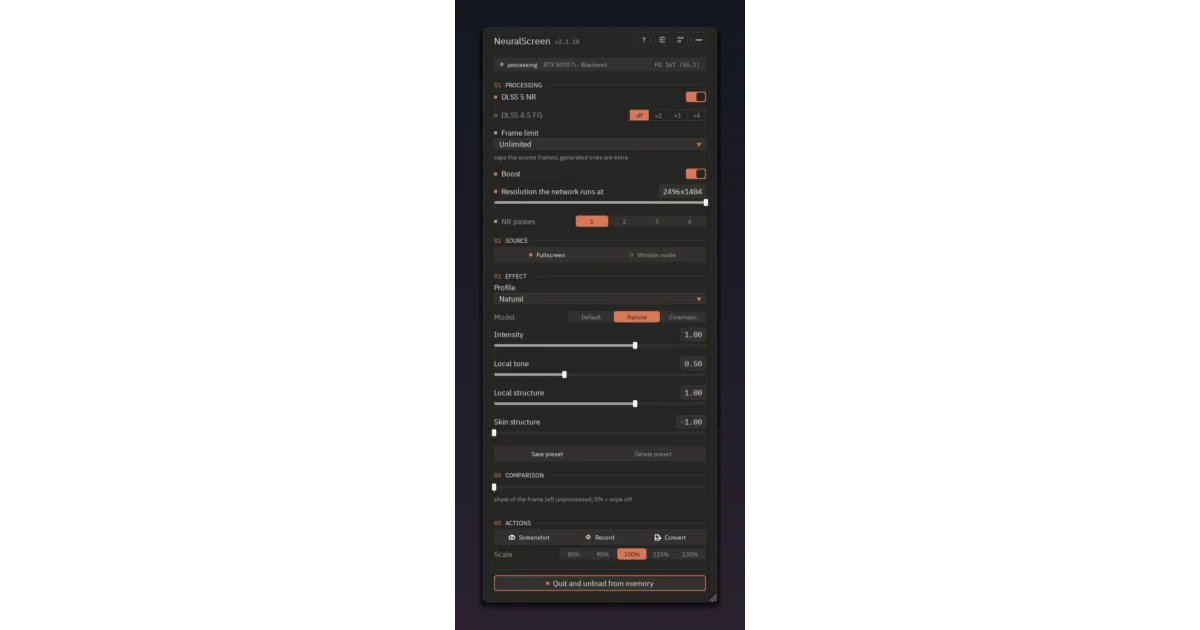
NeuralScreen is a tray-resident overlay that captures your whole Windows desktop — or a single window — runs it through the same DLSS 5 neural networks games use (nvngx_dlssnr.dll for neural rendering, nvngx_dlssg.dll for frame generation), and composites the result back over your screen. Games, video players, photos: everything gets the neural pass. It also records with audio via NVENC, takes screenshots, and can target just one window, following it as it moves and resizes.
The interesting bit
The bundled NR runtime is the leaked 310.8.0 DLSS build — NVIDIA’s property, shipped unmodified, research/educational use only, and the author openly invites rights holders to ask for its removal. Boost mode runs the network at reduced resolution and composes the result onto the original frame, so text and edges keep full native resolution; measured on a 5070 Ti at 4K, that’s 45.7 → 72.6 fps at the default step, 83.4 at the lowest. There’s also a before/after wipe slider that splits the screen so you can judge the effect yourself — a rare honest touch.
Key highlights
- Whole-desktop or single-window neural rendering, with the overlay following window moves and resizes
- Frame generation at ×2/×3/×4, with an honest dual fps readout (“47 / 111 fps”) and a visible refusal — not a silent off — on unsupported cards
- Boost mode: network at reduced resolution, composited onto the full-res original frame
- Three distinct models (Default, Natural, Cinematic) — different outputs, not different strengths; measured in TECHNICAL.md
- Spout2 output for OBS capture, 12 languages, user presets, dark-scene auto-brightening
Caveats
-
Hardware reality check: validated on RTX 50; RTX 40 is user-reported; RTX 30 neural rendering is unverified and frame generation is a known failure below Ada. Hybrid laptops and multi-GPU are experimental.
-
25–30 ms pipeline latency (10–15 with Boost) — fine interactively, not competitively; processing caps at 2560×1440 internally. True fullscreen games can’t be overlaid at all (borderless only), and HDR is experimental with SDR-only recording.
-
License is PolyForm Strict: noncommercial use only, and the whole thing rides on leaked NVIDIA DLLs — legally fuzzy by the author’s own admission.
Verdict
If you have an RTX 40/50 card and want to see what DLSS 5 does to your entire desktop — or upscale an old game that never got DLSS support — this is a fascinating, unusually well-documented experiment. Competitive online players and anyone needing a clean commercial license should stay away (the README says the anti-cheat part twice, and it means it).
Frequently asked
- What is perseval-BLR/NeuralScreen?
- NeuralScreen routes your entire Windows screen through NVIDIA's DLSS 5 neural renderer in real time — upscaling, frame generation and all.
- Is NeuralScreen open source?
- Yes — perseval-BLR/NeuralScreen is an open-source project tracked on heatdrop.
- What language is NeuralScreen written in?
- perseval-BLR/NeuralScreen is primarily written in Python.
- How popular is NeuralScreen?
- perseval-BLR/NeuralScreen has 1k stars on GitHub.
- Where can I find NeuralScreen?
- perseval-BLR/NeuralScreen is on GitHub at https://github.com/perseval-BLR/NeuralScreen.