mut-ex/gligen-gui
Draw bounding boxes, get exactly the cat you asked for
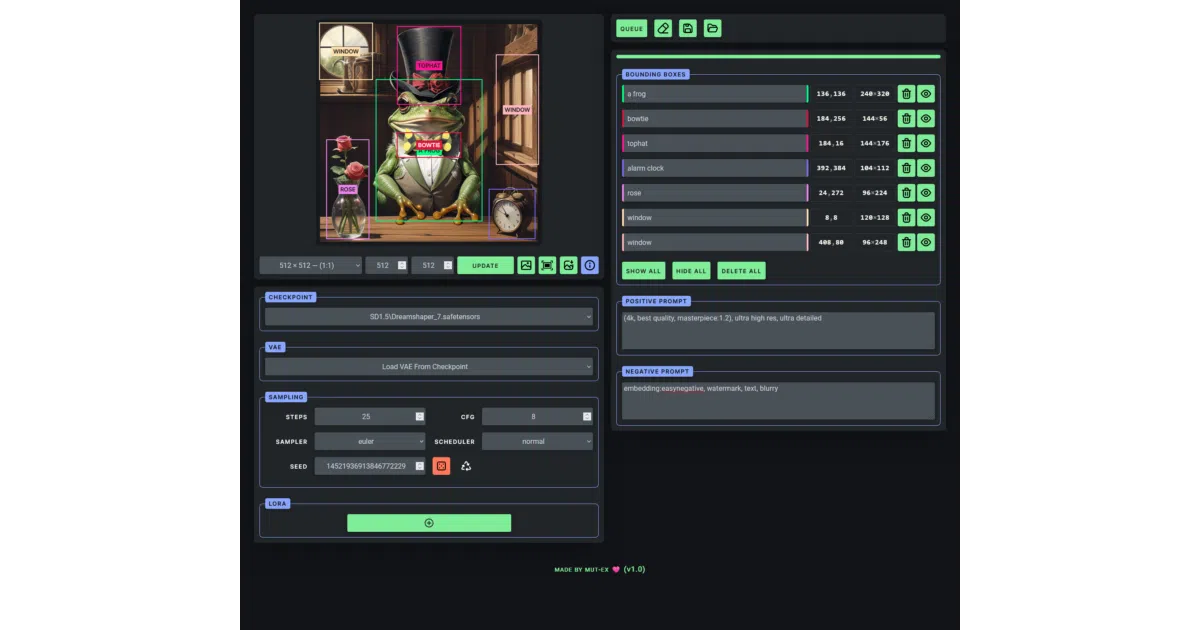
A browser frontend that makes GLIGEN's spatial image prompting feel less like CAD and more like MS Paint.
Not currently ranked — collecting fresh signals.
star history
What it does
GLIGEN lets you tell Stable Diffusion where objects go by drawing boxes on a canvas. This project wraps that capability in a Flask web app that talks to ComfyUI behind the scenes. You sketch grounding boxes, label them, add style prompts and LoRAs, then queue the job to your local ComfyUI instance.
The interesting bit
The whole thing is essentially a friendly skin over ComfyUI’s node graph. The author admits the positive prompt works better for style tags than scene description — a small but honest hint that the underlying model still has opinions about composition.
Key highlights
- Drag-and-draw bounding boxes with move/resize handles
- Save and reload sessions to file
- VAE and sampler selection exposed in the UI
- Aspect ratio presets added recently
- LoRA stacking with per-weight adjustment
- Requires ComfyUI running locally plus the GLIGEN safetensors model
Caveats
- Hardcoded to Stable Diffusion 1.5 checkpoints; no SDXL mentioned
- The “save the session the session” typo in the README suggests light proofreading
- Port wiring between Flask (5000) and ComfyUI (8188) is manual and easy to mismatch
Verdict
Worth a spin if you’re already running ComfyUI and tired of wiring GLIGEN nodes by hand. Skip it if you need SDXL support or a fully self-contained installer.
Frequently asked
- What is mut-ex/gligen-gui?
- A browser frontend that makes GLIGEN's spatial image prompting feel less like CAD and more like MS Paint.
- Is gligen-gui open source?
- Yes — mut-ex/gligen-gui is an open-source project tracked on heatdrop.
- What language is gligen-gui written in?
- mut-ex/gligen-gui is primarily written in JavaScript.
- How popular is gligen-gui?
- mut-ex/gligen-gui has 2k stars on GitHub.
- Where can I find gligen-gui?
- mut-ex/gligen-gui is on GitHub at https://github.com/mut-ex/gligen-gui.