microsoft/responsible-ai-toolbox
Microsoft's AI debugging dashboard stitches six open-source tools into one Jupyter widget
A Swiss-army-knife interface for model interpretability, fairness, error analysis, and causal inference—because responsible AI shouldn't require a dozen browser tabs.
Not currently ranked — collecting fresh signals.
star history
What it does
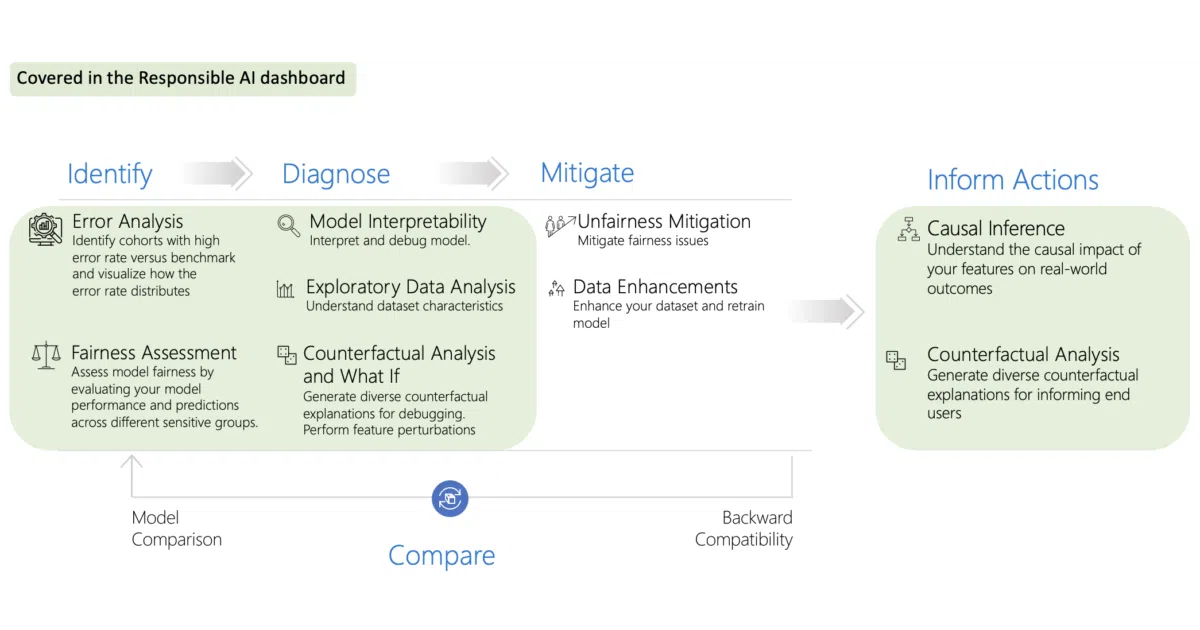
The Responsible AI Toolbox is a collection of Jupyter widgets and Python libraries that wrap existing open-source tools into a single interactive dashboard. You install it via pip install raiwidgets, then use it inside notebooks to explore model errors, check fairness across demographic cohorts, generate counterfactual explanations, and run causal analysis—without leaving your notebook kernel.
The interesting bit
Rather than building new algorithms from scratch, Microsoft acts as an integration layer: InterpretML handles explanations, Fairlearn covers fairness, DiCE generates counterfactuals, and EconML tackles causal inference. The value is in the plumbing—making these tools talk to each other through a shared UI where you can click from error analysis to counterfactuals to data exploration without re-wiring your notebook.
Key highlights
- Modular dashboard flows: The README documents nine pre-built workflows (e.g., “Model Overview → Error Analysis → Counterfactuals”) for different debugging and decision-making scenarios.
- Cohort-centric analysis: Built around identifying and drilling into subgroups where models underperform, rather than aggregate metrics.
- Multi-repo architecture: The core widgets live here; separate repositories handle mitigations, experiment tracking (with MLflow integration), and NLP gender-bias analysis.
- TypeScript frontend, Python backend: The UI ships as npm packages (
@responsible-ai/model-assessment) while the computation stays in Python. - Notebook-first: Everything is designed for Jupyter, with example notebooks for tabular data scenarios like housing decisions.
Caveats
- The README is vague on performance characteristics—no benchmarks for how these integrated tools scale with dataset size or model complexity.
- Several components are “powered by” external projects, so your experience depends on those upstream dependencies; this is essentially glue code with a Microsoft UI layer.
Verdict
Worth a look if you’re already doing model debugging in Jupyter and tired of context-switching between Fairlearn, InterpretML, and custom plotting code. Skip it if you need production monitoring or real-time inference analysis—this is an offline, notebook-bound exploration tool.
Frequently asked
- What is microsoft/responsible-ai-toolbox?
- A Swiss-army-knife interface for model interpretability, fairness, error analysis, and causal inference—because responsible AI shouldn't require a dozen browser tabs.
- Is responsible-ai-toolbox open source?
- Yes — microsoft/responsible-ai-toolbox is open source, released under the MIT license.
- What language is responsible-ai-toolbox written in?
- microsoft/responsible-ai-toolbox is primarily written in TypeScript.
- How popular is responsible-ai-toolbox?
- microsoft/responsible-ai-toolbox has 1.8k stars on GitHub.
- Where can I find responsible-ai-toolbox?
- microsoft/responsible-ai-toolbox is on GitHub at https://github.com/microsoft/responsible-ai-toolbox.