lllyasviel/FramePack
13B video model on a 6GB laptop GPU, no cloud required
FramePack makes video diffusion practical by treating long videos as a series of next-frame predictions with constant memory cost.
Not currently ranked — collecting fresh signals.
star history
What it does
FramePack is a desktop app and neural network architecture for generating videos from images and text prompts. It builds videos progressively, predicting the next frame-section rather than the whole sequence at once. The trick is compressing the input context to a fixed length, so generating a 1-minute video at 30fps (1,800 frames) uses the same GPU memory as generating a few seconds. The authors claim a 13B model runs on 6GB VRAM — laptop GPUs included.
The interesting bit
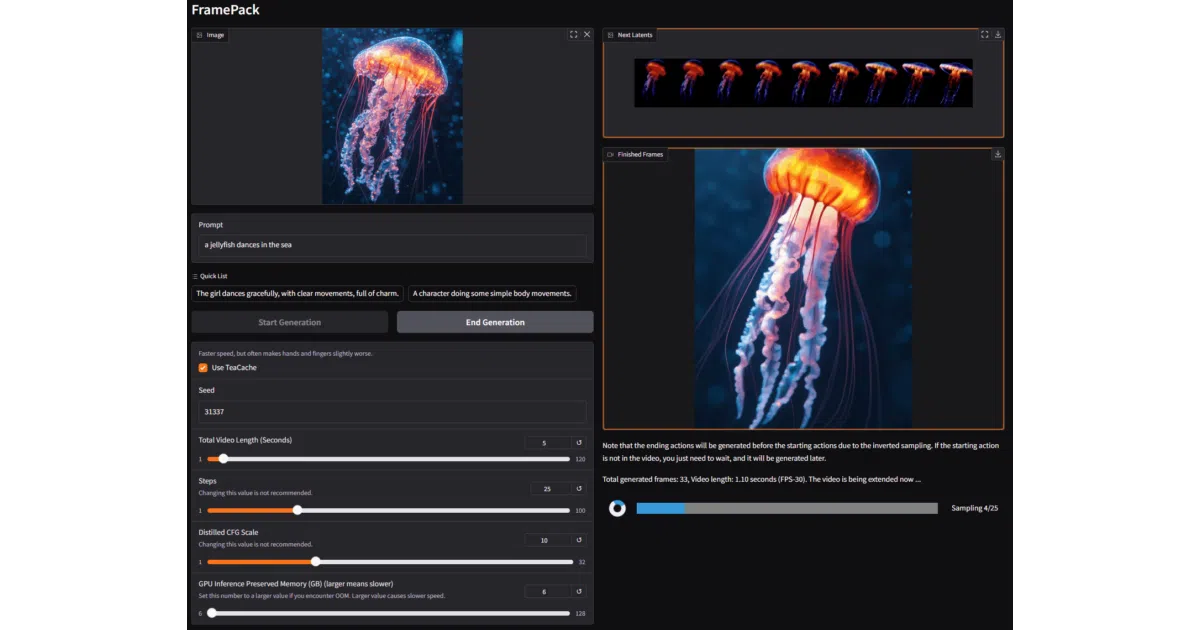
The “feels like image diffusion” pitch is the core insight: by keeping the per-step workload flat regardless of video length, FramePack sidesteps the usual memory cliff that makes video diffusion a datacenter hobby. It also means training batch sizes can scale like image models, not video models. The Gradio GUI streams results section-by-section, so you watch the video grow instead of staring at a progress bar.
Key highlights
- One-click Windows package with CUDA 12.6 and PyTorch 2.6; Linux install via pip
- Supports RTX 30/40/50-series, fp16/bf16; 6GB minimum VRAM
- Optional speedups via TeaCache, xformers, flash-attn, sage-attention — though the authors warn these can alter output quality
- ~30GB of models auto-download from HuggingFace on first run
- Built-in sanity checks with reference images/prompts to verify your setup isn’t silently broken
Caveats
- GTX 10/20-series untested; AMD GPUs not mentioned
- TeaCache and quantization are “not really lossless” — about 30% of users see visibly worse results with TeaCache enabled
- Speed on laptop GPUs is 4–8× slower than desktop RTX 4090 (which manages 1.5–2.5 sec/frame)
- Output is sensitive to hardware noise; identical prompts won’t pixel-match across devices
- No macOS support; no web service (the repo warns of numerous scam clone sites)
Verdict
Worth a spin if you have a mid-range Nvidia GPU and want local video generation without renting A100s. Skip it if you’re on AMD, macOS, or need guaranteed deterministic output across machines.
Frequently asked
- What is lllyasviel/FramePack?
- FramePack makes video diffusion practical by treating long videos as a series of next-frame predictions with constant memory cost.
- Is FramePack open source?
- Yes — lllyasviel/FramePack is open source, released under the Apache-2.0 license.
- What language is FramePack written in?
- lllyasviel/FramePack is primarily written in Python.
- How popular is FramePack?
- lllyasviel/FramePack has 17.1k stars on GitHub.
- Where can I find FramePack?
- lllyasviel/FramePack is on GitHub at https://github.com/lllyasviel/FramePack.