lianginx/chatgpt-vue
Yet another ChatGPT client, but this one keeps your API key in the browser
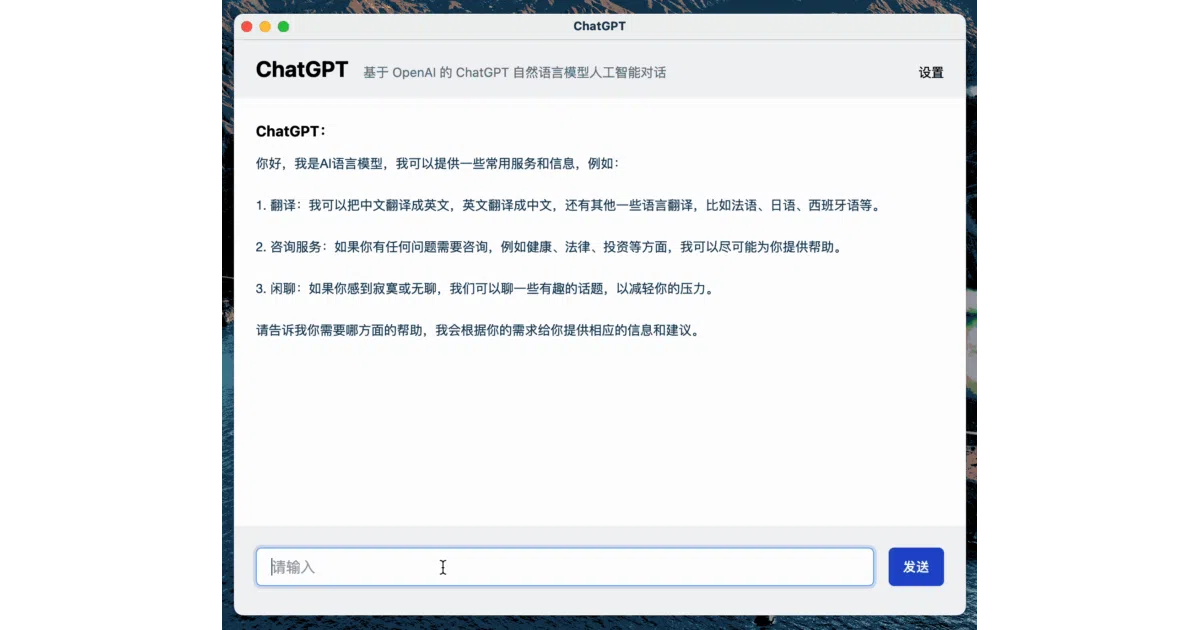
A minimal Vue 3 chat interface that calls OpenAI directly from the frontend—no backend, no proxy, just your browser and your API key.
Not currently ranked — collecting fresh signals.
star history
What it does
This is a bare-bones ChatGPT web UI built with Vue 3, TypeScript, and Tailwind CSS. You paste your OpenAI API key into a bottom-of-page input, hit save, and start chatting with gpt-3.5-turbo. It remembers context across messages, so you can have a continuous conversation. There’s also an Electron packaging guide if you want a desktop app.
The interesting bit
The whole thing runs client-side. No server, no proxy, no CORS workaround—your browser talks straight to OpenAI’s API. The README is admirably blunt about this: “能否连通基于你当前浏览器的所处的网络环境” (whether it connects depends on your network). If your ISP blocks OpenAI, tough luck; the author points you to their Nuxt-based server-side alternative instead.
Key highlights
- Pure frontend architecture: API calls happen in the browser, not a backend
- Vue 3 + TypeScript + Tailwind CSS—modern, predictable stack
- Supports continuous conversation (message history fed back to the model)
- Includes Electron packaging guide for desktop builds
- 601 stars, suggesting it hit a nerve as a simple reference implementation
Caveats
- Your API key lives in browser storage; this is convenient but not security-best-practice
- No proxy means connectivity is entirely at the mercy of your local network and any regional blocks
- The README notes this is specifically for
gpt-3.5-turbo; no mention of GPT-4 or other models
Verdict
Grab this if you want a clean, minimal ChatGPT UI to fork for your own experiments, or if you’re teaching someone how Vue 3 + API integration works. Skip it if you need multi-user support, key security, or live somewhere OpenAI’s API is blocked.
Frequently asked
- What is lianginx/chatgpt-vue?
- A minimal Vue 3 chat interface that calls OpenAI directly from the frontend—no backend, no proxy, just your browser and your API key.
- Is chatgpt-vue open source?
- Yes — lianginx/chatgpt-vue is open source, released under the MIT license.
- What language is chatgpt-vue written in?
- lianginx/chatgpt-vue is primarily written in Vue.
- How popular is chatgpt-vue?
- lianginx/chatgpt-vue has 596 stars on GitHub.
- Where can I find chatgpt-vue?
- lianginx/chatgpt-vue is on GitHub at https://github.com/lianginx/chatgpt-vue.