leemysw/yovoice
A local voice studio that skips the Python and the meter
yovoice bundles TTS, voice cloning, and full song generation into a native desktop app that never phones home or bills by the character.
Collecting fresh signals — velocity needs a few days of history.
collecting data…
star history
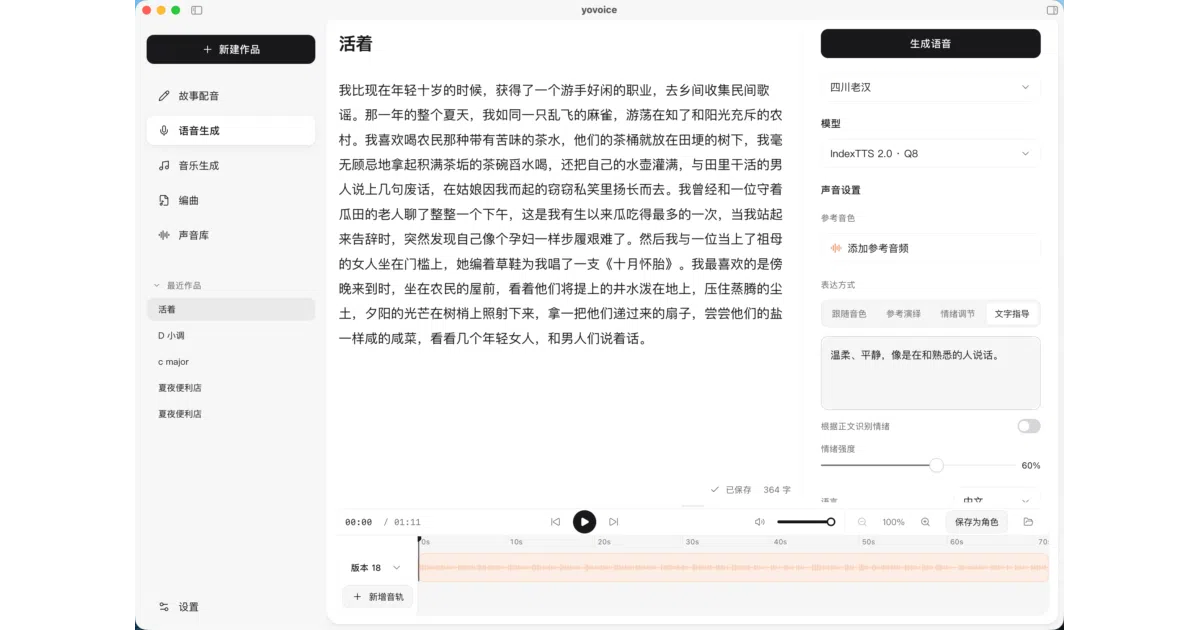
What it does yovoice is a desktop app (macOS 14+ Apple Silicon, Windows 10/11) for turning text into speech, cloned voices, complete songs, and multi-track MIDI scores — all on your own hardware. It runs a native C++ inference engine (audio.cpp) instead of a Python stack, so there’s no Conda, no PyTorch conflicts, and no cloud API calls. It’s essentially a well-executed glue layer over a solid roster of open models: IndexTTS 2.0/2.5, VoxCPM2, OmniVoice, Qwen3-TTS, Kokoro, and ACE-Step 1.5 for music.
The interesting bit Beyond the GUI, it ships a CLI, an Agent Skill, and an MCP server — so you can have Claude, Cursor, or a local Ollama model write lyrics, arrange scores, and generate voiceovers without opening the app. The hardware guide is refreshingly honest: Kokoro-82M runs on any CPU at 189 MB, while full song generation wants 12 GB+ VRAM.
Key highlights
- Zero-shot voice cloning, emotion control, and text-guided voice design (describe the voice you want in words)
- Music generation from style prompts and lyrics via ACE-Step 1.5, with every take kept for comparison
- General MIDI score arranging with repeatable renders, stem and MIDI export
- Metal on Apple Silicon; CUDA (bundled runtimes) and experimental Vulkan on Windows
- Optional AI-service connections (OpenAI, Anthropic, DeepSeek, Ollama, etc.) with keys stored locally
Caveats
- OmniVoice weights are CC-BY-NC — non-commercial use only; IndexTTS models carry a separate model license.
- Heavy lifting is real: high-fidelity cloning wants 4–6 GB VRAM, songs want 12 GB+.
- Version 0.2.0 — young project, and the README doesn’t say how polished the cloning quality actually is.
Verdict Worth a look if you want local TTS or music generation without subscription meters or a Python environment. Skip it if you’re on modest hardware and hoping for full song generation — the model sizes don’t negotiate.
Frequently asked
- What is leemysw/yovoice?
- yovoice bundles TTS, voice cloning, and full song generation into a native desktop app that never phones home or bills by the character.
- Is yovoice open source?
- Yes — leemysw/yovoice is open source, released under the Apache-2.0 license.
- What language is yovoice written in?
- leemysw/yovoice is primarily written in TypeScript.
- How popular is yovoice?
- leemysw/yovoice has 1.1k stars on GitHub.
- Where can I find yovoice?
- leemysw/yovoice is on GitHub at https://github.com/leemysw/yovoice.