lastmile-ai/aiconfig
JSON configs that let you version-control your prompts
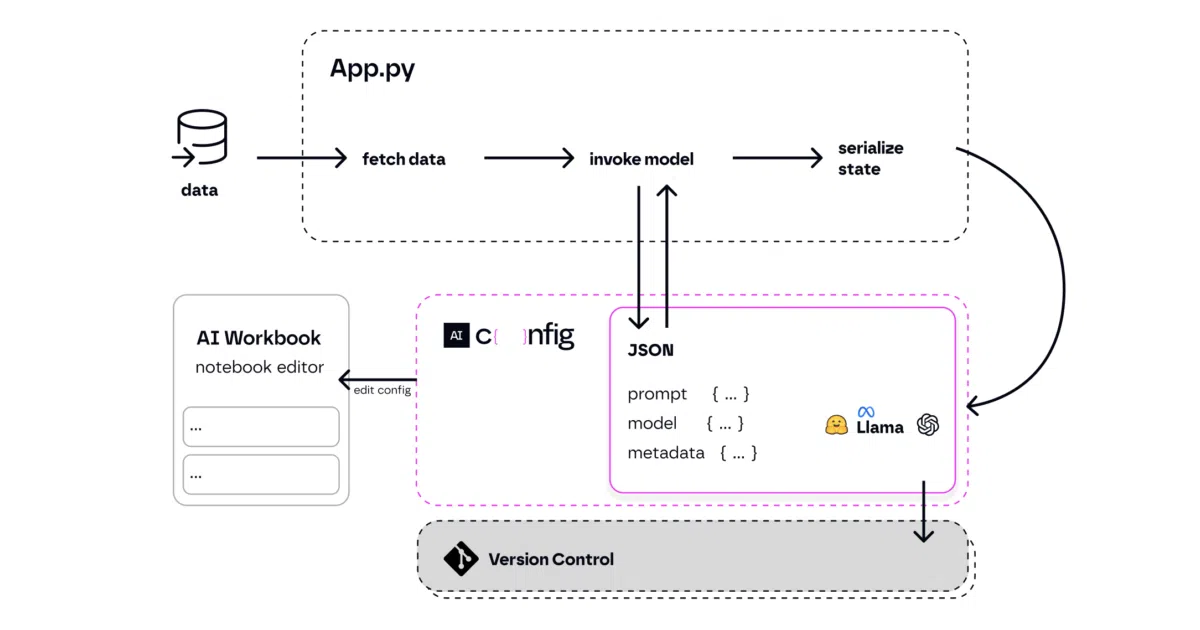
AIConfig treats prompts, model parameters, and chaining logic as a declarative artifact you can edit in a GUI and run from Python or Node.
Not currently ranked — collecting fresh signals.
star history
What it does
AIConfig is a framework that extracts generative AI behavior—prompts, model settings, and prompt chains—into JSON files you can version control, evaluate, and hand off between team members. Your application code shrinks to config.run("prompt_name") while the messy model-specific logic lives elsewhere.
The interesting bit
The VS Code extension (and standalone aiconfig edit CLI) gives you a visual editor for prompt chains with auto-save, but the underlying format remains plain JSON. That means a non-coder can tweak copy in the GUI while a developer reviews the diff in git. The README also notes you must install the Python package to use the editor even if your app runs on Node—a slightly awkward dependency worth knowing upfront.
Key highlights
- JSON schema for prompts, model parameters, and metadata; supports OpenAI, Gemini, LLaMA, PaLM, Hugging Face, and custom models via
ModelParserextensions - Visual editor with 15-second auto-save; runs as VS Code extension or local web app at
localhost:8080 - Python and Node SDKs for loading configs and running prompts with streaming support
- Built-in prompt chaining with variable interpolation (e.g.,
{{get_activities.output}}) - Cookbooks cover RAG, function calling, prompt routing, multi-LLM consistency, and safety guardrails
Caveats
- The Python package is mandatory for the editor even for Node.js projects
- Weekly release cadence suggests the API may still be shifting; check the changelog before pinning versions
Verdict Worth a look if your prompts are currently scattered across Python strings, LangChain nodes, or Jupyter cells and you want a single reviewable artifact. Skip it if you’re already happy with your current prompt-management setup or need deep framework integration the README doesn’t demonstrate.
Frequently asked
- What is lastmile-ai/aiconfig?
- AIConfig treats prompts, model parameters, and chaining logic as a declarative artifact you can edit in a GUI and run from Python or Node.
- Is aiconfig open source?
- Yes — lastmile-ai/aiconfig is open source, released under the MIT license.
- What language is aiconfig written in?
- lastmile-ai/aiconfig is primarily written in Python.
- How popular is aiconfig?
- lastmile-ai/aiconfig has 1.1k stars on GitHub.
- Where can I find aiconfig?
- lastmile-ai/aiconfig is on GitHub at https://github.com/lastmile-ai/aiconfig.