jtydhr88/ComfyUI-qwenmultiangle
A 3D camera rig inside your ComfyUI node graph
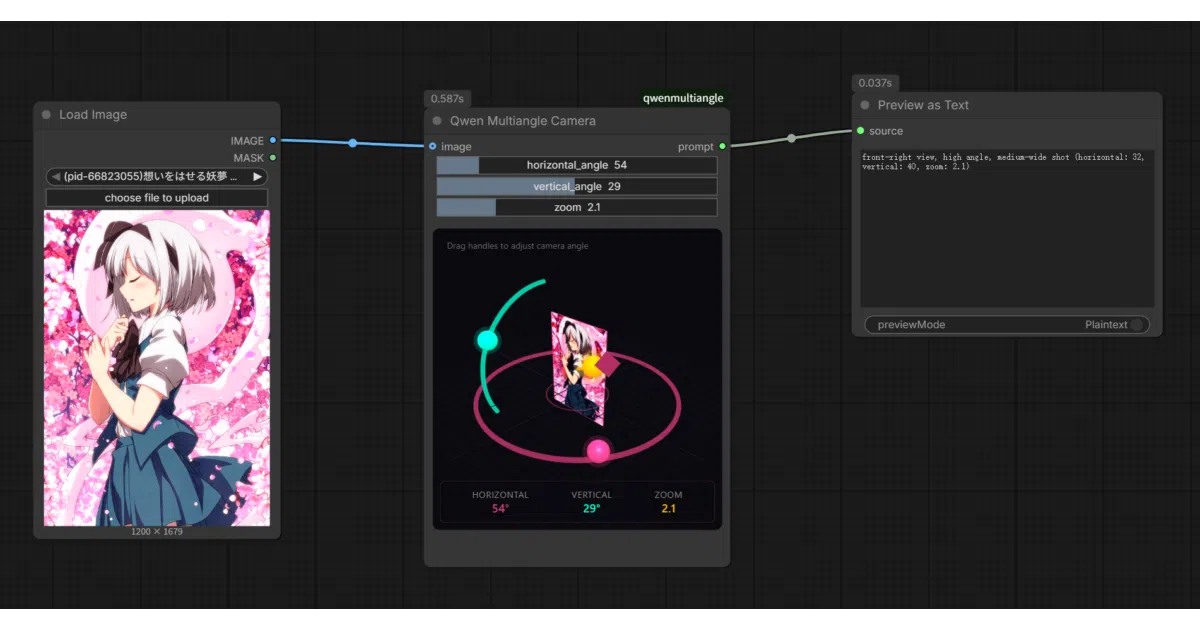
Drag pink and cyan handles in a Three.js viewport to generate perfectly formatted prompts for Qwen's multi-angle LoRA.
Not currently ranked — collecting fresh signals.
star history
What it does
This ComfyUI custom node embeds a full interactive 3D viewport—built with Vue 3, TypeScript, and Three.js—directly into your node graph. You drag colored handles to set azimuth, elevation, and zoom, and the node outputs a prompt string like <sks> front view eye-level shot medium shot that feeds straight into Qwen-Image-Edit-2511-Multiple-Angles-LoRA.
The interesting bit
The UI is genuinely bidirectional: drag the pink ring handle in 3D, the slider widget updates; tweak the dropdown, the 3D camera jumps. There’s even a camera_view mode that lets you orbit around your source image as a card in the scene. It’s a small standalone cinematography tool grafted onto a diffusion pipeline.
Key highlights
- Preset dropdowns for standard film angles (quarter views, low-angle, close-up, etc.)
- Real-time image preview rendered as a card with grid backface
- Four-language UI auto-detected from ComfyUI settings (en/zh/ja/ko)
- Sliders clamped to LoRA-safe ranges: elevation -30° to 60°, distance 0–10
- Build system included: Vite dev server, type checking, committed
js/output for distribution
Caveats
- Requires downloading the specific LoRA from Hugging Face manually
- One widget (
default_prompts) is deprecated and does nothing; still visible for backward compatibility - Output prompts are English-only regardless of UI language
Verdict
Worth it if you’re already running ComfyUI and want consistent multi-angle character shots from Qwen without hand-writing camera prompts. Skip if you don’t use that specific LoRA or workflow.
Frequently asked
- What is jtydhr88/ComfyUI-qwenmultiangle?
- Drag pink and cyan handles in a Three.js viewport to generate perfectly formatted prompts for Qwen's multi-angle LoRA.
- Is ComfyUI-qwenmultiangle open source?
- Yes — jtydhr88/ComfyUI-qwenmultiangle is open source, released under the MIT license.
- What language is ComfyUI-qwenmultiangle written in?
- jtydhr88/ComfyUI-qwenmultiangle is primarily written in JavaScript.
- How popular is ComfyUI-qwenmultiangle?
- jtydhr88/ComfyUI-qwenmultiangle has 1.4k stars on GitHub.
- Where can I find ComfyUI-qwenmultiangle?
- jtydhr88/ComfyUI-qwenmultiangle is on GitHub at https://github.com/jtydhr88/ComfyUI-qwenmultiangle.