jev-chat/jev-chat-windows
A chat sidecar that reads your screen but refuses to hit send
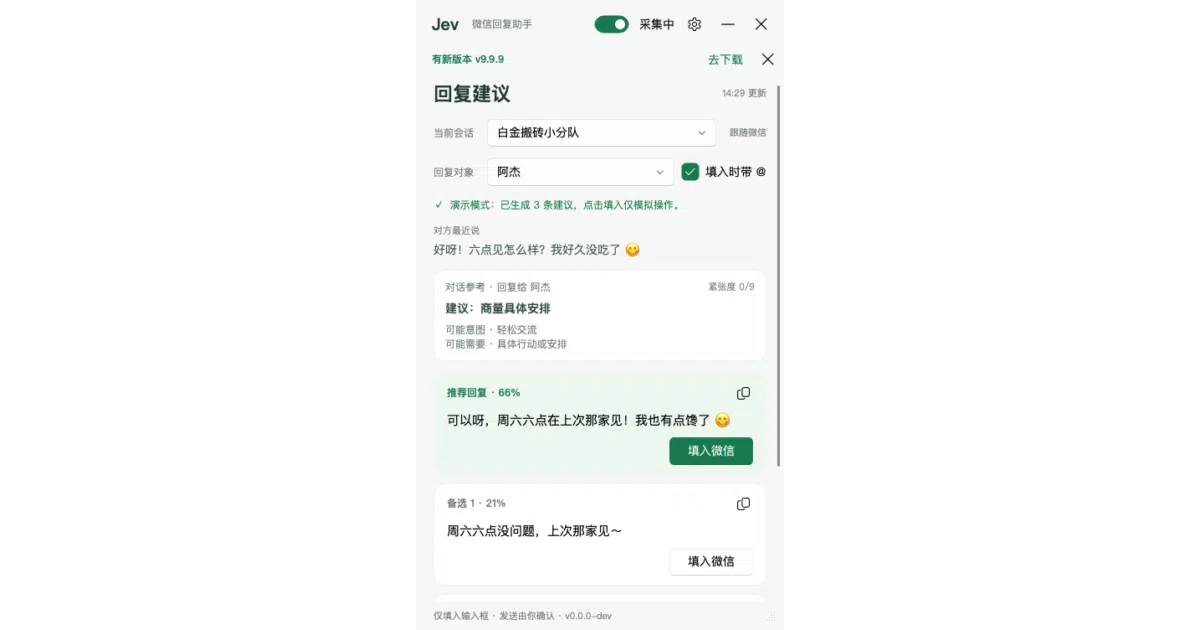
It suggests three replies and pastes them into the input box, but the actual sending is strictly your problem.
Collecting fresh signals — velocity needs a few days of history.
collecting data…
star history
What it does
JevChat-Windows is a floating reply assistant that lives next to your chat window. It uses Windows Graphics Capture to take screenshots, runs local offline OCR to read the conversation, and asks an LLM to judge intent and draft three candidate replies. You click one, the text appears in the input box, and the tool steps back — it will never press the send button for you.
The interesting bit
Instead of hooking into the chat app, it treats your window like a video stream: pixel-anchor detection finds the message area without hardcoded coordinates, so light and dark themes both work. The author’s privacy boundaries are unusually rigid — screenshots are numpy arrays that never touch disk, API keys are stored only in registry environment variables, and the system prompt explicitly bans auto-sending and money-related topics.
Key highlights
- Local RapidOCR parses chat bubbles by color and filters out timestamps, quotes, and link cards; group-chat mode extracts speaker names and can target a specific participant
- Two-key architecture separates intent judgment (
JEV_API_KEY) from reply drafting (LLM_API_KEY), with presets for DeepSeek, OpenRouter, TypeSafe, and nine other providers - Zero API calls during silence; it only reaches out when a new message actually arrives or you switch reply targets
- Debug view draws recognition boxes in memory only, never saving frames or logs
- Responsive floating window follows whichever chat session is active, with a compact mode when narrowed below 400 px
Caveats
- Windows 10 1903+ or 11 only; the author explicitly will not help you fork it for other platforms or chat apps
- Not fully offline: local OCR handles the screen, but judgment and drafting still need two separate cloud API keys
- The executable is unsigned, so Windows SmartScreen will flag it on first run
Verdict
Grab it if you want an LLM wingman for social chat that respects hard boundaries around privacy and manual control. Pass if you are on macOS, want a fully autonomous chatbot, or prefer not to manage two API keys.
Frequently asked
- What is jev-chat/jev-chat-windows?
- It suggests three replies and pastes them into the input box, but the actual sending is strictly your problem.
- Is jev-chat-windows open source?
- Yes — jev-chat/jev-chat-windows is an open-source project tracked on heatdrop.
- What language is jev-chat-windows written in?
- jev-chat/jev-chat-windows is primarily written in Python.
- How popular is jev-chat-windows?
- jev-chat/jev-chat-windows has 533 stars on GitHub.
- Where can I find jev-chat-windows?
- jev-chat/jev-chat-windows is on GitHub at https://github.com/jev-chat/jev-chat-windows.