jev-chat/jev-chat-jarvis-mac
A floating chat copilot that just reads your screen — politely
jev-chat-jarvis-mac watches your chat window, runs a local model to judge intent and risk, and drafts replies in 14 personas — without injecting, hooking, or touching any database.
Collecting fresh signals — velocity needs a few days of history.
collecting data…
star history
What it does
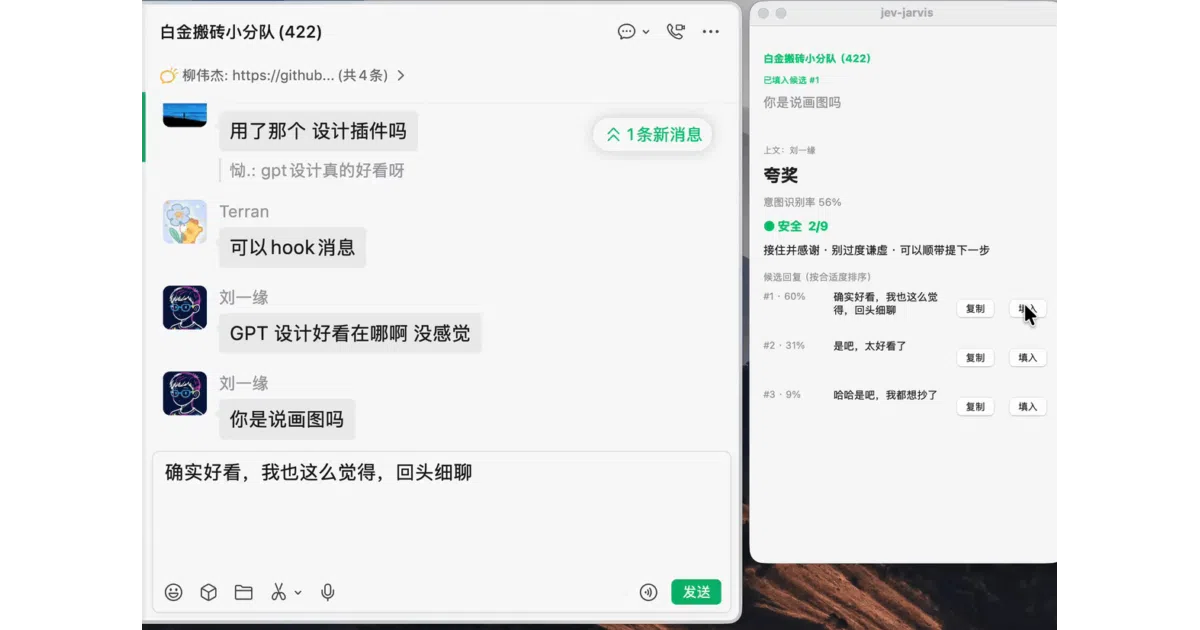
When a message lands in a supported macOS chat app, a frosted-glass floating panel pops up with the message’s intent (8 categories), a 0–9 risk score with action advice, and candidate replies grouped by persona — including the “dog-headed strategist” trio of steady, flirty, and detached. You pick a candidate, hit fill-in, and it lands in the chat input box via accessibility APIs. Sending stays manual; the tool never presses send for you.
The interesting bit
The whole thing is read-only by architecture: no injection, no hooks, no decrypting chat databases. It literally screenshots the window, runs Apple Vision OCR, and classifies bubbles by surface, borders, and left/right alignment to figure out who said what — including handling quoted messages as background context rather than new messages. There’s also a second path that reads text directly via the system accessibility interface, no screenshots at all.
Key highlights
- Intent classification is zero-shot at 86.4% on a 22-message regression set, with the full distribution from a single local forward pass
- 14 reply personas generated concurrently, then re-ranked in place by a local model; per-persona candidate count is configurable (default 2)
- Fast on M1 Pro: ~1.5 s to intent, ~1.5–2 s to candidates (README notes these are mechanism-derived estimates; logs are the source of truth)
- Optional manual calibration mode for draggable contact lists, with a preview gate before any region is saved
- Runs fully local; a privacy doc covers data flow
Caveats
- Apple Silicon only (M-series, macOS 13+) — the torch dependency has no Intel build, and Rosetta is explicitly unsupported
- The app isn’t notarized, so first launch requires a right-click open or clearing the quarantine attribute
- Manual calibration doesn’t auto-detect internal layout changes (dragged lists, input-box height, chats with pinned announcements) — you must recalibrate yourself
- OCR-based recognition is validated on specific layouts and light/dark themes; the README is candid that this isn’t a general vision model and complex themes may still slip through
Verdict
Worth a look if you’re on an M-series Mac and want a local, privacy-respecting reply assistant for chat apps — the read-only design is genuinely thoughtful. Skip it if you’re on Intel, on another OS, or expecting a general-purpose screen-understanding model.
Frequently asked
- What is jev-chat/jev-chat-jarvis-mac?
- jev-chat-jarvis-mac watches your chat window, runs a local model to judge intent and risk, and drafts replies in 14 personas — without injecting, hooking, or touching any database.
- Is jev-chat-jarvis-mac open source?
- Yes — jev-chat/jev-chat-jarvis-mac is open source, released under the MIT license.
- What language is jev-chat-jarvis-mac written in?
- jev-chat/jev-chat-jarvis-mac is primarily written in Python.
- How popular is jev-chat-jarvis-mac?
- jev-chat/jev-chat-jarvis-mac has 500 stars on GitHub.
- Where can I find jev-chat-jarvis-mac?
- jev-chat/jev-chat-jarvis-mac is on GitHub at https://github.com/jev-chat/jev-chat-jarvis-mac.