cccyd2003-qwq/pinkbin
A disk cleaner that asks AI before it deletes
Pinkbin scans your whole drive in seconds, then lets you drag mystery folders to an LLM to figure out what's safe to trash.
Not currently ranked — collecting fresh signals.
star history
What it does
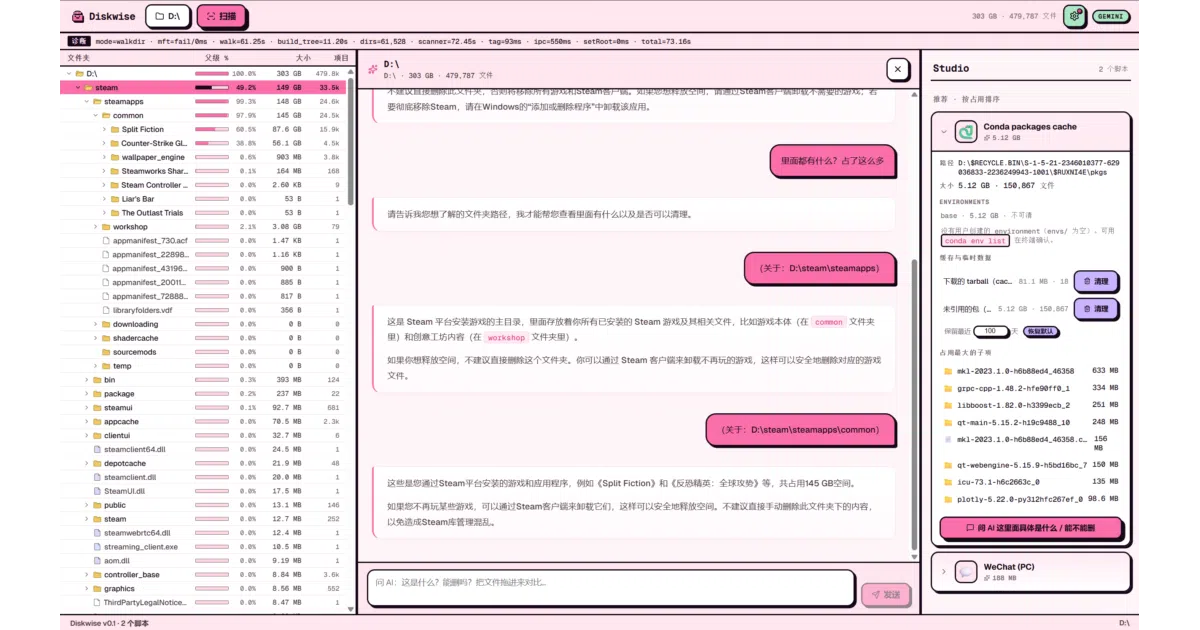
Pinkbin is a Windows disk analyzer built on Tauri 2 + React + Rust. It reads the NTFS Master File Table directly to map your entire drive in 2–5 seconds, renders a treemap and tree view, and offers two cleanup paths: drag any folder to a built-in AI chat for a “what is this, can I delete it?” verdict, or use curated cleanup scripts for known space hogs like WeChat PC and Conda environments. Everything goes to the system Recycle Bin by default; it never reads file contents, only directory metadata.
The interesting bit
The project treats “accidental data loss” as a first-class risk to engineer against. Cleanup scripts require a TOML manifest and a Rust integration test with positive assertions and red-line assertions (e.g., “never touch chat DBs”), enforced in CI. The authors nuked 36 legacy scaffolds because nobody had verified their glob boundaries. That level of paranoia is rare in a 508-star hobby project.
Key highlights
- NTFS MFT direct read for whole-drive scans in single-digit seconds; falls back to
jwalkon other platforms - BYOK AI advisor: Anthropic, OpenAI, Gemini, or local Ollama; only path names, sizes, file counts, and ≤20 sample paths are sent
- Curated scaffolds: WeChat PC (22 cleanup scopes, 3.x/4.x compatible) and Conda (stale env detection via
conda-meta/historymtime) - All deletions default to Recycle Bin; optional 7-day quarantine with
~/.pinkbin/undo.jsonl trash-rsfor safe deletion,globsetfor path matching,react-markdownfor AI responses
Caveats
- Windows only for prebuilt binaries; macOS and Linux builds exist but lack signatures and real-machine validation
- Only two cleanup scaffolds ship today (WeChat, Conda); the authors explicitly warn users to handle everything else manually
- First launch triggers Windows SmartScreen; the installer needs admin rights for MFT reading
Verdict
Worth a look if you’re on Windows, paranoid about disk space, and want an AI second opinion before you nuke a folder. Skip it if you need macOS/Linux binaries today or want fully automated cleanup beyond WeChat and Conda.
Frequently asked
- What is cccyd2003-qwq/pinkbin?
- Pinkbin scans your whole drive in seconds, then lets you drag mystery folders to an LLM to figure out what's safe to trash.
- Is pinkbin open source?
- Yes — cccyd2003-qwq/pinkbin is open source, released under the MIT license.
- What language is pinkbin written in?
- cccyd2003-qwq/pinkbin is primarily written in TypeScript.
- How popular is pinkbin?
- cccyd2003-qwq/pinkbin has 1.3k stars on GitHub.
- Where can I find pinkbin?
- cccyd2003-qwq/pinkbin is on GitHub at https://github.com/cccyd2003-qwq/pinkbin.