arcsin1/oh-my-ppt
Turn a Prompt Into HTML Slides—No Cloud, No PowerPoint
It generates editable HTML presentations from a simple prompt so you can skip PowerPoint's formatting maze.
Not currently ranked — collecting fresh signals.
star history
What it does
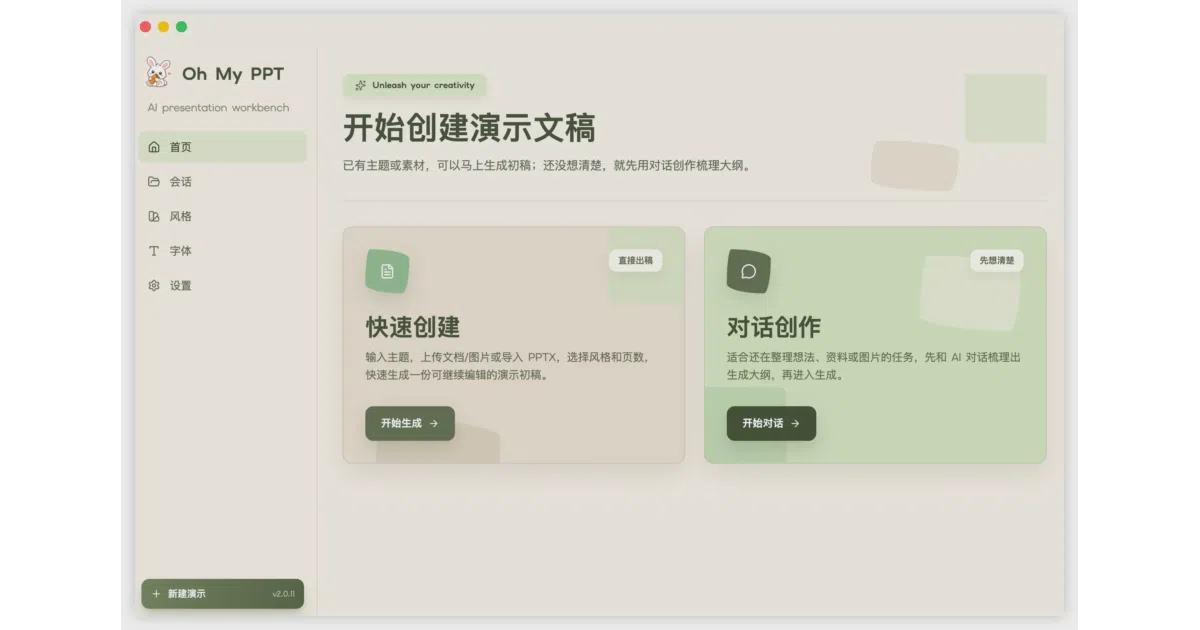
Oh My PPT is an Electron desktop app that generates presentation slides as HTML rather than traditional office documents. You describe a topic, upload a document, or import an existing PPTX, and an AI agent plans the outline, picks fonts and colors, and lays out the pages on a fixed 16:9 canvas. Everything runs locally, including support for Ollama via an OpenAI-compatible endpoint, and the resulting decks can be edited visually or through conversational commands.
The interesting bit
The project treats the web browser as the native presentation runtime instead of an export target. Slides are built with React and animated with Anime.js v4, so you get staggered entrances and click-to-reveal sequences that feel closer to a keynote than a static document. It even packages the final deck into a single executable HTML file that opens in any browser, no installation required.
Key highlights
- Local-first architecture: no registration, no cloud upload, and it works offline with your own API keys or a local Ollama instance.
- Multi-modal style cloning: upload a screenshot or design mockup and the AI extracts its visual style to build a matching theme (requires a vision-capable model).
- Round-trip PPTX support: import existing PowerPoint files for editing, then export back to PPTX with fonts auto-embedded, though complex layouts are still being refined.
- Conversational editing: select any element and tell the AI to change colors, add charts, or rewrite text without rebuilding the deck.
- One-click packaging: bundle the HTML presentation into a standalone executable that runs on any machine with a browser.
Caveats
- PPTX export is explicitly a work in progress; the README warns that text overlap, mixed layouts, and complex charts are still being optimized.
- macOS may refuse to open the distributed app because the releases are not yet system-level code signed.
- You must bring your own model configuration—there is no built-in AI backend, and the app will error if settings are left blank.
Verdict
Worth a look if you want AI-assisted slides but refuse to feed your data to a SaaS, or if you prefer web-native animations over PowerPoint’s toolchain. Skip it if you need guaranteed pixel-perfect PowerPoint round-tripping or a zero-config, plug-and-play experience.
Frequently asked
- What is arcsin1/oh-my-ppt?
- It generates editable HTML presentations from a simple prompt so you can skip PowerPoint's formatting maze.
- Is oh-my-ppt open source?
- Yes — arcsin1/oh-my-ppt is open source, released under the Apache-2.0 license.
- What language is oh-my-ppt written in?
- arcsin1/oh-my-ppt is primarily written in TypeScript.
- How popular is oh-my-ppt?
- arcsin1/oh-my-ppt has 2.2k stars on GitHub.
- Where can I find oh-my-ppt?
- arcsin1/oh-my-ppt is on GitHub at https://github.com/arcsin1/oh-my-ppt.