WhatDreamsCost/WhatDreamsCost-ComfyUI
ComfyUI nodes that think they're a video editor
A collection of UI-heavy custom nodes that force ComfyUI to behave more like a video editor for LTX generation workflows.
Not currently ranked — collecting fresh signals.
star history
What it does
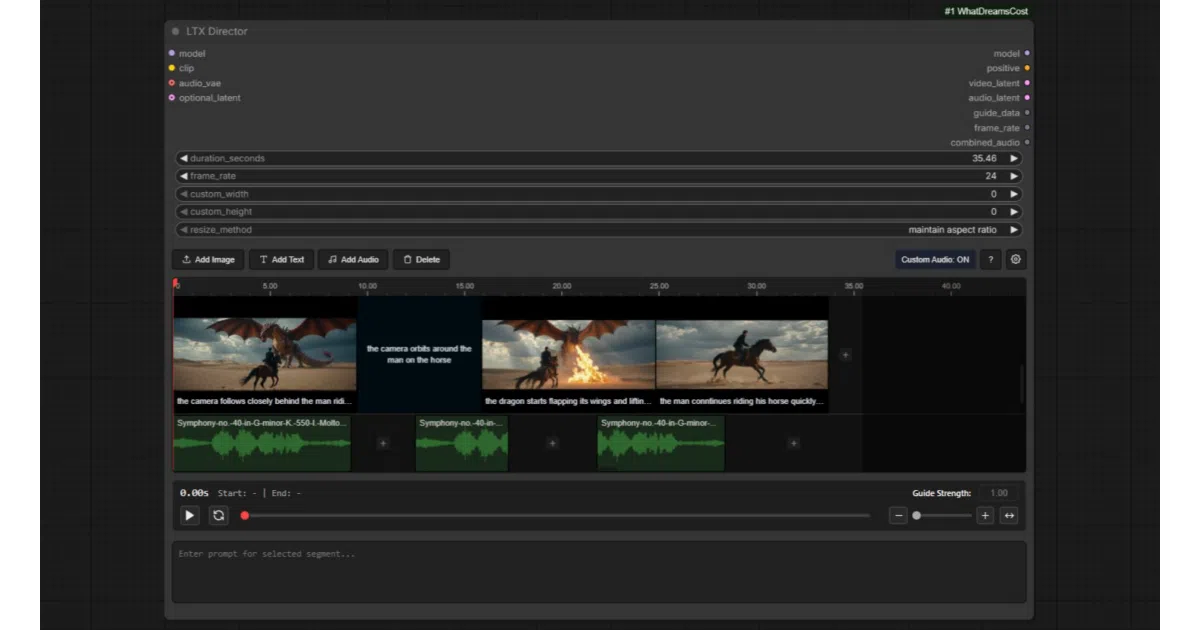
WhatDreamsCost-ComfyUI is a set of custom nodes for ComfyUI built around LTX video generation. The flagship LTX Director drops a full timeline editor into the node graph, letting you set keyframes, trim audio, and chain prompts without wrestling with the default node layout. Supporting cast includes a drag-and-drop video and audio trimmer, a speech-length estimator for dialogue timing, and a synced image sequencer for first-frame-last-frame shots.
The interesting bit
The author is openly using Gemini to generate the JavaScript, which explains the occasional “redundant, messy code” disclaimer. Rather than hiding the AI assist, they ship practical UI patches—like a Load Video UI node that lifts ComfyUI’s 100 MB file limit and adds real-time previews—that feel like quality-of-life fixes the core application forgot.
Key highlights
LTX Directorbundles timeline editing, prompt relay, custom audio import, and first/middle/last frame support into one node.Multi Image Loaderadds a built-in gallery with drag-and-drop rearranging and batched output.Speech Length Calculatorupdates video duration estimates in real time as you type dialogue.Load Video UIandLoad Audio UIadd trimming, cropping, and file-drop support that the default nodes lack.- Sequencer nodes sync with each other in real time; editing one updates its siblings automatically.
Caveats
- The author warns that all code is AI-generated and may contain redundant or messy patches.
LTX Directorstill lacks written documentation; tutorials are promised but not yet delivered.Load Video UIwill chew through RAM on large output videos despite optimizations, owing to ComfyUI’s own constraints.
Verdict
Grab this if you generate LTX video inside ComfyUI and want a timeline metaphor instead of node-graph archaeology. Skip it if you demand pristine, hand-rolled code and comprehensive docs today.
Frequently asked
- What is WhatDreamsCost/WhatDreamsCost-ComfyUI?
- A collection of UI-heavy custom nodes that force ComfyUI to behave more like a video editor for LTX generation workflows.
- Is WhatDreamsCost-ComfyUI open source?
- Yes — WhatDreamsCost/WhatDreamsCost-ComfyUI is open source, released under the GPL-3.0 license.
- What language is WhatDreamsCost-ComfyUI written in?
- WhatDreamsCost/WhatDreamsCost-ComfyUI is primarily written in JavaScript.
- How popular is WhatDreamsCost-ComfyUI?
- WhatDreamsCost/WhatDreamsCost-ComfyUI has 2k stars on GitHub.
- Where can I find WhatDreamsCost-ComfyUI?
- WhatDreamsCost/WhatDreamsCost-ComfyUI is on GitHub at https://github.com/WhatDreamsCost/WhatDreamsCost-ComfyUI.