Uminosachi/sd-webui-inpaint-anything
Inpaint by pointing: SAM meets Stable Diffusion Web UI
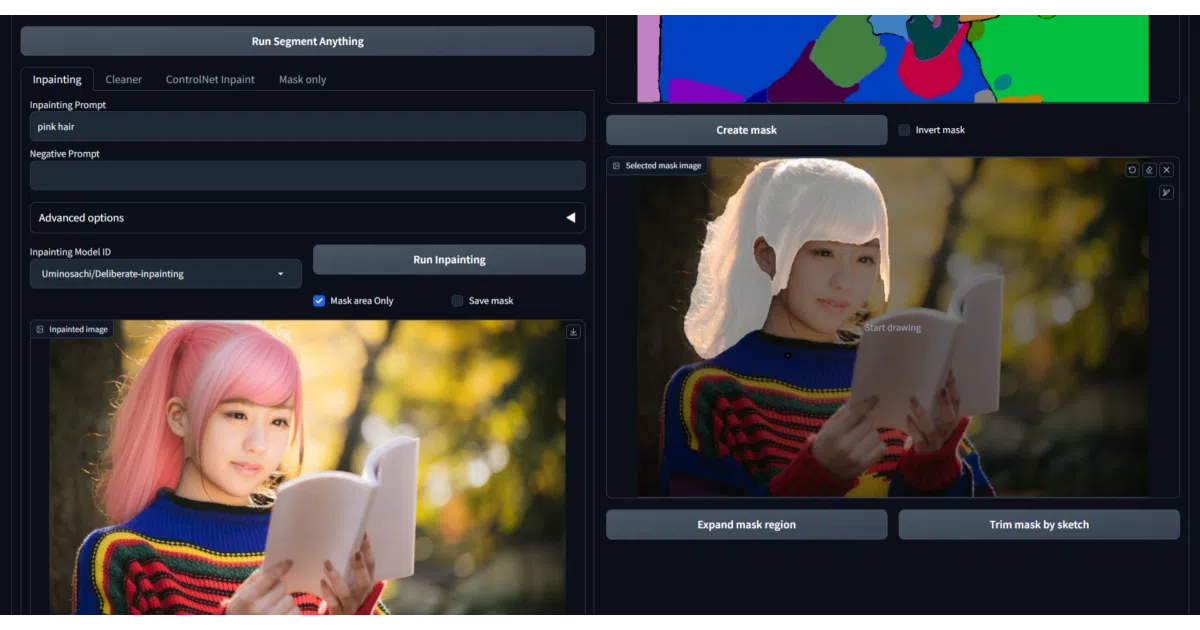
This extension swaps manual mask-drawing for Segment Anything’s point-and-click segmentation inside the AUTOMATIC1111 Web UI.
Not currently ranked — collecting fresh signals.
star history
What it does
sd-webui-inpaint-anything is an extension for AUTOMATIC1111’s Stable Diffusion Web UI that automates mask creation for inpainting. It feeds your image to a Segment Anything model—SAM 2, HQ SAM, FastSAM, or MobileSAM—then lets you select regions to inpaint by simply sketching over the generated segmentation map. From there it can run diffusion-based inpainting via HuggingFace diffusers, apply Lama Cleaner, or hand the mask off to ControlNet and the native Web UI inpainter.
The interesting bit
The project is essentially a workflow router. Rather than forcing a single pipeline, it offers four distinct tabs that dispatch the same SAM-generated mask to different backends: a diffusers inpainter, a local A1111 checkpoint, a Lama Cleaner pass, or a ControlNet inpaint workflow. There is even a “Mask only” tab that exports the mask so you can bail out entirely and use your own tools.
Key highlights
- Supports multiple SAM variants, from the huge original to lightweight MobileSAM, with VRAM costs scaling accordingly.
- Mask refinement is interactive: expand the region, or add and trim areas by sketching directly on the mask.
- Includes an
Anime Stylesegmentation mode that trades a little mask fidelity for better detection of anime-style subjects. - The ControlNet tab integrates with the separate
sd-webui-controlnetextension to support Reference-Only guidance and IP-Adapter conditioning. - Outputs can be auto-saved, dragged back into the UI for iterative edits, or piped straight to the Web UI’s standard img2img inpaint upload.
Caveats
- The README notes that browser privacy extensions like DuckDuckGo can break mask retrieval from sketches, and older Gradio versions may render the segmentation preview unusably small.
- First-time runs require downloading both SAM and inpainting models, which the README warns can take significant time and disk space in the HuggingFace cache.
- Several tabs depend on external extensions or model files—ControlNet support needs the
sd-webui-controlnetextension installed, and the native Web UI inpaint tab only appears if you already have a local model withinpaintin its filename.
Verdict
Worth a look if you spend too much time in Photoshop drawing masks for A1111. If you do not use the AUTOMATIC1111 Web UI, or if you already have a preferred inpainting pipeline that handles segmentation, this extension is just extra glue.
Frequently asked
- What is Uminosachi/sd-webui-inpaint-anything?
- This extension swaps manual mask-drawing for Segment Anything’s point-and-click segmentation inside the AUTOMATIC1111 Web UI.
- Is sd-webui-inpaint-anything open source?
- Yes — Uminosachi/sd-webui-inpaint-anything is open source, released under the Apache-2.0 license.
- What language is sd-webui-inpaint-anything written in?
- Uminosachi/sd-webui-inpaint-anything is primarily written in Python.
- How popular is sd-webui-inpaint-anything?
- Uminosachi/sd-webui-inpaint-anything has 1.3k stars on GitHub.
- Where can I find sd-webui-inpaint-anything?
- Uminosachi/sd-webui-inpaint-anything is on GitHub at https://github.com/Uminosachi/sd-webui-inpaint-anything.