RVC-Project/Retrieval-based-Voice-Conversion-WebUI
Real-time voice conversion that retrieves, not guesses
RVC exists because voice conversion usually demands heavy compute and hours of data; it packs training, inference, and vocal separation into a browser UI that claims to work with ten minutes of audio and weaker GPUs.
Velocity · 7d
+6.6
★ / day
Trend
↘cooling
star history
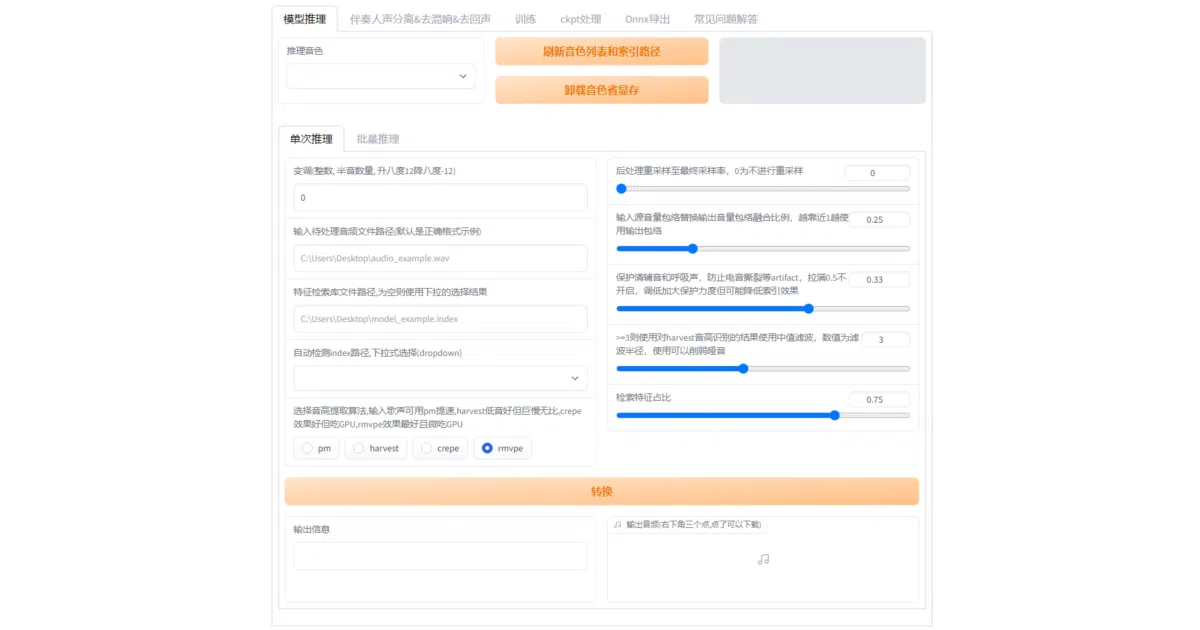
What it does RVC is a voice-conversion workbench built around VITS. It provides a Gradio web interface to train a model on a small amount of target speech—roughly ten minutes of clean audio—then run batch inference or real-time conversion. The package also bundles vocal-accompaniment separation via UVR5 and a full pitch-extraction pipeline, so you rarely need to leave the browser.
The interesting bit Rather than forcing the model to hallucinate every timbre detail, RVC performs a top-1 retrieval step that swaps input source features with the closest match from the training set. The authors claim this prevents timbre leakage. The project is also aggressively hardware-agnostic: it advertises fast training on weaker GPUs and ships support for NVIDIA, AMD ROCm, and Intel IPEX accelerators.
Key highlights
- Low data floor: claims usable results from about ten minutes of low-noise speech
- Real-time pipeline: reports end-to-end latency of 170 ms, dropping to 90 ms with ASIO hardware
- Integrated preprocessing: calls UVR5 to isolate vocals and uses the RMVPE pitch extractor (Interspeech 2023) which it claims is faster and lighter than
crepe_full - Cross-platform GPU support: CUDA, AMD ROCm on Linux, and Intel IPEX on Linux
- Ready-made base model: pretrained on the open VCTK dataset to sidestep copyright concerns
Caveats
- The README states the retrieval mechanism but never explains how the feature matching actually works
- Achieving the advertised 90 ms real-time latency depends heavily on ASIO driver support
- You must manually download several pretrained checkpoints, FFmpeg, and RMVPE weights before the UI becomes functional
Verdict A practical stopgap if you want to experiment with voice conversion without provisioning a cloud GPU or curating a massive dataset. Look elsewhere if you need a headless API or want to understand exactly what the retrieval layer is doing under the hood.
Frequently asked
- What is RVC-Project/Retrieval-based-Voice-Conversion-WebUI?
- RVC exists because voice conversion usually demands heavy compute and hours of data; it packs training, inference, and vocal separation into a browser UI that claims to work with ten minutes of audio and weaker GPUs.
- Is Retrieval-based-Voice-Conversion-WebUI open source?
- Yes — RVC-Project/Retrieval-based-Voice-Conversion-WebUI is open source, released under the MIT license.
- What language is Retrieval-based-Voice-Conversion-WebUI written in?
- RVC-Project/Retrieval-based-Voice-Conversion-WebUI is primarily written in Python.
- How popular is Retrieval-based-Voice-Conversion-WebUI?
- RVC-Project/Retrieval-based-Voice-Conversion-WebUI has 38.9k stars on GitHub and is currently cooling off.
- Where can I find Retrieval-based-Voice-Conversion-WebUI?
- RVC-Project/Retrieval-based-Voice-Conversion-WebUI is on GitHub at https://github.com/RVC-Project/Retrieval-based-Voice-Conversion-WebUI.