OndrejTexler/Few-Shot-Patch-Based-Training
Paint a whole video from a handful of frames
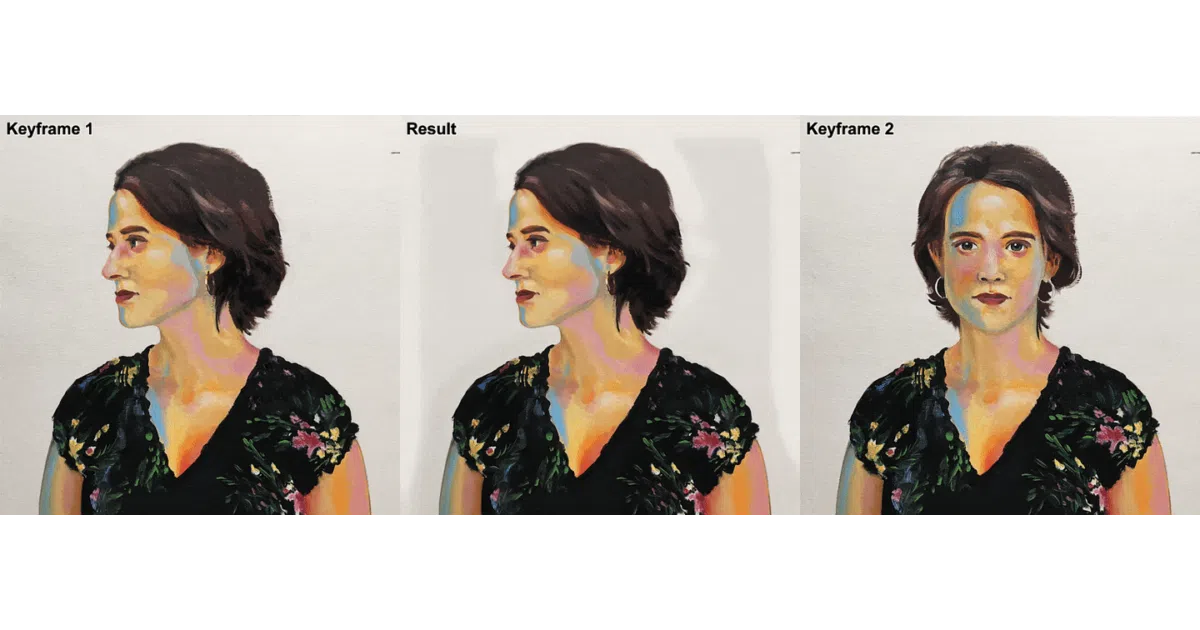
A SIGGRAPH 2020 method that trains a style-transfer network on tiny patches from just a few hand-stylized keyframes, then generates the rest.
Not currently ranked — collecting fresh signals.
star history
What it does
You pick a few frames of a video, paint or stylize them by hand, and this tool learns the style from 32×32 pixel patches. It then redraws every remaining frame to match. There’s also a webcam mode for live stylization, though it crops to square and resizes for speed.
The interesting bit
Temporal consistency is deliberately not baked into the network. That sounds like a bug, but it’s a feature: training stays fast and parallelizable. The tradeoff is flickering, which the authors tackle with a separate post-processing pipeline of optical flow and bilateral filtering. They also use auxiliary “gaussian mixture” images to disambiguate similar-looking patches—like two chunks of sky that should map to differently stylized outputs.
Key highlights
- Trains on patch-level correspondences, not full frames, from as few as 1–4 stylized keyframes
- Optional temporal consistency tools:
disflowfor optical flow,bilateralAdvfor noise filtering,gaussfor patch disambiguation - Pre-trained models and test data provided via Google Drive links
- Webcam demo included (
generate_webcam.py) - PyTorch Lightning reimplementation available from community contributor
Caveats
- Windows-first tooling: build scripts and prebuilt binaries are for Windows; Linux/MacOS users get “get inspired by the build script” guidance
- TensorFlow 1.15.3 is listed as a dependency but only used in
logger.py; author notes it will be removed - Webcam mode always crops to square and resizes, so aspect ratio and resolution take a hit
Verdict
Worth a look if you’re doing research in few-shot video stylization or need a baseline for comparison. Probably not a drop-in production tool: the temporal consistency workflow is involved, and the Windows-centric tooling will slow down non-Windows shops.
Frequently asked
- What is OndrejTexler/Few-Shot-Patch-Based-Training?
- A SIGGRAPH 2020 method that trains a style-transfer network on tiny patches from just a few hand-stylized keyframes, then generates the rest.
- Is Few-Shot-Patch-Based-Training open source?
- Yes — OndrejTexler/Few-Shot-Patch-Based-Training is an open-source project tracked on heatdrop.
- What language is Few-Shot-Patch-Based-Training written in?
- OndrejTexler/Few-Shot-Patch-Based-Training is primarily written in C++.
- How popular is Few-Shot-Patch-Based-Training?
- OndrejTexler/Few-Shot-Patch-Based-Training has 627 stars on GitHub.
- Where can I find Few-Shot-Patch-Based-Training?
- OndrejTexler/Few-Shot-Patch-Based-Training is on GitHub at https://github.com/OndrejTexler/Few-Shot-Patch-Based-Training.