MichaelYuhe/ai-group-tabs
Your 47 tabs, sorted by a chatbot that hasn't seen them
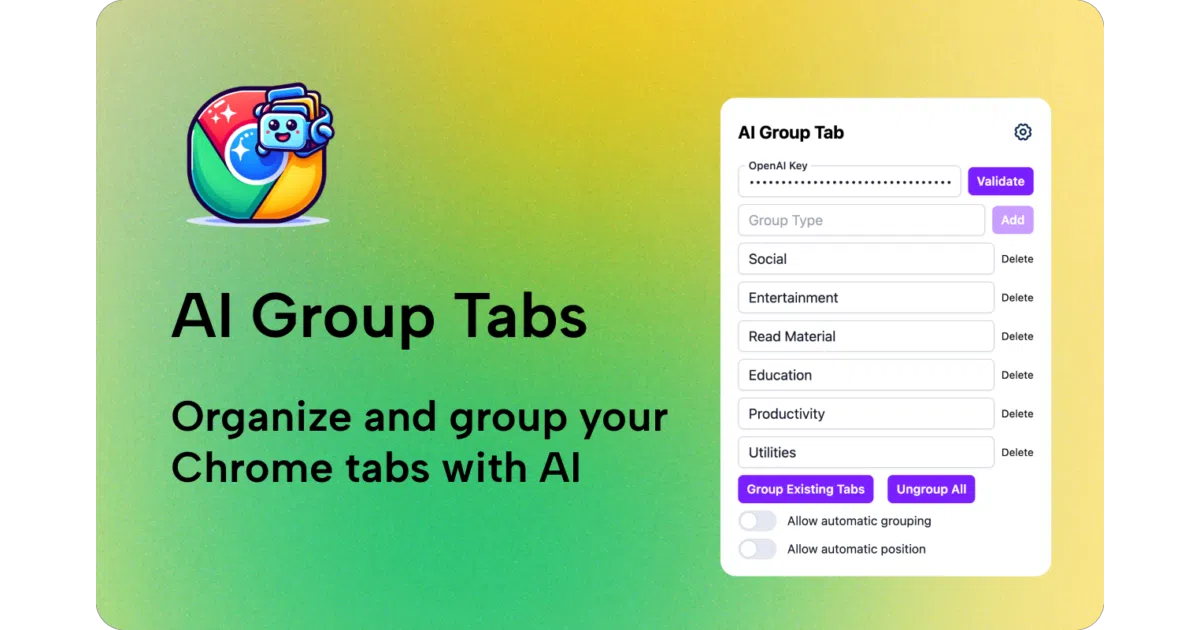
A Chrome extension that asks an LLM to impose order on your browser chaos.
Not currently ranked — collecting fresh signals.
star history
What it does AI Group Tabs reads your open Chrome tabs and asks an LLM (OpenAI by default, or a custom model/server) to sort them into named groups. It runs automatically when you open new tabs or update existing ones, and it stores your API key in Chrome’s local storage so you don’t re-enter it.
The interesting bit The whole product is essentially a prompt-engineering exercise wrapped in a browser extension. The roadmap reveals the journey: “better prompt engineering” was a deliberate milestone, and the current version groups only the changed tab rather than reprocessing everything — a small efficiency that suggests someone actually used this on a heavy session.
Key highlights
- Custom categories via popup; you’re not stuck with the LLM’s default taxonomy
- Supports custom models and API servers, so you can point it at a local endpoint
- Published on the Chrome Web Store; also buildable from source with Vite/pnpm
- Auto-groups new tabs and updated tabs without manual triggering
- Free, with a “buy me a coffee” button and a Zeabur sponsorship tie-in for contributors
Caveats
- Requires bringing your own OpenAI API key (or running your own compatible server)
- The README doesn’t specify which tab metadata gets sent to the LLM — URL? Title? Content? — so privacy implications are unclear
- “Better prompt engineering” is checked off, but there’s no detail on what the prompt actually does or how it handles ambiguous pages
Verdict Grab it if you’re already paying for API credits and your tab bar is a disaster. Skip it if you’re privacy-sensitive about your browsing data or you were hoping for on-device sorting without a network round-trip.
Frequently asked
- What is MichaelYuhe/ai-group-tabs?
- A Chrome extension that asks an LLM to impose order on your browser chaos.
- Is ai-group-tabs open source?
- Yes — MichaelYuhe/ai-group-tabs is open source, released under the MIT license.
- What language is ai-group-tabs written in?
- MichaelYuhe/ai-group-tabs is primarily written in TypeScript.
- How popular is ai-group-tabs?
- MichaelYuhe/ai-group-tabs has 1k stars on GitHub.
- Where can I find ai-group-tabs?
- MichaelYuhe/ai-group-tabs is on GitHub at https://github.com/MichaelYuhe/ai-group-tabs.