LingyiChen-AI/AIComicBuilder
From script to storyboard to stitched video, no drawing required
A Next.js app that pipelines AI models to turn a text script into an animated comic video with consistent characters and shot-by-shot generation.
Not currently ranked — collecting fresh signals.
star history
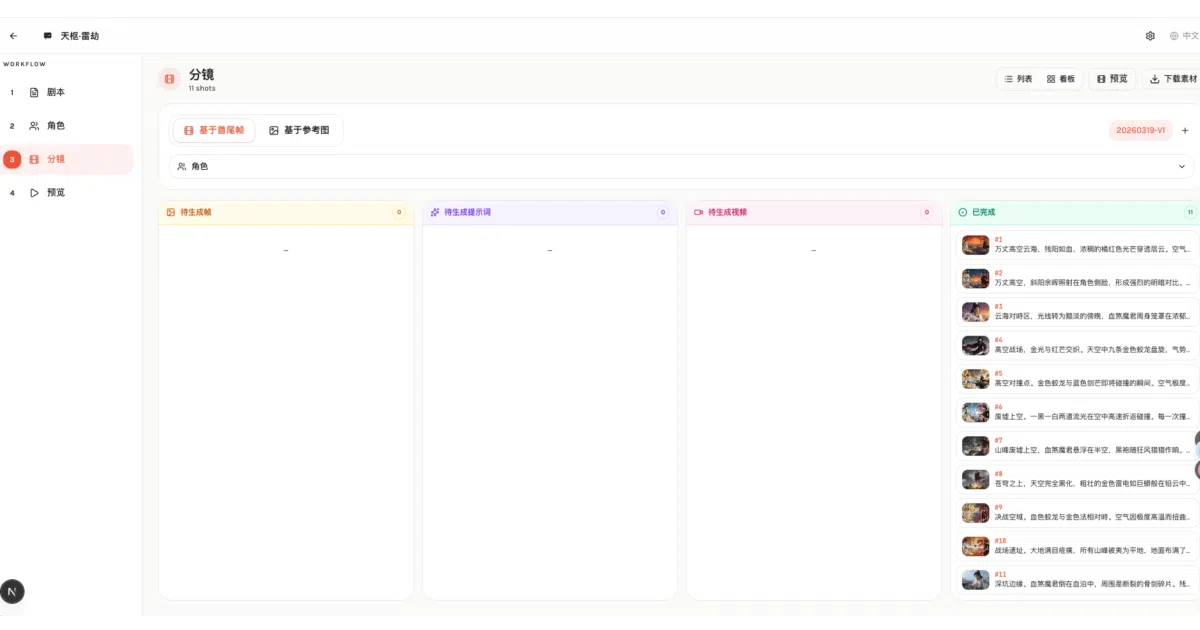
What it does AIComicBuilder is a self-hosted web app that takes a script—uploaded as TXT, DOCX, or PDF—and runs it through a multi-stage AI pipeline: character extraction, four-view reference images, storyboard breakdown, keyframe generation, video prompt creation, and final stitching with FFmpeg. It outputs a complete animated video with burned-in subtitles. The whole thing is built as a Next.js 16 app with a SQLite backend and a Kanban-style editor for tracking shot progress.
The interesting bit The project treats character consistency as a first-class problem: it generates front, three-quarter, side, and back reference views for every character, then uses those to anchor the first and last frames of each shot before interpolating video. That is the unglamorous glue work that usually breaks AI-generated narratives.
Key highlights
- Supports multiple AI backends: OpenAI, Gemini, Kling, Seedance, and Veo, configurable per project
- Style-adaptive pipeline auto-detects anime vs. realistic tones and propagates the choice to reference frames and keyframes
- Shot-level version control: create multiple storyboard versions and compare them
- Docker deployment with volume-mounted SQLite and asset storage
- Full i18n support: Chinese, English, Japanese, and Korean
- The author claims the entire site was AI-developed, linking to a “vibe-coding” guide
Caveats
- Requires FFmpeg installed locally and API keys for every AI provider you want to use; costs stack quickly across text, image, and video models
- SQLite and local volumes for persistence means this is strictly single-node; no multi-user concurrency story is visible
- README is strong on feature lists but light on error handling, rate limiting, or how the task queue behaves under load
Verdict Worth a look if you want a structured, opinionated workflow for AI-generated animated shorts and do not mind wiring up multiple paid APIs. Skip it if you need collaborative editing, horizontal scaling, or a tool that works offline.
Frequently asked
- What is LingyiChen-AI/AIComicBuilder?
- A Next.js app that pipelines AI models to turn a text script into an animated comic video with consistent characters and shot-by-shot generation.
- Is AIComicBuilder open source?
- Yes — LingyiChen-AI/AIComicBuilder is open source, released under the Apache-2.0 license.
- What language is AIComicBuilder written in?
- LingyiChen-AI/AIComicBuilder is primarily written in TypeScript.
- How popular is AIComicBuilder?
- LingyiChen-AI/AIComicBuilder has 1.6k stars on GitHub.
- Where can I find AIComicBuilder?
- LingyiChen-AI/AIComicBuilder is on GitHub at https://github.com/LingyiChen-AI/AIComicBuilder.