Kosinkadink/ComfyUI-VideoHelperSuite
The plumbing ComfyUI needs to stop treating video as loose images
ComfyUI natively thinks in single images; this suite adds the load, split, merge, and encode nodes needed to actually work with video without leaving the graph.
Not currently ranked — collecting fresh signals.
star history
What it does
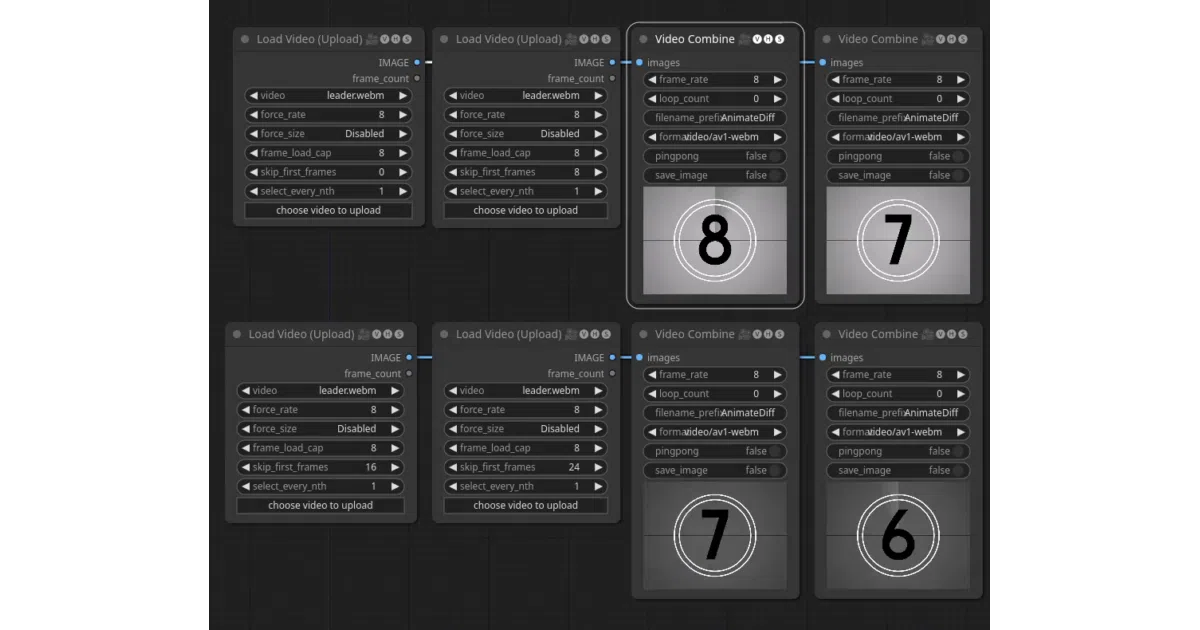
Provides custom ComfyUI nodes that treat video as batched frames instead of one-off images. Load Video ingests a file and emits a controllable frame sequence—adjusting frame rate, resolution, skip offsets, and load caps—while Video Combine assembles processed frames back into a video with optional audio, metadata, and codec tweaks. Load Image Sequence and Load Audio cover frame folders and soundtracks, and latent utilities like Split Batch, Merge Batch, and Select Every Nth let you slice frame groups inside the graph.
The interesting bit
The suite treats ffmpeg as a first-class citizen. You can define new output codecs by dropping JSON files into a video_formats folder, and the node will expose codec-specific widgets like crf directly in the UI. An optional “Advanced Previews” mode runs ffmpeg on demand to generate browser-friendly preview clips that respect your skip and crop settings, which is useful when you are remote or working with oddball formats.
Key highlights
Load Videosupports forced frame rates and aspect-ratio-aware resizing to match targets like AnimateDiff’s 8 fps.Video Combinecan embed the ComfyUI workflow metadata into the output video, just like the built-in image saver.- Output formats are fully configurable via JSON: pass custom ffmpeg arguments, audio codecs, pixel formats, and even environment variables.
- Right-clickable animated previews on load and combine nodes, with a sync option for side-by-side comparisons.
- Path variants allow loading videos and image sequences from outside the standard ComfyUI input folder.
Caveats
- Advanced Previews is disabled by default because it introduces delays before videos appear in the browser, and the generated previews are lower quality.
- The
16bitinput color depth option for custom ffmpeg formats is experimental.
Verdict
If you are doing video-to-video or animation work in ComfyUI—especially with AnimateDiff—this suite is essentially mandatory infrastructure. Pure image-generation users can ignore it.
Frequently asked
- What is Kosinkadink/ComfyUI-VideoHelperSuite?
- ComfyUI natively thinks in single images; this suite adds the load, split, merge, and encode nodes needed to actually work with video without leaving the graph.
- Is ComfyUI-VideoHelperSuite open source?
- Yes — Kosinkadink/ComfyUI-VideoHelperSuite is open source, released under the GPL-3.0 license.
- What language is ComfyUI-VideoHelperSuite written in?
- Kosinkadink/ComfyUI-VideoHelperSuite is primarily written in Python.
- How popular is ComfyUI-VideoHelperSuite?
- Kosinkadink/ComfyUI-VideoHelperSuite has 1.8k stars on GitHub.
- Where can I find ComfyUI-VideoHelperSuite?
- Kosinkadink/ComfyUI-VideoHelperSuite is on GitHub at https://github.com/Kosinkadink/ComfyUI-VideoHelperSuite.