GoogleCloudPlatform/vertex-ai-creative-studio
Google's generative media buffet, served in a Python UI
A demo web app that wires Gemini, Veo, Lyria, and friends into one place so you can actually play with them.
Not currently ranked — collecting fresh signals.
star history
What it does
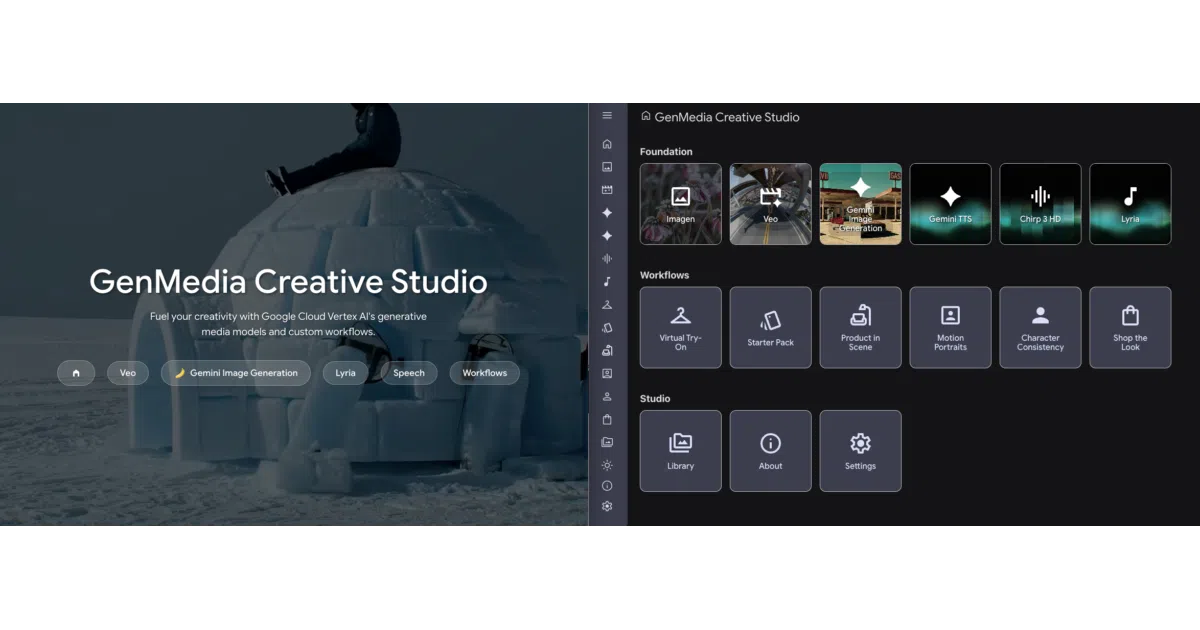
GenMedia Creative Studio is a browser-based demo app that exposes Google Cloud’s generative media APIs—image generation (including the whimsically named “Nano Banana” models), video via Veo, music via Lyria, and speech via Chirp 3 and Gemini TTS—through a single interface. It also bundles pre-built workflows like “Shop the Look” and “Interior Designer” that chain these models together. The whole thing is built on Mesop, an internal-flavored Python UI framework Google uses for quick AI prototypes.
The interesting bit
The experiments/ folder includes MCP (Model Context Protocol) servers, which means this isn’t just a pretty UI—it’s also exploring how generative media tools can plug into broader agent workflows. That’s the part worth watching if you care about composable AI systems rather than one-off generation.
Key highlights
- Covers the full generative media stack: images, video, music, speech
- Pre-built workflows for character consistency, virtual try-on, moodboards
- Deploys via Terraform + Cloud Run, with IAP and custom domain support
- Includes MCP servers and standalone experiments for advanced use cases
- One-click Cloud Shell launch if you don’t want to set up locally
Caveats
- Explicitly not an officially supported Google product; demo-only, not production-grade
- Chrome recommended; Safari and Firefox may break on some features
- README is vague on whether API costs are your own (they almost certainly are)
Verdict
Worth a spin if you’re already on Google Cloud and want to survey what Vertex AI’s generative APIs can do without writing boilerplate. Skip it if you need a production-ready creative suite or if you’re not prepared to foot the API bill.
Frequently asked
- What is GoogleCloudPlatform/vertex-ai-creative-studio?
- A demo web app that wires Gemini, Veo, Lyria, and friends into one place so you can actually play with them.
- Is vertex-ai-creative-studio open source?
- Yes — GoogleCloudPlatform/vertex-ai-creative-studio is open source, released under the Apache-2.0 license.
- What language is vertex-ai-creative-studio written in?
- GoogleCloudPlatform/vertex-ai-creative-studio is primarily written in Jupyter Notebook.
- How popular is vertex-ai-creative-studio?
- GoogleCloudPlatform/vertex-ai-creative-studio has 1.2k stars on GitHub.
- Where can I find vertex-ai-creative-studio?
- GoogleCloudPlatform/vertex-ai-creative-studio is on GitHub at https://github.com/GoogleCloudPlatform/vertex-ai-creative-studio.