DropbaseHQ/dropbase
Self-hosted AI builder that keeps your API keys at home
Dropbase generates Python web apps locally so your credentials never leave your machine.
Not currently ranked — collecting fresh signals.
star history
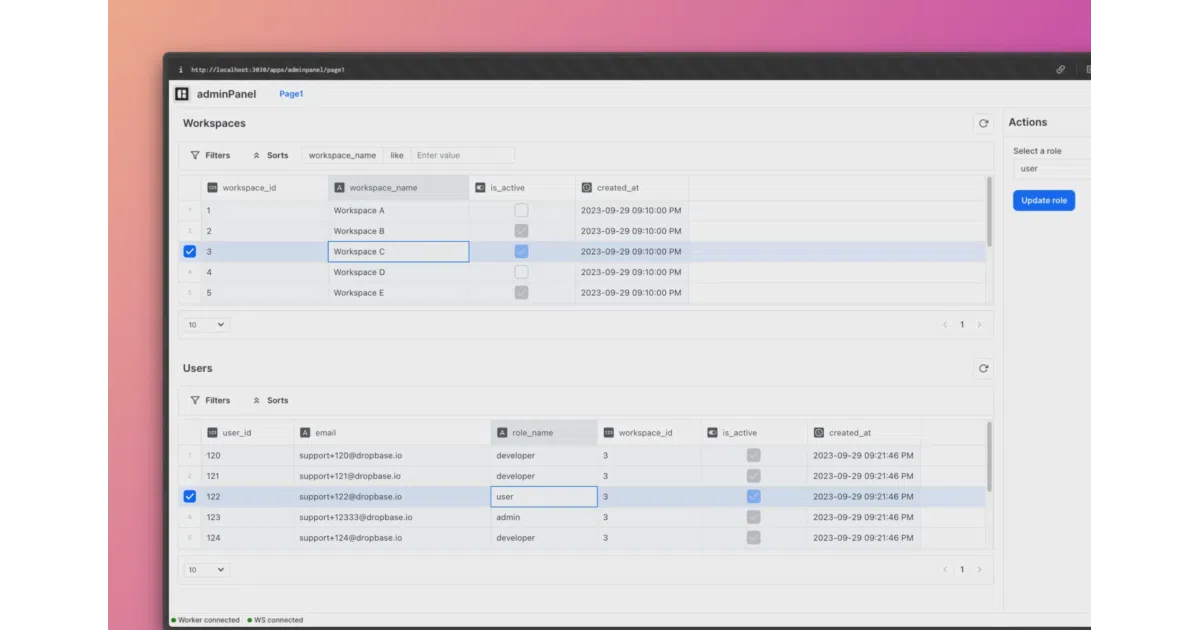
What it does Dropbase is a local-first, self-hosted tool for spinning up internal web apps—admin panels, billing dashboards, back-office tools—using a drag-and-drop UI builder backed by a Python framework. AI (OpenAI or Anthropic) generates the underlying code, which you can then verify or edit directly. Everything runs in Docker on localhost:3030.
The interesting bit
The twist is the “local-first” stance in a space crowded with cloud-hosted low-code platforms. Your database passwords, Stripe keys, and Slack tokens sit in a local worker.toml file; the LLM API key goes in server.toml. Nothing is phoned home to DropbaseHQ. That trade-off—convenience of AI generation without the SaaS data-extraction model—is the project’s clearest differentiator.
Key highlights
- AI generates app code using GPT-4o or Claude Sonnet; output is editable Python in your workspace
- Built-in component library means no frontend toolchain wrangling
- Apps are portable folders you can zip and share with other Dropbase users
- Imports any PyPI package, plus custom scripts from your own codebase
- Supports Postgres, SQLite, and third-party APIs via TOML configuration
Caveats
- Requires Docker; Apple Silicon users are nudged toward Docker Desktop specifically
- AI features are off by default and need manual API key configuration in
server.toml - The README warns about TOML table ordering gotchas when adding env vars, suggesting the config parser is finicky
Verdict Worth a look if you need quick internal tools but your security team frowns at SaaS credentials. Skip it if you want managed hosting, collaborative cloud editing, or a no-code experience with zero code exposure.
Frequently asked
- What is DropbaseHQ/dropbase?
- Dropbase generates Python web apps locally so your credentials never leave your machine.
- Is dropbase open source?
- Yes — DropbaseHQ/dropbase is an open-source project tracked on heatdrop.
- What language is dropbase written in?
- DropbaseHQ/dropbase is primarily written in Python.
- How popular is dropbase?
- DropbaseHQ/dropbase has 1.3k stars on GitHub.
- Where can I find dropbase?
- DropbaseHQ/dropbase is on GitHub at https://github.com/DropbaseHQ/dropbase.