Acly/comfyui-tooling-nodes
ComfyUI without the file-juggling dance
Custom nodes that let external tools pipe images directly into ComfyUI via WebSocket, base64, or RAM cache—no filesystem round-trips required.
Not currently ranked — collecting fresh signals.
star history
What it does
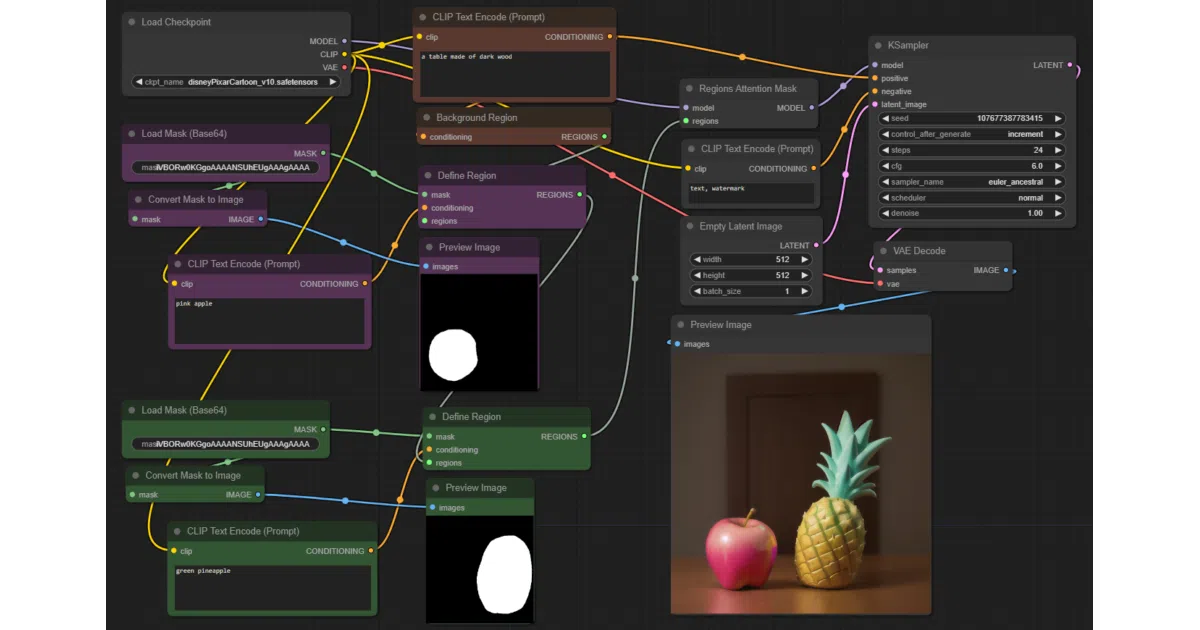
This is a set of ComfyUI custom nodes and API endpoints built for one purpose: letting external tools treat ComfyUI as a backend without touching the filesystem. Instead of the usual upload-prompt-download shuffle, images flow in as base64 strings, WebSocket binary frames, or cached RAM blobs retrieved over HTTP. The nodes also cover tiled image processing, attention-masked regional prompting, and a grab-bag of utilities including local text translation and an NSFW filter.
The interesting bit
The image I/O redesign is the core pitch. ComfyUI normally writes everything to disk, which means cleanup headaches and latency for tool integrations. These nodes keep images in RAM or stream them over sockets—Load Image (Base64) embeds PNGs directly in prompts, Send Image (WebSocket) pushes raw PNG bytes over the client connection with a small binary header, and the cache nodes (Load Image from Cache / Save Image to Cache) use temporary RAM storage with HTTP GET/PUT. The README is admirably specific about the wire format: two big-endian 32-bit integers (values 1 and 2) followed by PNG data.
Key highlights
- Three image paths, zero filesystem: base64 embedding, WebSocket streaming, or HTTP-cached RAM storage—pick your latency/complexity tradeoff
- Regional attention masking: softer than conditioning masking; prompts apply only to masked areas with a background region catching the remainder
- Tile primitives, not pipelines: split/merge/extract nodes that let external scripts build per-tile workflows with different prompts or ControlNets
- Model inspection API:
GET /api/etn/model_info/{folder}peeks at headers to classify base model (SD 1.5, SDXL, Flux, etc.) and detect quantization formats like GGUF and SVDQuant - Local translation: powered by argos-translate, with both a node and a
GET /api/etn/translate/{lang}/{text}endpoint for UI feedback
Caveats
- The NSFW filter explicitly warns it “isn’t perfect” and some explicit content may slip through
- Tile workflows require external scripting to generate individual per-tile prompts; the nodes don’t provide a turnkey tiled pipeline
- Model inspection can be slow on systems with aggressive antivirus or slow hard drives
Verdict
Worth a look if you’re building a tool or plugin that needs to drive ComfyUI programmatically and you’re tired of babysitting temp files. Less compelling if you only use ComfyUI’s web UI manually—these nodes solve an integration problem, not a creative one.
Frequently asked
- What is Acly/comfyui-tooling-nodes?
- Custom nodes that let external tools pipe images directly into ComfyUI via WebSocket, base64, or RAM cache—no filesystem round-trips required.
- Is comfyui-tooling-nodes open source?
- Yes — Acly/comfyui-tooling-nodes is open source, released under the GPL-3.0 license.
- What language is comfyui-tooling-nodes written in?
- Acly/comfyui-tooling-nodes is primarily written in Python.
- How popular is comfyui-tooling-nodes?
- Acly/comfyui-tooling-nodes has 679 stars on GitHub.
- Where can I find comfyui-tooling-nodes?
- Acly/comfyui-tooling-nodes is on GitHub at https://github.com/Acly/comfyui-tooling-nodes.